
English


Views: 0 Author: Site Editor Publish Time: 2026-10-12 Origin: Site
Unboxing a sleek new ultrabook is an undeniably thrilling experience. That excitement often hits a brick wall the moment you inspect the ports. You might find a grand total of two inputs. Manufacturers continually prioritize razor-thin chassis designs over functional hardware layouts. For professionals who rely on external monitors, mechanical keyboards, and wired internet, this missing infrastructure creates a massive workflow bottleneck.
Recent market data reveals a fundamental shift in remote work hardware. As companies embrace hot-desking and remote-first operations, static desktop setups are rapidly disappearing. Remote workers now demand high-bandwidth, agile connectivity. They refuse to be tethered to a single desk. They also refuse to carry a bag full of tangled, single-use cables. The modern professional needs a unified expansion device that bridges the gap between portability and desktop-level power.
How do you solve this connectivity gap? You can purchase a handful of single-use connectors. Or, you can invest in a comprehensive expansion device. Standalone cables serve a purpose in emergencies. However, a multi-functional peripheral manager is the undisputed champion for daily productivity. It empowers users to transform a minimalist laptop into a full-fledged workstation.
Navigating the peripheral market can feel overwhelming. Overlapping terminology confuses buyers. Establishing clear definitions ensures you invest in the exact hardware required for your specific daily tasks.
This is a simple one-to-one connector. A common example is a short cable converting a Type-C input into an HDMI output. These bare-bones tools work best for extremely minimal setups. They are temporary fixes when you only need to connect one specific device.
Hardware engineers often refer to these as unified expansion tools. A high-quality USB-C hub takes a single laptop port and dramatically expands it. It provides a diverse array of inputs. These are designed explicitly for digital nomads who demand maximum versatility without excessive bulk.
Full docking stations are substantially larger than portable tools. They require their own dedicated wall power supply. They excel at supporting multiple high-resolution displays and heavy-duty desktop equipment. The tradeoff is a complete lack of travel agility.
Juggling three or four different single-use connectors instantly clutters a home office desk. It transforms a clean aesthetic into a chaotic nest of tangled wires. The math behind port scarcity is brutal. If your machine features two inputs and one is actively tethered to a power charger, you have exactly one port left. Connecting a standalone monitor cable leaves absolutely zero room for a wireless mouse receiver, a webcam, or an external hard drive.
Travel introduces even more frustration. Imagine settling into a crowded co-working space. You have a looming deadline. Then you realize you left your specific SD card reader on your kitchen counter. This fragmented approach to connectivity guarantees workflow interruptions.
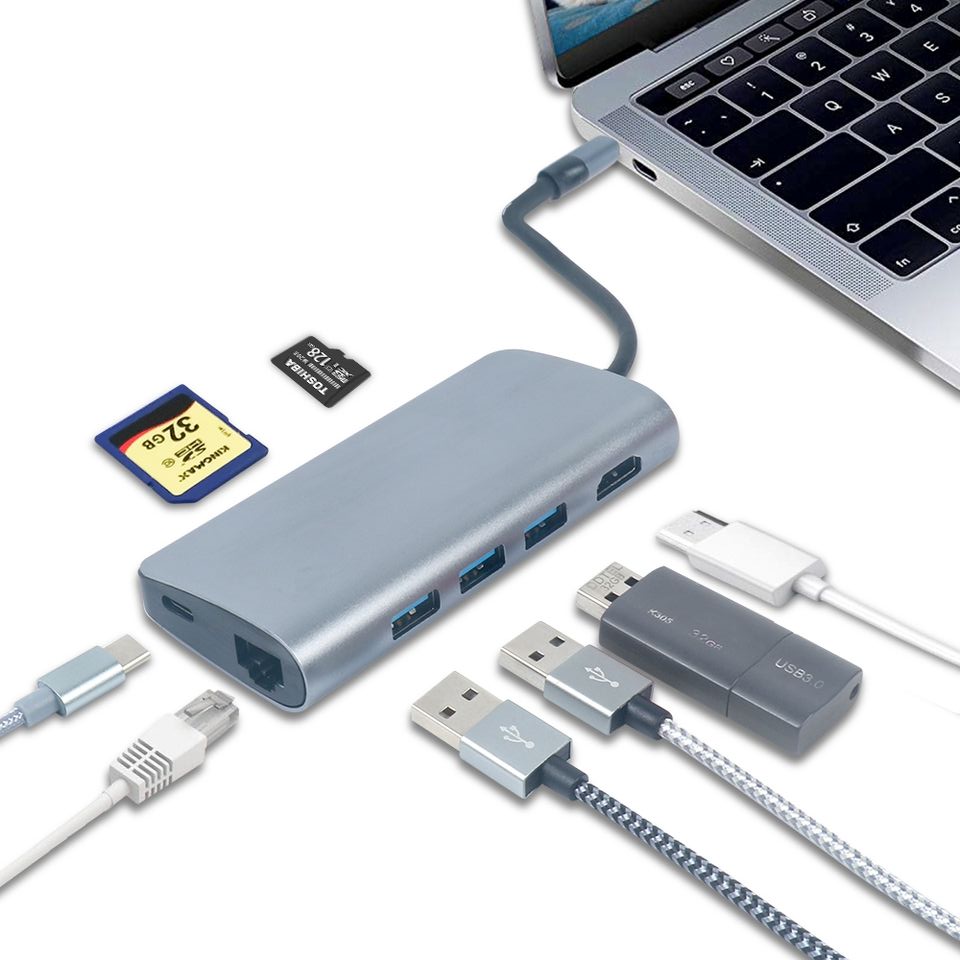
Transitioning from a fragmented collection of cables to a unified tool offers tangible benefits. These advantages directly impact your daily efficiency and hardware longevity.
| Feature | Single-Use Adapter | Multiport Expansion Hub | Stationary Docking Station |
|---|---|---|---|
| Desk Clutter | High (Multiple tangled cables) | Low (Single cable connection) | Low (But requires desk space) |
| Portability | High (If carrying just one) | High (Pocket-sized, travel-ready) | Low (Heavy, requires wall plug) |
| Power Delivery | Rarely supported | Up to 100W Pass-Through | Dedicated external power supply |
| Cost-Efficiency | Poor (Expensive to buy many) | Excellent (All-in-one value) | Moderate (High initial investment) |
Battery anxiety ruins virtual meetings. Premium solutions equipped with Power Delivery technology solve this. They allow users to route power straight from a wall charger, through the peripheral device, and into the laptop. A professional-grade multiport adapter easily handles 100W pass-through charging. You can operate power-hungry external drives and monitors simultaneously. You never have to sacrifice a precious input slot just for battery maintenance.
Processing video signals, transferring gigabytes of data, and routing high-wattage power generates severe thermal energy. Heat destroys delicate electronics. Cheap plastic enclosures trap this heat. In contrast, premium aluminum casings act as active heat sinks. This superior thermal management protects the internal controller chips. It ensures stable, long-term performance even during heavy workloads.
Spotty home Wi-Fi is the absolute bane of remote collaboration. Wireless instability during a crucial client pitch is unacceptable. Built-in Gigabit Ethernet ports bypass unpredictable wireless routers. An RJ45 connection delivers the rock-solid, low-latency bandwidth required for professional video conferencing and massive file uploads.
Not all expansion devices are engineered to the same standards. Abstract advice does not help you buy the right gear. You need hard specifications to match your daily workflow.
Look for an 8-in-1 architectural layout. This is the sweet spot for modern remote workers. Ensure the video output supports 4K HDMI resolution at a smooth refresh rate. For data migration, verify the device functions as a true USB 3.0 hub. This guarantees 5Gbps transfer speeds, which is essential for moving large video files. If your work involves photography, dual SD and TF card readers are mandatory inclusions.
Pay close attention to bandwidth allocation. A single laptop port has a finite amount of data capacity. If you push dual high-resolution monitors while transferring massive files, you might experience performance throttling. Assess your primary use case. Select a model optimized with high-quality internal controller chips.
Organizations are aggressively transitioning to permanent hybrid structures. IT departments now recognize the necessity of standardizing employee hardware. Issuing a uniform, reliable laptop hub to all remote staff is a strategic move. It dramatically reduces IT support tickets related to incompatible monitors, spotty Wi-Fi, and missing connectors.
Procurement managers and brand owners looking to streamline this process should explore Original Equipment Manufacturer solutions. Customizing these essential tools allows companies to maintain strict quality control. It also opens avenues for corporate branding. Standardizing the remote toolkit ensures every team member has the reliable infrastructure needed to perform at their absolute best.
A single cable might save the day in a brief pinch. However, a comprehensive 8-in-1 expansion device remains the absolute cornerstone of a productive remote workspace. Audit your current desk setup. Count your necessary peripherals. Then, upgrade your hardware to eliminate connectivity bottlenecks once and for all. For premium, engineering-grade connectivity solutions tailored to both individual professionals and enterprise deployment, explore the proven product lineups at Yuanshan Tech today.
Yes, but only slightly. The device itself requires a small amount of power, usually around 10W to 15W, to operate its internal processing chips. If you utilize a model equipped with Power Delivery technology and plug it directly into a wall outlet, it will actively charge your laptop while powering all connected accessories.
This depends entirely on your laptop operating system and internal graphics hardware. Many major operating systems support the Multi-Stream Transport protocol, allowing for multiple extended displays via one connection. Other systems may simply mirror the displays unless you use specialized DisplayLink hardware.
The core difference is data transfer speed. Older 2.0 ports top out at 480 Mbps. This is perfectly fine for basic peripherals like wireless mice and mechanical keyboards. Newer 3.0 ports offer speeds up to 5 Gbps. This increased bandwidth is absolutely essential for transferring large files to external hard drives quickly.
This is completely normal and engineered by design. These devices manage high-wattage power transfer, complex video processing, and rapid data streams simultaneously. This naturally generates thermal energy. Aluminum casings are specifically designed to act as heat sinks. They pull warmth away from the delicate internal components to keep the hardware safe.
Yes, bandwidth is a shared resource. The single connection to your laptop has a maximum data ceiling. When you use the HDMI port, Ethernet, and transfer files simultaneously, the internal controller chip allocates bandwidth across all active ports. Heavy video output will slightly reduce the available speed for file transfers.
Absolutely. Modern premium devices feature intelligent power management chips. These internal controllers prevent overcharging, overheating, and short circuits. Leaving the unit plugged into your laptop and wall charger creates a highly efficient, permanent desktop docking solution.


