
English

Views: 0 Author: Site Editor Publish Time: 2026-08-11 Origin: Site
Selecting the ideal port layout for your brand isn't merely a technical exercise. It stands as a critical commercial decision shaping product margins. It directly dictates return rates and strongly influences enterprise adoption. For companies launching new tech accessories, replicating generic market layouts often invites disaster. You will likely face widespread compatibility failures across mixed-OS environments. Corporate IT departments might even reject the product outright due to missing security features. A strategic, evaluation-driven approach requires careful balance. You must weigh Bill of Materials (BOM) costs against strict hardware bandwidth limitations. You also need to pinpoint specific target-market use cases. These scenarios range from basic prosumer setups to strict enterprise 802.1x network compliance. By understanding these technical dynamics, you can architect a highly reliable product tailored for success. We will explore how to allocate video outputs intelligently, budget data streams safely, and integrate essential network security protocols effectively.
Every port added to a Private Label Docking Station impacts your bottom line. Engineers must route data carefully to prevent bottlenecking. When designers ignore bus limitations, users suffer. Poorly allocated bandwidth causes immense user frustration. For example, over-promising simultaneous 4K video alongside massive 10Gbps data transfers usually causes peripheral dropouts. Keyboards disconnect randomly. External drives fail during large file transfers. These hardware failures inevitably trigger severe return rates (RMAs). High RMAs destroy product profitability and severely damage brand reputation.
You must actively choose between standard factory molds and a uniquely optimized custom port configuration. Off-the-shelf layouts often try appealing to everyone simultaneously. They pack numerous random ports onto a basic Printed Circuit Board (PCB). Custom layouts, conversely, serve specific market verticals. They feature optimized PCB routing designed explicitly for reliable data flow. This customization requires thoughtful target audience profiling.
Defining baseline requirements determines your success. A mixed-environment office needs broad compatibility. Windows and Mac users share these desks daily. These generic office setups require flexible video outputs and reliable Ethernet. Conversely, specialized engineering or creative workstations demand entirely different specs. Creatives need UHS-II SD card readers. They require multiple high-speed downstream USB-C ports for NVMe drives. Engineering users often demand legacy serial connections or specialized video outputs. Identifying your core buyer prevents costly over-engineering.
Designing the video output panel remains your most complex challenge. Commercial buyers hold rigid expectations regarding monitor support. Navigating DisplayPort and HDMI allocation requires understanding enterprise desk setups. IT departments heavily favor DisplayPort for corporate deployments. DisplayPort daisy-chaining simplifies cable management significantly. Therefore, a dual DisplayPort plus single HDMI layout serves as the golden standard. This setup easily accommodates three-screen enterprise environments. It provides maximum flexibility across older and modern displays.
The industry continues shifting rapidly. Monitor manufacturers now integrate downstream USB-C and Thunderbolt video inputs natively. Forward-thinking brands should consider allocating bandwidth to full-function downstream USB-C ports. This future-proofs your product for modern creative studios.
However, the OS compatibility trap ruins many product launches. Windows and macOS handle multi-monitor signals completely differently. Understanding this divide prevents catastrophic marketing errors.
The following chart illustrates the fundamental compatibility differences between protocols and operating systems.
| Technology standard | Windows Support (Extended) | macOS Support (Extended) | Cost Impact |
|---|---|---|---|
| Standard USB-C (MST) | Yes (Native) | No (Mirror Only) | Low |
| DisplayLink (Software) | Yes (Via Driver) | Yes (Via Driver) | High (Licensing) |
| Thunderbolt 3 / 4 | Yes (Native) | Yes (Native) | Premium |
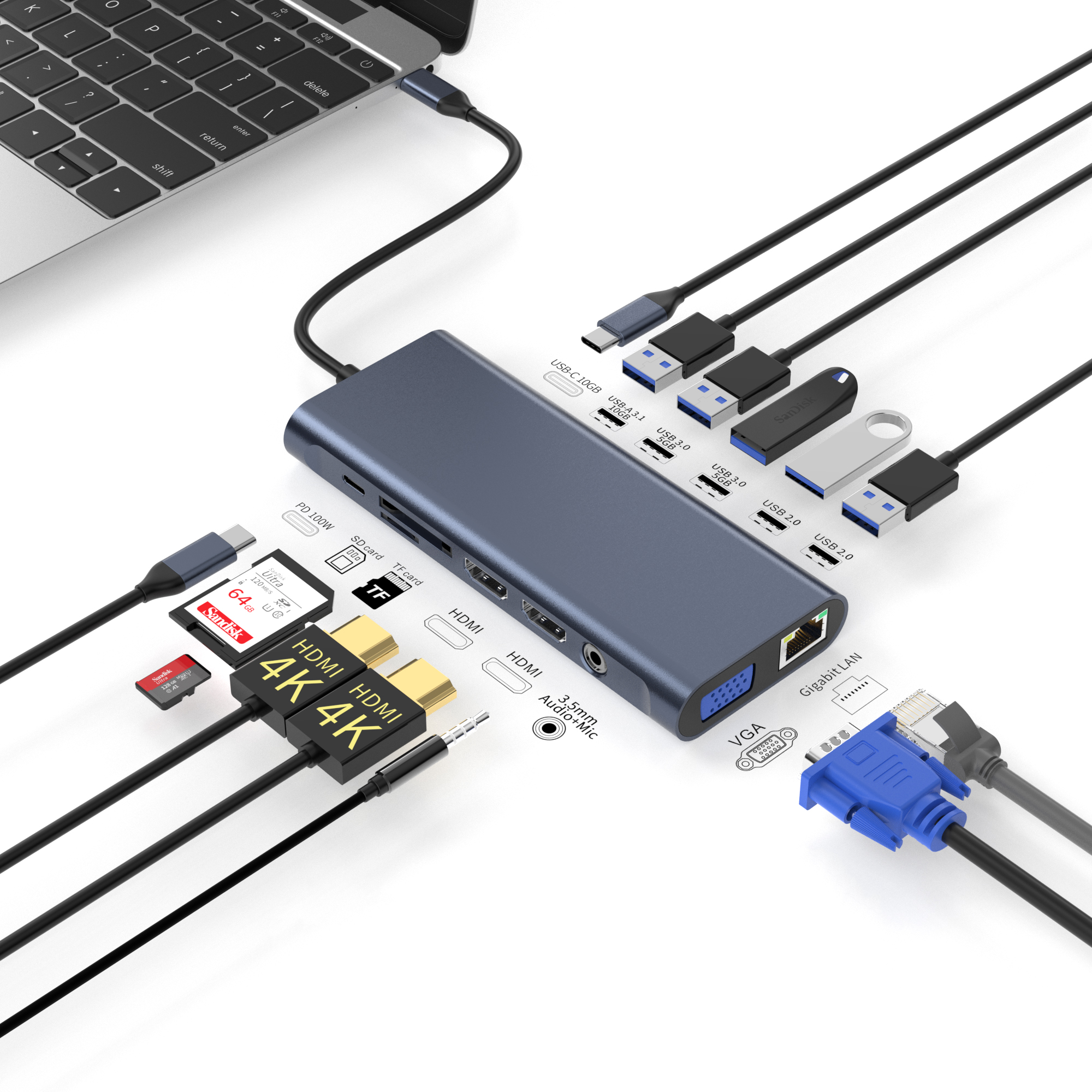
Creating a reliable private label USB C dock means wrestling with strict physics. USB hierarchy dictates exactly how much data flows concurrently. You must carefully budget the available bandwidth. Most standard hubs operate on a 10Gbps total budget. High-end models utilize 40Gbps Thunderbolt or USB4 standards. Overloading a 10Gbps pipeline causes immediate device failure.
Consider this standard hierarchy for bandwidth budgeting:
Host Power Delivery (PD) specifications represent another massive hurdle. Users expect their laptops to remain fully charged while docked. You must decide between passthrough charging and an integrated power supply. Passthrough relies on the user providing their own laptop charger. This reduces BOM costs but causes user confusion if their charger lacks sufficient wattage. Integrated power supplies guarantee consistent performance.
Setting the proper baseline matters immensely. You should aim for 85W to 100W of host charging. High-performance laptops consume significant power during heavy workloads. If the dock consumes 15W for internal operations and only passes 60W to the host, modern laptops will suffer battery drain. Ensure the internal PD controller negotiates power routing dynamically.
Consumer networking chips rarely survive rigorous corporate environments. B2B deployments look beyond basic internet connectivity. They require advanced network management capabilities. When IT managers evaluate hardware, standard Gigabit Ethernet chips often fail their internal audits. Basic Realtek chips found in cheap hubs drop packets under heavy loads. They also lack enterprise-grade security features.
Corporate network security relies heavily on 802.1x Authentication. This standard prevents unauthorized devices from accessing local networks. Ensure your selected Network Interface Controller (NIC) supports strict Network Access Control (NAC) compatibility. If the internal NIC fails to pass authentication certificates properly, IT administrators cannot deploy your product.
MAC Address Pass-Through (MAPT) serves as an absolute requirement for IT departments. Every network card has a unique hardware identifier called a MAC address. Standard hubs present their own MAC address to the network. This frustrates IT teams. They need to track individual host laptops, not the hub itself. MAPT allows the laptop to bypass the dock's hardware address. It presents the laptop's true MAC address to the corporate firewall. This ensures security policies apply correctly to the individual employee.
Remote management requires robust legacy features. IT staff perform system updates overnight. They deploy massive software patches while employees sleep. To accomplish this, they utilize Preboot Execution Environment (PXE) Boot. They also rely on Wake-on-LAN (WoL). If your device blocks WoL magic packets, remote deployment fails. Prioritize NICs capable of maintaining low-power standby states specifically for these remote triggers.
Partnering with a reliable OEM docking station manufacturer ensures product longevity. Factory capabilities vary wildly. You must look past marketing brochures and verify actual engineering competence. Requesting compliance and certification proof acts as your first defensive layer.
Ask manufacturers for their official USB-IF certification documentation. Verify their CE and FCC compliance test reports. Uncertified products face immediate customs seizures. Furthermore, if your design requires DisplayLink or Thunderbolt, demand proof of active licensing. Intel aggressively protects the Thunderbolt trademark. Using unauthorized chips invites devastating legal action.
Thermal design separates premium products from budget failures. Higher power delivery and intense video processing generate extreme heat. Assessing how the manufacturer manages heat dissipation proves critical. Do they use cheap plastic housings? Do they integrate internal aluminum heatsinks? A poorly cooled hub throttles data speeds aggressively. It drops video frames to protect internal components. Superior thermal engineering requires carefully placed thermal pads and robust metal enclosures.
The following chart outlines key evaluation criteria when auditing an OEM partner.
| Evaluation Metric | Minimum Requirement | Premium Standard |
|---|---|---|
| Certification Proof | Self-declared CE/FCC | Official USB-IF & Intel Thunderbolt Labs |
| Thermal Management | Basic plastic shell | Aluminum alloy housing + internal heatsinks |
| Firmware Support | No post-launch updates | Dedicated portal for OTA firmware patches |
Finally, address firmware lifecycle management immediately. Operating systems update constantly. Apple and Microsoft release major patches annually. These patches frequently break peripheral compatibility. Ensure the OEM provides ongoing firmware updates. They must commit to addressing future OS patches and emerging security vulnerabilities. A manufacturer unwilling to support firmware updates guarantees your product will become obsolete within months.
Launching a highly successful branded docking station demands rigorous strategic planning. You must evaluate audience needs accurately. Budget your hardware bandwidth realistically. Avoid overpromising features the internal bus cannot support. Prioritize critical enterprise features like MAC Address Pass-Through and PXE Boot if you target lucrative B2B sales channels. Focusing on reliable thermal design prevents frustrating device throttling and lowers return rates.
Your next step involves direct hardware verification. Do not commit to mass production blindly. Advise your procurement team to request complete component data sheets. Order prototype sample units immediately. Test these samples extensively within a mixed Windows and Mac environment. Ensure they pass active NAC network policies inside a real corporate network. Validate every single claim before launching your private label production run.
A: Yes, but it requires either Thunderbolt integration or a DisplayLink chipset. Standard USB-C MST docks will natively support extended dual 4K displays on Windows. However, they will only mirror the displays on macOS due to Apple's operating system limitations. DisplayLink bypasses this issue entirely using software.
A: Generally, yes. Modifying an existing PCB layout or altering the outer housing mold requires new tooling and engineering validation. This typically triggers much higher MOQs compared to simply white-labeling an existing, off-the-shelf OEM layout.
A: The main differences are bandwidth capacity and licensing. Thunderbolt guarantees a massive 40Gbps data pipeline and requires strict Intel certification. This drives up BOM costs significantly but ensures premium, uncompromised performance. Standard USB-C hubs typically range from 5Gbps to 20Gbps depending on the generation.


