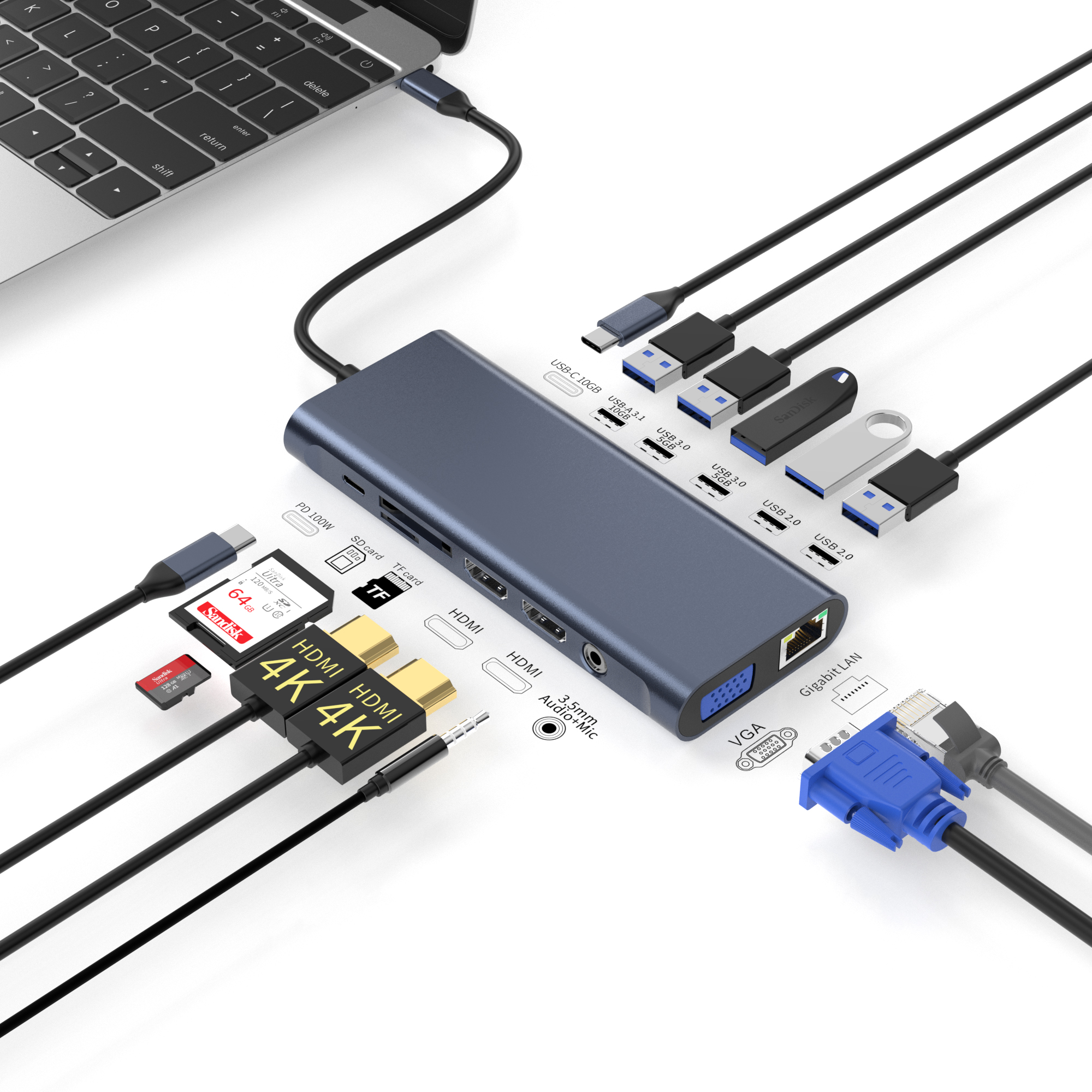
High failure rates and operating system compatibility issues make docking station procurement highly risky. B2B IT buyers and accessory distributors face constant challenges navigating these hardware choices. You need equipment that functions perfectly every time. Shifting away from heavily marked-up proprietary brand docks is an essential first step. Doing so requires identifying a verifiable, high-quality OEM USB-C docking station. This central hub must perform reliably across modern, mixed-device fleets. We understand the sheer complexity of managing large hardware deployments. You cannot afford unstable external displays or overheating connectors. Our core objective is to guide you safely through this sourcing process. We will define the strict technical baselines you must require. We will also explore effective supplier vetting frameworks and critical risk mitigation strategies. These insights are strictly required to successfully source and deploy B2B laptop accessories at scale. By the end, you will know exactly how to evaluate factory partners and avoid common supply chain traps.
Key Takeaways
Universal Compatibility Reduces Overhead: Transitioning from vendor-specific to standard OEM USB-C docks lowers per-desk deployment costs and simplifies IT management.
Chipsets Determine Longevity: Base purchasing decisions on verified chipsets (e.g., DisplayLink, Realtek) rather than exterior shell design.
Compliance is Non-Negotiable: Legitimate suppliers provide verifiable USB-IF, CE, FCC, and RoHS certifications prior to sample shipping.
Pilot Testing is Mandatory: Bulk procurement requires rigorous mixed-OS stress testing to expose thermal throttling and firmware limitations.
The Business Case: Universal vs. Proprietary Docking Solutions
The procurement landscape for IT accessories is shifting rapidly. Decades ago, businesses relied heavily on brand-specific hardware. If your company deployed Dell laptops, you purchased Dell docking stations. This legacy approach created deep vendor lock-in. It also introduced severe headaches during hardware refresh cycles. Today, hybrid work environments demand extreme flexibility. Employees bring diverse devices into shared workspaces. You might see a Lenovo ThinkPad, an Apple MacBook Pro, and an HP EliteBook on the same desk. This reality creates a glaring procurement dilemma. Sticking to proprietary docks forces unnecessary compatibility bottlenecks.
Switching to an OEM laptop dock directly addresses the modern cost-to-performance ratio. Proprietary brands charge massive premiums simply for printing their logo on the casing. By sourcing standard OEM solutions, you bypass these retail markups entirely. You still secure enterprise-grade connectivity, but you preserve crucial budget margins. These savings add up quickly when outfitting an entire corporate campus or stocking a distribution warehouse.
Fleet standardization acts as the final driver for this transition. Universal USB-C protocols simplify everything. They reduce the sheer volume of IT support tickets. When an employee plugs in a standard Type-C cable, the dock handles power, data, and video instantly. Mixed Mac and Windows deployments no longer require separate desk setups. You provide one standardized dock per desk. They plug it in, and it works. This frictionless experience is the ultimate goal of B2B procurement.
Technical Evaluation Criteria for an OEM USB-C Docking Station
Power Delivery (PD) and Thermal Architecture
Evaluating true Power Delivery (PD) wattage is critical. Many manufacturers advertise a "100W PD" capability. However, you must differentiate between power input and power output. A dock inherently consumes power to run its own internal chips and peripheral ports. Typically, a dock reserves up to 15W for itself. If you supply it with a 100W adapter, it delivers only 85W to the host laptop. If a user connects a high-performance workstation expecting a full 100W charge, they will see a "slow charger" warning. You must verify exact pass-through charging specifications.
Thermal management requirements represent another massive hurdle. Docks generate significant heat under full peripheral load. Pushing dual 4K monitors, gigabit Ethernet, and heavy data transfers simultaneously stresses internal components. If the heat dissipation is poor, the dock will experience thermal throttling. It will drop network connections or cause screen flickering to protect itself. Look for aluminum alloy casings and internal thermal pads. They effectively draw heat away from the main logic board.
Display Protocols and Multi-Monitor Support
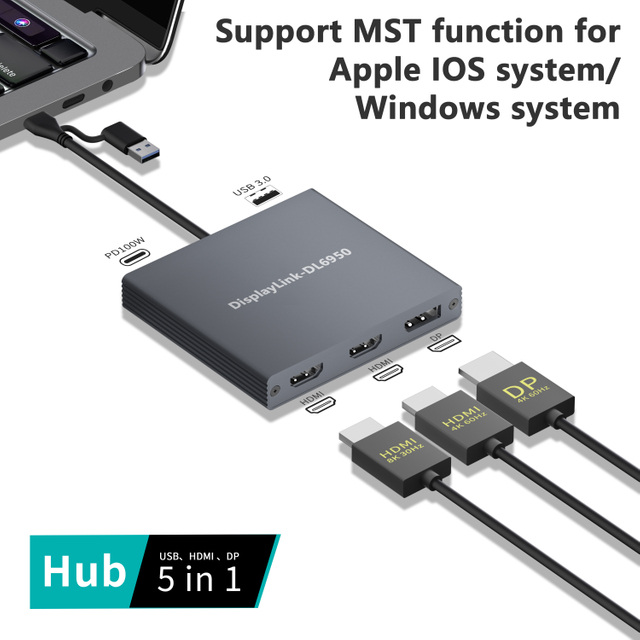
Understanding display protocols saves buyers from disastrous compatibility issues. The fundamental differences between macOS and Windows multi-display capabilities rely on SST and MST technologies. You must understand how they operate to avoid customer complaints.
Protocol
Definition
Operating System Behavior
SST (Single Stream Transport)
Sends a single video stream from the host device.
macOS uses SST natively via standard USB-C. It can only mirror external displays, not extend them independently.
MST (Multi-Stream Transport)
Splits a single video output into multiple independent streams.
Windows natively supports MST. It allows two or more monitors to display different extended desktops.
Bandwidth allocations also dictate performance limits. A standard USB-C connection has finite data lanes. Balancing 4K video output demands against USB 3.0 or 3.1 data transfers requires advanced engineering. If the video channels consume all available bandwidth, USB port speeds will plummet to 2.0 standards. You should clarify these bandwidth priorities during your technical review.
Internal Chipset Reliability
The exterior shell design means very little compared to the internal architecture. Controller chips manage every specific function. You have dedicated chips for the USB hub, Power Delivery, video output, and audio processing. Premium components from manufacturers like DisplayLink, Realtek, or VIA Labs ensure long-term stability.
You must request Bill of Materials (BOM) transparency from a bulk docking station supplier. This document lists the exact silicon inside the casing. It prevents factories from using generic, unbranded controllers. Insisting on a transparent BOM is a non-negotiable step for any serious corporate procurement strategy.
Vetting a USB-C Dock Manufacturer for B2B Procurement
Certifications and Regulatory Compliance
Marketing terms can easily mislead buyers. Identifying authentic USB-IF certification is vastly different from accepting "USB compatible" claims. Genuine certification ensures the product passed rigorous electrical and interoperability tests. You can verify authentic certification numbers directly through public databases.
Mandatory regional compliance verification is equally critical. You cannot legally import or distribute electronics without them. A legitimate USB-C dock manufacturer will proactively supply documentation. For European markets, CE certification proves adherence to health, safety, and environmental protection standards. For North America, FCC certification ensures the device does not emit harmful electromagnetic interference. RoHS compliance confirms the product is free from hazardous materials like lead and cadmium. Never wire a deposit until you personally inspect these certificates.
Production Capacity and Quality Control (QC)
Evaluating factory-level Quality Control (QC) processes separates premium suppliers from risky vendors. Ask potential partners about their specific testing protocols. Standard visual inspections are insufficient. You need pre-shipment burn-in testing. Factories should run the docks at maximum load in heated environments for 12 to 24 hours. This forces early failure of weak components.
Connector durability tests are also essential. Type-C ports endure thousands of insertion cycles over their lifespan. Factories must verify port tension and structural integrity. Define your acceptable defect rate tolerances early in the negotiation. Your target should always sit below 1%. Anything higher indicates poor manufacturing standards or inadequate component sourcing.
Customization and Private Label Flexibility
Many distributors want to build their own brand identity. Assessing the viability of a private label docking station requires understanding two main routes. White-labeling existing molds is the fastest path. You select a pre-designed shell and apply your branding. Custom tooling, or ODM (Original Design Manufacturing), involves designing a unique exterior from scratch. It takes longer but offers exclusivity.
You must discuss Minimum Order Quantity (MOQ) thresholds upfront. These minimums vary drastically based on your customization depth. Basic laser-engraved branding might require an MOQ of just 500 units. Localized packaging design might push the MOQ to 1,000 units. If you demand custom firmware adjustments or unique physical molds, expect MOQ thresholds exceeding 3,000 units.
Implementation Risks and Supply Chain Blind Spots
Procuring hardware overseas introduces unique risks. Hidden component swaps act as the most common supply chain blind spot. This is the risk of lower-tier factories silently swapping chipsets mid-production run. They do this to maintain or increase their profit margins. Your sample unit might perform flawlessly with a Realtek chip. Three months later, your bulk shipment arrives with a cheaper, unstable alternative. You prevent this by contractually locking in the Bill of Materials (BOM). Specify the exact chip models in your purchasing agreement. State clear financial penalties for unauthorized substitutions.
Firmware support presents another long-term hurdle. Operating systems update constantly. When Apple releases a new macOS version, it frequently disrupts external display compatibility. Evaluating the manufacturer's ability to provide firmware updates is crucial. Ask them how they handled the transition to Apple silicon (M1/M2 chips). If they lack an in-house engineering team capable of compiling timely firmware patches, your customers will face dead screens.
Warranty and RMA (Return Merchandise Authorization) realities require careful financial calculation. Standard return warranties sound safe on paper. In practice, calculating the true cost of return shipping for defective units tells a different story. Shipping a heavy box of broken docks back to a factory in Asia is expensive and slow. Instead, negotiate an upfront "spare unit allowance." Requesting 1-2% extra units included for free in your bulk shipment is often safer. It allows you to replace a customer's broken dock immediately. You skip the cumbersome international shipping process entirely.
Shortlisting Suppliers and Structuring the Pilot Order
Structuring your supplier engagement properly saves significant time. Do not jump straight to placing a bulk order. Follow a rigid, step-by-step qualification process.
Step 1: The Desktop Audit. Do your homework before engaging sales representatives. Request detailed specification sheets. Cross-reference their stated certifications against public databases like the USB Implementers Forum. Discard any supplier who hesitates to provide these documents.
Step 2: The Stress-Test Sample. Never judge a product by a single golden unit. Order 3 to 5 sample units. Perform rigorous in-house testing on varied laptops. Implement a strict test protocol. Run dual 4K monitors, pass-through charging, and heavy LAN/data transfers simultaneously for a continuous 48 hours. Monitor for excessive heat, dropped packets, or screen flickering.
Step 3: Scaling the Order. Transition cautiously from a small pilot batch to bulk production. Define exact lead times in your contract. Finalize your quality penalty clauses. Ensure the supplier understands that bulk deliveries must perfectly match the approved sample units. Establish a clear timeline for delivery and pre-shipment inspections.
Following this structured path mitigates the majority of sourcing disasters. It builds a foundation of accountability with your new manufacturing partner.
Conclusion
Sourcing reliable OEM docking stations requires strict technical discipline. You must look far past the aesthetic casing of the product. Focus your attention entirely on chipset architecture, thermal stability, and verifiable factory compliance. Standardizing on universally compatible hardware significantly reduces deployment friction and support tickets. Proper vetting ensures your bulk shipments arrive exactly as promised, without unauthorized component swaps.
Your immediate next action is to develop an internal Technical Requirements Document (TRD). This document must detail your specific operating system mix. It should outline your exact display needs and define your target cost per unit. Build this comprehensive TRD before soliciting quotes from manufacturers. It establishes your authority and signals to factories that you are a serious, knowledgeable buyer.
FAQ
Q: What is a standard MOQ for private label docking stations?
A: Typically ranges from 500 to 1,000 units for basic logo printing, but custom molds/tooling often require MOQs of 3,000+ units.
Q: How do OEM USB-C docks handle Mac M1/M2 multiple display limitations?
A: Standard base-level M1/M2 chips natively support only one external display. Overcoming this requires an OEM dock specifically equipped with DisplayLink technology, requiring driver installation.
Q: Why is my bulk OEM docking station overheating during pass-through charging?
A: Inadequate thermal padding or poor shell heat dissipation design. Evaluators should check if the supplier tests docks at their absolute maximum advertised load (e.g., 100W PD + dual 4K + Gigabit Ethernet) rather than just idle states.