Sourcing OEM hardware carries immense stakes today. You risk high product return rates, severe thermal throttling, and dangerous end-user hardware damage if you choose the wrong chipset architecture. Poor component choices quickly ruin brand reputation in highly competitive markets.
The modern Type-C landscape remains notoriously fragmented for hardware buyers. Procurement teams constantly navigate the confusing protocol madness surrounding USB 3.2, USB4, and Thunderbolt standards. You must cut through this marketing noise to build genuinely reliable devices.
We created this article to provide a pragmatic, engineering-backed framework for evaluating silicon. You will learn how to balance Bill of Materials costs against advanced functionality and long-term product reliability. We explore everything from thermal management limits to custom firmware tuning so you can source much smarter.
Key Takeaways
- Architecture Dictates Performance: Single-IC controllers offer cost efficiency for basic adapters, while multi-IC architectures are mandatory for stable, high-bandwidth multiport hub design.
- Thermal Management is Non-Negotiable: A chipset's TDP (Thermal Design Power) heavily influences PCB layout, casing materials, and overall product lifespan.
- Compliance Minimizes Risk: Selecting chipsets with certified USB-IF and PD (Power Delivery) compliance prevents catastrophic failures like host-device bricking.
- OEM Capabilities Matter: The right USB C hub OEM provides critical value not just in assembly, but in custom firmware tuning and rigorous signal integrity testing.
The Business Impact of USB C Hub Chipset Selection
Silicon decisions shape your entire product lifecycle. Making the right USB C hub chipset selection dictates user satisfaction and long-term profit margins. Unstable chipsets cause severe functional dropouts during daily use. End-users frequently experience peripheral disconnects and frustrating display flickering. Negative user reviews pile up quickly. These reviews permanently damage brand reputation on major e-commerce platforms. For enterprise deployments, unstable hubs trigger massive IT support tickets.
We must deeply examine the hidden costs of cheap silicon. Many buyers prioritize unbranded silicon over established controllers to save initial manufacturing costs. This strategy creates a dangerous Bill of Materials versus yield matrix. Cheaper chips often demand increased PCB complexity to function properly. They lack integrated power management blocks. You spend more money on external components just to compensate. Factory QA failure rates also skyrocket. Saving one dollar on a controller often costs five dollars in failed quality control tests.
You must clearly define your product tier before allocating a silicon budget. Are you building a basic travel adapter? Is it a mid-tier multiport hub? Or are you designing a premium enterprise docking station? Entry-level devices tolerate highly integrated, low-cost controllers. Premium docks demand modular, high-bandwidth ICs. Aligning your budget to the exact product tier prevents wasteful over-engineering. Any reliable Custom USB C Hub requires balancing these business variables. Failing to match the chipset to user expectations ensures commercial failure. You must source deliberately.
![USB C Hub PCB layout and custom hub controller design]()
Core Categories of Custom Hub Controllers
Engineers categorize controllers based on their primary function. Entry-level hubs rely on basic USB data and video controllers. These integrated circuits utilize DisplayPort Alternate Mode (DP Alt Mode). They are highly cost-effective and simple to implement. However, they force hard compromises regarding physical lane allocation. Type-C cables possess limited high-speed data lanes. You often sacrifice USB 3.0 speeds to achieve 4K resolution at 60Hz. If four lanes process video, only USB 2.0 speeds remain for data transfer. You must explain this trade-off clearly to your buyers.
Higher-end models require software-driven video chipsets. DisplayLink remains the industry standard technology here. Standard DP Alt Mode struggles across certain operating systems. Native macOS environments strictly limit external displays using standard hubs via MST (Multi-Stream Transport). DisplayLink overcomes these native OS limitations. It compresses video data and transmits it over standard USB data lanes. This enables dual or triple monitor setups on restricted machines. These chips cost more and require software drivers, but they unlock premium use cases.
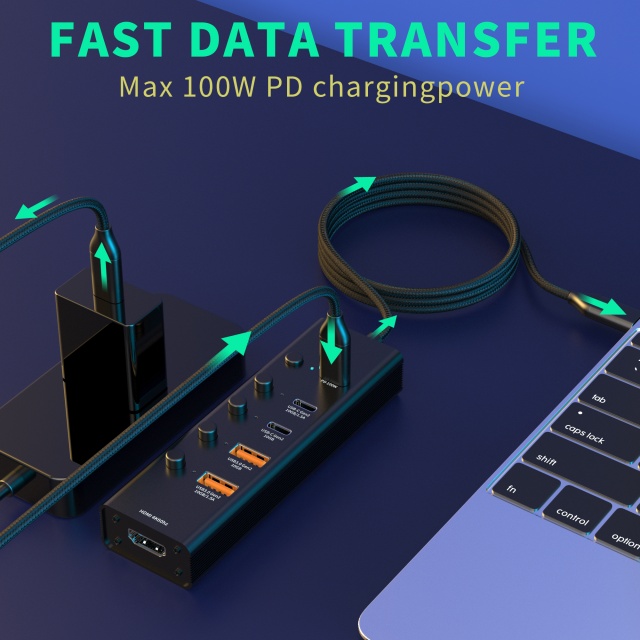
Power Delivery demands dedicated silicon. Modern hubs pass up to 100W or even 140W to the host laptop. A dedicated PD 3.0 or PD 3.1 microcontroller manages this pass-through charging safely. It negotiates voltage between the wall charger, the hub, and the laptop. Integrated PD blocks inside cheap combo-chips often overheat under maximum load. Standalone PD microcontrollers prevent devices from over-drawing power. They stop catastrophic thermal events from destroying expensive hardware.
We designed a quick reference comparison to help you categorize these technical options clearly.
| Controller Category | Primary Function | Best Target Use Case | Common Design Compromise |
| Basic DP Alt Mode | Native video and data routing | Entry-level travel adapters | Sacrifices USB 3.0 speeds for 4K@60Hz |
| DisplayLink Chipsets | Software-driven multi-display | Premium macOS docking stations | Requires user driver installation |
| Dedicated PD Chips | Safe power negotiation | High-wattage pass-through hubs | Increases overall BOM cost |
Key Evaluation Criteria for Multiport Hub Design
Evaluating silicon requires strict performance benchmarks. Advanced multiport hub design depends entirely on efficient bandwidth allocation. Hubs must handle multiple concurrent operations flawlessly. A user might read an SD card, drive a 4K monitor, and transfer files via gigabit Ethernet simultaneously. Poor chipsets choke under this heavy load. You must analyze the controller's uplink bandwidth limits. Ensure the internal architecture avoids bottlenecking downstream peripheral ports.
Thermal Design Power (TDP) acts as your next critical evaluation metric. High-performance controllers generate immense heat under maximum load. You must evaluate how hot the IC runs during stress testing. This dictates your necessary heat dissipation mechanisms. High TDP chips require thermal pads, zinc alloy enclosures, and expanded PCB spacing. Ignoring thermal thresholds guarantees premature hardware failure. It also leads to aggressive CPU throttling inside the hub itself.
Firmware upgradability protects your long-term product investment. Operating systems constantly update and alter their peripheral handling logic. Major tech companies push updates frequently. A locked chipset becomes instantly obsolete if a new OS update breaks compatibility. Upgradable flash memory allows engineers to deploy post-manufacturing firmware patches. This resolves future OS compatibility bugs instantly without recalling hardware.
We mandate specific baseline standards for compliance readiness:
- USB-IF Certification: Guarantees universal handshake protocol compliance across devices.
- CE and FCC Marks: Ensures electromagnetic interference remains within strict legal limits.
- PD Certification: Validates safe power negotiation parameters for charging pass-through.
Primary silicon must meet these standards out of the box. Uncertified silicon creates massive liability risks for the importing brand.
Implementation Realities and PCB Design Risks
Even premium silicon fails if the PCB layout contains flaws. Signal integrity limitations plague modern electronics manufacturing. Engineers route high-speed traces tightly across small circuit boards. This proximity creates massive cross-talk risks. USB 3.x data lines operate at frequencies extremely similar to wireless signals. This causes the infamous 2.4GHz interference issue. A poorly shielded custom hub controller knocks out wireless mice and keyboards. Proper grounding and copper foil shielding mitigate this risk effectively.
Power delivery failures represent a more severe threat. Poorly configured PD controllers can literally fry host laptop motherboards. Dangerous voltage spikes occur during peripheral hot-swapping. You must integrate Overvoltage Protection (OVP) hardware into the PCB. Overcurrent Protection (OCP) is equally crucial. These safeguard circuits detach the power load instantly during anomalies. Never rely solely on the main controller for hardware power safety.
We must also navigate the notorious protocol madness trap. Brands often fall for misleading marketing regarding actual chipset capabilities. You must align silicon specs with hardware pinout realities. Standard Type-C ports differ drastically from full USB4 implementations. Adding a USB4 label to a hub running on older protocol silicon creates severe problems. It misleads consumers and violates platform standards. Always verify the physical lane count matches the advertised data protocol.
- Complex trace routing requires strict impedance control.
- Metallic shielding isolates noisy 5Gbps data lines.
- Protection ICs isolate the main controller from surges.
Understanding these hard realities separates professional OEMs from amateur electronics assemblers.
How to Shortlist and Vet a USB C Hub OEM
Choosing the right manufacturing partner protects your silicon investment. You must evaluate a factory's true engineering depth. Many suppliers simply repackage white-label public molds without engineering knowledge. A capable USB C hub OEM customizes PCB layouts from scratch. They adjust port placements, optimize thermal paths, and alter firmware parameters. Ask for real examples of their custom board layouts during your initial vetting process.
Testing infrastructure reveals a factory's actual quality commitment. A standard multimeter check is wildly insufficient for high-speed data devices. You must ask highly specific questions about their QA environment. Do they use expensive protocol analyzers to verify USB handshakes? Do they employ thermal imaging cameras during maximum load stress tests? Cross-platform OS testing is also mandatory. The factory must maintain testing bays running Windows, macOS, ChromeOS, and Linux natively. This ensures your product works flawlessly everywhere.
Supply chain stability determines your time to market. The global electronics market suffers periodically from gray-market silicon flooding. Counterfeit or lower-binned ICs cause erratic performance and massive return rates. Your manufacturing partner needs direct purchasing relationships with major IC vendors. Direct access guarantees stable lead times and authentic silicon. It removes supply chain uncertainty entirely.
You can verify this capability easily. Request official vendor supply certificates during your supplier audits. Legitimate factories provide these documents happily and transparently.
Conclusion
Successful hardware development requires evaluating chipsets as part of a holistic hardware ecosystem. You cannot look at a controller in isolation. The intricate PCB layout, physical thermal design, and custom firmware tuning all interact to determine the final user experience.
Investing in proven controllers and a highly capable manufacturing partner maximizes ROI by drastically reducing RMA rates. A holistic approach ensures your devices survive daily enterprise use. Skipping vital quality checks or buying uncertified silicon always costs your brand more money later.
We encourage you to audit your current designs today. Consult with a specialized OEM engineering team to review your proposed port configuration thoroughly. Request a customized BOM breakdown to see exactly where your development budget goes. Expert guidance ensures your next product launch remains seamless, reliable, and highly profitable.
FAQ
Q: What is the difference between a single-chip and multi-chip custom USB C hub?
A: Single-chip designs use one highly integrated controller to handle USB data, basic video, and power. They are extremely cost-effective and generate less heat, making them ideal for small travel adapters. Multi-chip designs use dedicated ICs for specific tasks. This prevents bottlenecks and enables higher bandwidth distribution, though it increases heat generation and PCB complexity.
Q: Do I need a DisplayLink chipset for dual-monitor support?
A: It depends on your primary operating system. Standard DP Alt Mode supports multiple displays via MST on Windows machines natively. However, macOS environments restrict MST, limiting external displays to a single extended screen. A DisplayLink chipset bypasses this limitation by using custom software drivers to render multiple unique screens on Apple computers.
Q: Why do some USB C hubs interfere with wireless mice and keyboards?
A: USB 3.0 data transfer generates broadband noise specifically in the 2.4GHz frequency range. Because standard wireless mice and keyboards also operate on 2.4GHz, poorly shielded hubs cause severe RF interference. Premium chipsets paired with proper metallic shielding and optimized PCB trace routing effectively mitigate this frustrating cross-talk issue.
Q: How does chipset selection impact Power Delivery (PD) pass-through safety?
A: A dedicated PD controller actively negotiates voltage and current handshakes between the charger, the hub, and the laptop. Cheap or poorly integrated PD chipsets fail to adjust to sudden voltage spikes quickly. Premium PD controllers integrate overvoltage and overcurrent protection to isolate the host machine. This prevents catastrophic hardware damage during unexpected power surges.