Contents
Introduction
Why Docking Stations Are Essential for Windows Laptops in 2026
Understanding Docking Station Types and Connection Technologies
Key Performance Criteria That Define a High-Quality Docking Station
Display, Video Output, and Multi-Monitor Considerations
Port Selection and Expansion Needs for Modern Workflows
Power Delivery, Charging, and Electrical Safety Factors
Use-Case-Based Selection: Home Office, Professional, and Mobile Setups
Conclusion
FAQ
Introduction
By 2026, Windows laptops have evolved into powerful, lightweight computing hubs designed to support increasingly complex workflows. However, their slim form factors often limit native connectivity, making external expansion not just convenient but essential. A well-chosen docking station transforms a Windows laptop into a full desktop-class workstation by enabling multi-display output, high-speed data transfer, stable networking, and unified power delivery through a single connection.
Choosing the right solution today requires more than checking port counts. Advancements in USB standards, display protocols, wireless connectivity, and power management mean buyers must evaluate compatibility, performance headroom, and long-term flexibility. This guide provides a structured, forward-looking framework to help users select the most suitable docking station for Windows laptops in 2026, based on real usage demands rather than marketing claims.
Why Docking Stations Are Essential for Windows Laptops in 2026
The role of the docking station has shifted from a peripheral accessory to a productivity foundation. Modern Windows laptops are increasingly used across multiple environments—home office desks, corporate workstations, shared hot desks, and mobile setups. A single, reliable docking solution allows seamless transitions between these contexts without repeated cable management or device reconfiguration.
In 2026, software workflows demand more screen space, faster storage access, and consistent wired network performance. Video conferencing, cloud-based development tools, and AI-assisted applications all benefit from stable, high-bandwidth connections that laptops alone cannot always provide. A Professional docking station enables users to offload these requirements externally while maintaining portability.
Additionally, operating system updates and enterprise security policies increasingly favor standardized connectivity solutions. A Universal docking station that supports multiple Windows devices reduces hardware fragmentation and simplifies IT management. For individual users, this translates into longer device lifecycles and better return on investment, making docking stations a strategic purchase rather than an optional add-on.
Understanding Docking Station Types and Connection Technologies
Selecting the best docking station begins with understanding the underlying connection technology. In 2026, most Windows laptops rely on USB-C-based interfaces, but not all USB-C ports deliver the same capabilities. Bandwidth, display support, and power delivery depend on the specific protocol implemented by the laptop.
There are three primary categories to consider. USB-C docking stations provide broad compatibility and are ideal for users seeking a Compact docking station with plug-and-play functionality. High-bandwidth options support multiple displays and fast data transfer, making them suitable for advanced productivity tasks. Wireless docking solutions, while still niche, appeal to users prioritizing cable-free desks and quick connections in flexible workspaces.
A Wireless docking station typically sacrifices some peak performance in exchange for convenience, making it more suitable for presentation environments or light office use. Conversely, wired solutions remain the standard for demanding workloads. Understanding these trade-offs ensures that the chosen docking station aligns with actual usage rather than theoretical specifications.
Key Performance Criteria That Define a High-Quality Docking Station
Performance evaluation goes beyond the number of ports. A high-quality docking station in 2026 must balance data throughput, display handling, power stability, and thermal efficiency. Bottlenecks in any of these areas can limit productivity, especially when multiple peripherals operate simultaneously.
Bandwidth allocation is a critical factor. Docking stations share available data lanes among connected devices, meaning insufficient bandwidth can degrade display resolution or storage speeds. Users running external SSDs alongside dual monitors should prioritize solutions engineered for sustained throughput. A Professional docking station is typically designed with these scenarios in mind.
Thermal management also plays a growing role. As docking stations deliver higher power levels and support faster data rates, heat dissipation affects long-term reliability. Well-designed enclosures and internal layouts contribute to consistent performance under continuous load, which is especially important for workstations running all day.
Display, Video Output, and Multi-Monitor Considerations
Multi-monitor setups are one of the primary reasons users invest in a docking station. In 2026, productivity workflows commonly involve two or more external displays, requiring careful attention to video output capabilities. Resolution support, refresh rates, and protocol compatibility directly impact user experience.
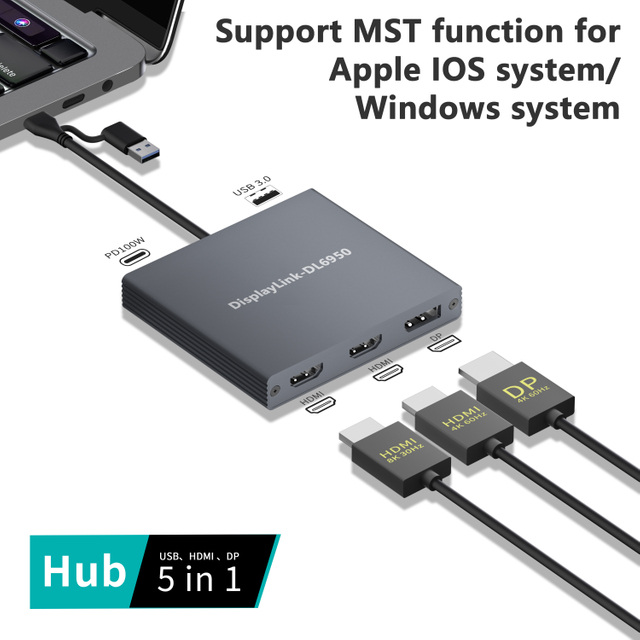
For users running dual displays, a Dual HDMI docking station or configurations supporting HDMI and DisplayPort outputs are common. These setups must handle high resolutions without compression artifacts or latency. A docking station with HDMI and Ethernet is particularly valuable for stable conferencing and content creation environments where wired networking complements video output reliability.
The following table outlines typical display requirements and recommended docking station capabilities:
| Use Case | Display Requirement | Recommended Docking Station Features |
| Home office productivity | Dual 1080p monitors | USB-C, Dual HDMI, stable power delivery |
| Professional design work | Dual 4K displays | High-bandwidth wired connection, advanced video support |
| Corporate workstation | Mixed display types | Universal docking station, multiple video outputs |
| Mobile presentations | Single external display | Compact docking station, HDMI output |
Choosing the right display configuration ensures that the docking station enhances productivity rather than limiting visual performance.
Port Selection and Expansion Needs for Modern Workflows
Port variety defines how adaptable a docking station is to evolving workflows. In 2026, users typically connect a combination of external storage, input devices, network cables, and audio peripherals. A well-balanced port layout reduces reliance on additional adapters and improves desk organization.
For a docking station for home office use, essential ports include USB for peripherals, HDMI for displays, and Ethernet for network stability. Professionals may require additional high-speed data ports to support external drives and specialized equipment. The physical placement of ports also matters, as frequently accessed connections benefit from front-facing availability.
Future-proofing is another key consideration. Selecting a docking station with more ports than currently required provides flexibility as workflows expand. This approach minimizes replacement costs and supports gradual hardware upgrades, aligning with sustainable purchasing practices.
Power Delivery, Charging, and Electrical Safety Factors
Power delivery is one of the most critical yet misunderstood aspects of choosing a docking station. In 2026, Windows laptops often rely on a single cable for data and charging, making consistent power output essential for stable operation. Insufficient power delivery can lead to throttling, battery drain, or intermittent disconnections.
A reliable docking station should provide enough wattage to support the laptop under full load while powering connected peripherals. Electrical safety features such as surge protection, thermal regulation, and overcurrent safeguards contribute to device longevity. These factors are especially important in professional environments where systems remain connected continuously.
Users with portable setups may prioritize a Compact docking station that still delivers adequate charging capacity. Balancing size, power, and safety ensures that the docking station supports both performance and reliability without compromising portability.
Conclusion
Choosing the best docking station for Windows laptops in 2026 requires a strategic evaluation of performance, compatibility, and real-world usage needs. Rather than focusing solely on specifications, users benefit from understanding how connection technologies, display support, port selection, and power delivery interact within their daily workflows.
A well-matched docking station enhances productivity, simplifies transitions between work environments, and extends the functional lifespan of a Windows laptop. Whether selecting a Universal docking station for shared use, a Professional docking station for demanding workloads, or a Wireless docking station for flexible spaces, informed decisions lead to long-term value and consistent performance.
FAQ
Q1: Is a universal docking station suitable for all Windows laptops in 2026?
A Universal docking station works with most modern Windows laptops, but users should always confirm port capabilities and supported protocols to ensure full functionality.
Q2: Are wireless docking stations reliable enough for daily work?
A Wireless docking station is convenient for light tasks and presentations, but wired solutions remain more stable for high-performance workflows.
Q3: How important is Ethernet support in a docking station?
A docking station with HDMI and Ethernet provides more stable networking, which is essential for video conferencing, cloud access, and enterprise environments.
Q4: Can a compact docking station replace a full desktop setup?
A Compact docking station can support many desktop functions, but users with multiple high-resolution displays or heavy peripherals may require a larger solution.
Q5: Should power delivery influence docking station selection?
Yes, adequate power delivery ensures stable laptop performance and prevents battery drain during extended use, making it a critical selection factor.