Contents
Introduction
The Fundamental Concept of a Docking Station
Why the Docking Station Was Created: Problems It Solves
How a Docking Station Works Within a Modern Workspace
Types of Docking Station and Their Practical Use Cases
Key Functional Advantages That Explain Why Docking Stations Exist
Choosing the Right Docking Station Based on Real Needs
The Future Role of the Docking Station in Digital Workflows
Conclusion
FAQ
Introduction
A docking station exists to bridge the gap between portable computing and full-scale productivity. As laptops, tablets, and hybrid devices became thinner and more mobile, their physical connectivity diminished. At the same time, work environments continued to demand multiple displays, stable wired networking, external storage, and ergonomic peripherals. The docking station emerged as a purpose-built solution to reconcile mobility with functionality, enabling a single device to instantly transform from a portable system into a complete workstation. Understanding what a docking station is and why it exists requires examining not only its structure, but also the real-world problems it was designed to eliminate.
The Fundamental Concept of a Docking Station
A docking station is a centralized hardware interface that expands a computer’s connectivity through a single physical or wireless connection. Instead of plugging multiple cables directly into a laptop, users connect all peripherals to the docking station, then link the computer using one port. This design prioritizes efficiency, consistency, and workspace stability.
At its core, a docking station functions as an intermediary between compact devices and full desktop environments. Modern laptops often sacrifice ports to achieve slimmer profiles, making direct expansion impractical. A Universal docking station addresses this limitation by aggregating video outputs, USB interfaces, audio connections, storage access, and network connectivity into one hub.
This concept is not about convenience alone. It ensures predictable performance, reduces port wear on laptops, and standardizes workstations across teams. Whether used as a Compact docking station at home or a Professional docking station in enterprise environments, the underlying purpose remains the same: extend capability without compromising mobility.
Why the Docking Station Was Created: Problems It Solves
The docking station exists because modern computing created structural contradictions. Users wanted lightweight devices, yet required powerful multi-peripheral setups. Direct cable management became inefficient, error-prone, and time-consuming, especially in environments where devices are frequently connected and disconnected.
One core problem is port limitation. A single laptop may need external monitors, Ethernet, power delivery, keyboards, mice, storage drives, and audio devices. Without a docking station, this results in constant plugging and unplugging, increasing physical strain on ports and disrupting workflow continuity.
Another issue is workspace consistency. A docking station for home office use allows users to replicate a professional setup without permanently dedicating a desktop machine. In corporate settings, shared desks rely on docking stations to provide instant workstation access regardless of the employee’s device.
By consolidating connections, a Wireless docking station or wired alternative eliminates friction, reduces setup time, and ensures stable performance. The docking station exists because modern productivity demands both flexibility and permanence in equal measure.
How a Docking Station Works Within a Modern Workspace
A docking station operates as a connectivity multiplier. Through one upstream connection to a computer, it distributes data, power, and signals to multiple downstream peripherals simultaneously. This architecture allows users to maintain a clean desk layout while accessing desktop-class functionality.
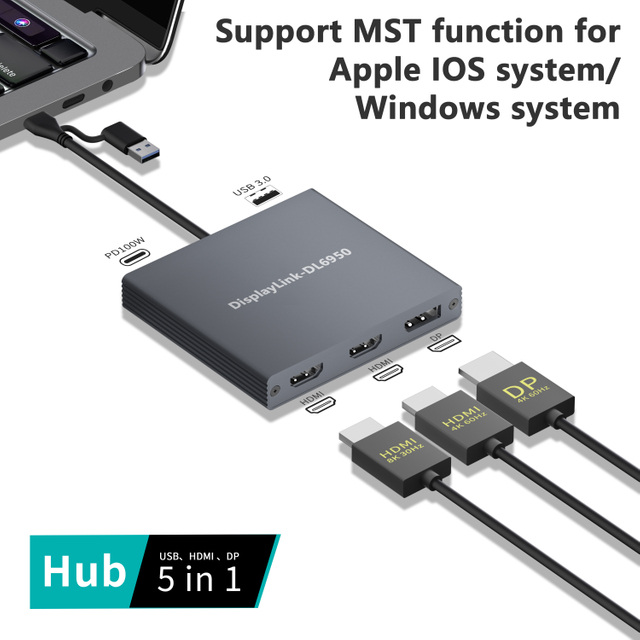
In a typical setup, displays connect via HDMI or DisplayPort, peripherals via USB, and networks through Ethernet. A docking station with HDMI and Ethernet enables simultaneous high-resolution display output and stable wired internet, which is critical for professional communication and data transfer.
Internally, docking stations rely on controller chips to manage bandwidth allocation, display signals, and power delivery. Advanced models support Dual HDMI docking station configurations, enabling extended or mirrored multi-monitor workflows without GPU overload.
The operational value lies in consistency. Once configured, the docking station becomes the fixed infrastructure, while the computer remains the variable. This separation is precisely why docking stations exist in environments where efficiency, speed, and reliability are non-negotiable.
Types of Docking Station and Their Practical Use Cases
Docking stations exist in multiple forms, each addressing different usage scenarios. Understanding these distinctions clarifies why the category continues to expand rather than converge.
| Docking Station Type | Primary Use Case | Key Benefit |
| Universal docking station | Mixed-device environments | Broad compatibility |
| Compact docking station | Travel and minimal desks | Portability |
| Docking station for home office | Remote work setups | Desktop-like experience |
| Wireless docking station | Cable-free workspaces | Flexibility |
| Professional docking station | Enterprise and power users | Stability and expansion |
| Dual HDMI docking station | Multi-monitor productivity | Visual efficiency |
Each type exists because no single configuration satisfies all workflows. A Professional docking station prioritizes reliability and port density, while a compact version focuses on space efficiency. Wireless models address flexibility but trade off latency and power delivery.
The continued diversification of docking stations reflects evolving work habits. As users shift between locations and devices, docking stations adapt to preserve productivity without forcing compromises.
Key Functional Advantages That Explain Why Docking Stations Exist
The existence of docking stations is justified by tangible advantages that directly impact daily productivity. The most significant is workflow continuity. Connecting one cable instead of many saves time and reduces cognitive load during transitions.
Another critical advantage is scalability. A docking station allows users to upgrade displays, storage, or peripherals without replacing their core device. This modularity extends device lifespan and reduces total hardware costs.
Ergonomics also play a central role. External monitors at eye level, full-size keyboards, and wired networks improve comfort and performance. A docking station for home office use transforms temporary setups into sustainable long-term work environments.
From an operational perspective, docking stations reduce hardware wear, minimize desk clutter, and standardize connectivity. These benefits explain why docking stations persist even as devices evolve. They solve systemic problems, not temporary inconveniences.
Choosing the Right Docking Station Based on Real Needs
Selecting a docking station is not about maximizing specifications, but aligning features with actual workflows. The existence of varied docking station designs makes intentional selection essential.
Users who rely on visual multitasking benefit most from a Dual HDMI docking station, while those prioritizing network stability should focus on models with HDMI and Ethernet. Mobile professionals may favor a Compact docking station, whereas fixed desks benefit from full-scale professional designs.
Compatibility is another decisive factor. A Universal docking station reduces friction in multi-device households or offices, ensuring consistent performance regardless of the connected system.
Ultimately, the right docking station is the one that disappears into the workflow. Its success lies in enabling work without drawing attention to itself, fulfilling the exact reason docking stations exist in the first place.
The Future Role of the Docking Station in Digital Workflows
The docking station continues to evolve as work becomes increasingly hybrid. Future designs focus on higher bandwidth, simplified connectivity, and seamless transitions between physical and wireless environments.
As laptops further minimize ports, docking stations will absorb more functional responsibility. Wireless docking stations will mature to reduce latency, while professional models will support higher-resolution displays and faster data pipelines.
Despite technological shifts, the core reason docking stations exist will remain unchanged. They provide structure in an increasingly flexible digital world, anchoring productivity wherever work happens.
Conclusion
A docking station exists because modern computing demands both mobility and permanence. It is not merely an accessory, but an infrastructural component that enables portable devices to function as complete workstations. By solving port limitations, simplifying connectivity, and stabilizing work environments, docking stations address fundamental productivity challenges. Their continued relevance lies in their ability to adapt while remaining purpose-driven. Understanding what a docking station is and why it exists ultimately reveals how technology supports human workflows, not the other way around.
FAQ
1.What is the main purpose of a docking station?
The main purpose of a docking station is to expand connectivity and transform a portable device into a full workstation using a single connection.
2.Why do docking stations still matter with modern laptops?
Modern laptops prioritize portability over ports. Docking stations exist to restore functionality without sacrificing mobility.
3.Is a universal docking station better than a device-specific one?
A Universal docking station offers broader compatibility, making it ideal for multi-device environments.
4.Can a docking station replace a desktop computer?
For many workflows, a Professional docking station paired with a powerful laptop can fully replace a traditional desktop setup.
5.Are wireless docking stations reliable for daily work?
A Wireless docking station offers flexibility, but wired models remain superior for maximum stability and performance.