Have you ever wondered how to maximize your laptop's potential? A docking station is the answer. It expands your laptop's capabilities by connecting multiple devices and monitors, enhancing productivity. In this article, we’ll explore what a docking station does, its advantages, and how to choose the right one for your needs.
What is a Docking Station?
A docking station is a device that allows laptops to connect to multiple peripherals, expanding their functionality. Essentially, it serves as a hub, enabling users to connect monitors, keyboards, mice, printers, and other devices with ease. This is especially beneficial for those who need a more versatile workspace.
Primary Purpose of a Docking Station
The main goal of a docking station is to enhance the capabilities of a laptop. By providing additional ports and connections, it transforms a portable device into a powerful workstation. This means you can enjoy the benefits of a desktop setup while still having the flexibility of a laptop. Imagine being able to switch from a mobile office to a full desktop experience in seconds!
Common Types of Docking Stations
Docking stations come in various forms, each designed for specific needs. Here are some common types:
Type | Description |
Desktop Docks | These are designed for office use, providing multiple ports for monitors and peripherals. |
Vehicle Docks | Used in transportation industries, these docks secure laptops in vehicles while offering connectivity. |
Portable Docks | Lightweight and compact, ideal for those who travel frequently and need quick access to multiple devices. |
Rugged Mobile PCs and Docking Stations
Rugged mobile PCs are specifically built for demanding environments, like construction sites or emergency services. These devices often utilize docking stations to enhance their productivity. For example, a rugged laptop may dock in a vehicle, allowing users to access data and applications safely while on the move. This setup not only improves efficiency but also ensures that the device remains secure and functional in challenging conditions.
In summary, docking stations play a crucial role in maximizing the potential of laptops. By understanding their definition, purpose, and types, users can make informed decisions about which docking station best suits their needs.

How Does a Docking Station Work?
A docking station connects your laptop to various peripherals, enhancing its functionality. Understanding how this connectivity process works is essential for maximizing its benefits. Let’s dive into the details of how a docking station operates.
Overview of the Connectivity Process
When you connect your laptop to a docking station, it acts as a central hub. This hub allows multiple devices to communicate simultaneously. For instance, you can connect monitors, printers, and external hard drives all at once. The docking station uses various ports like USB, HDMI, and Ethernet to facilitate these connections, making it easy to plug and play.
Here’s a simple diagram to illustrate this process:
Laptop ----> Docking Station ----> Monitors, Printers, Other Devices
Power Delivery from the Laptop to Peripherals
One of the key features of a docking station is its ability to deliver power. When connected, the docking station receives power from your laptop's AC adapter. It then distributes this power to connected devices. This means you don’t need separate power sources for each peripheral, simplifying your workspace and reducing clutter.
For example, if you have a monitor and a keyboard connected to your docking station, they can both receive power directly from the laptop. This setup not only saves space but also ensures that your devices remain charged and ready for use.
Controller Chips and Their Role
Inside the docking station, controller chips play a vital role. These chips detect when devices are plugged in or unplugged. They manage data transfer and power delivery, ensuring everything works smoothly. Imagine them as the traffic controllers of your device connections, directing data where it needs to go.
● Detection: When you connect a device, the controller chip recognizes it and enables communication.
● Data Management: It ensures that data flows efficiently between your laptop and peripherals.
● Power Regulation: The chip monitors power delivery to prevent overloads.
One-Step Docking and Undocking
Docking stations offer a convenient one-step process for connecting and disconnecting devices. Instead of fumbling with multiple cables, you simply slide your laptop into the docking station. This design minimizes wear and tear on ports and cables, extending their lifespan.
To illustrate, here’s how the process typically looks:
1. Docking: Slide your laptop into the docking station.
2. Connection: The docking station automatically connects to all attached peripherals.
3. Undocking: Pull the laptop away, and all connections are safely disengaged.
This ease of use is particularly beneficial for those who frequently move between workspaces. It allows for quick transitions without the hassle of disconnecting and reconnecting multiple devices.
In short, understanding how docking stations work can significantly enhance your productivity. They simplify connections, streamline power delivery, and provide a seamless experience for users.
Advantages of Using a Docking Station
Docking stations offer numerous benefits that can significantly enhance your work experience. From improving productivity to reducing clutter, they provide solutions for both home and office setups. Let’s explore the key advantages of using a docking station.
Enhanced Productivity
One of the standout features of docking stations is their ability to boost productivity. Setting up multiple monitors can transform your workflow. For instance, you can have one screen for emails and another for documents, making multitasking much easier. This setup allows for quicker access to information, which means less time switching between applications.
Additionally, using various peripherals simultaneously—like a keyboard, mouse, and printer—streamlines tasks. You can type, print, and navigate all at once, improving efficiency.
Moreover, docking stations contribute to ergonomic advantages. By allowing you to position monitors at eye level, they help reduce neck and back strain. A well-organized workspace enhances focus and minimizes distractions, leading to better work performance.
Clutter Reduction
Docking stations play a crucial role in organizing your workspace. They consolidate multiple connections into a single point, reducing cable clutter. This not only makes your desk look tidy but also simplifies your setup. Imagine having one cable connecting your laptop to a docking station instead of several cords running everywhere.
Benefits of Clutter Reduction |
Organized Workspace |
Easier Access to Devices |
Reduced Cable Management Issues |
Furthermore, the convenience of having a single connection point makes it easy to transport connected equipment. You can quickly disconnect your laptop and take it with you, knowing that everything else remains in place.
Flexibility and Portability
Docking stations offer remarkable flexibility, allowing you to switch between different work environments effortlessly. Whether you’re at home, in the office, or traveling, you can set up your workspace quickly. This adaptability is essential in today’s hybrid work culture.
Different models cater to various needs, such as USB-C and Thunderbolt docks. These options ensure compatibility with a wide range of devices and operating systems. For example, USB-C docks are increasingly popular due to their versatility and high-speed data transfer capabilities.
● Switching Work Environments: Easily transition from home to office setups.
● Model Variety: Choose based on specific device compatibility.
● Device Compatibility: Support for various operating systems enhances usability.
This flexibility not only improves your work efficiency but also makes it easier to adapt to changing work conditions. Overall, docking stations are invaluable tools for anyone looking to enhance their productivity and streamline their workspace.
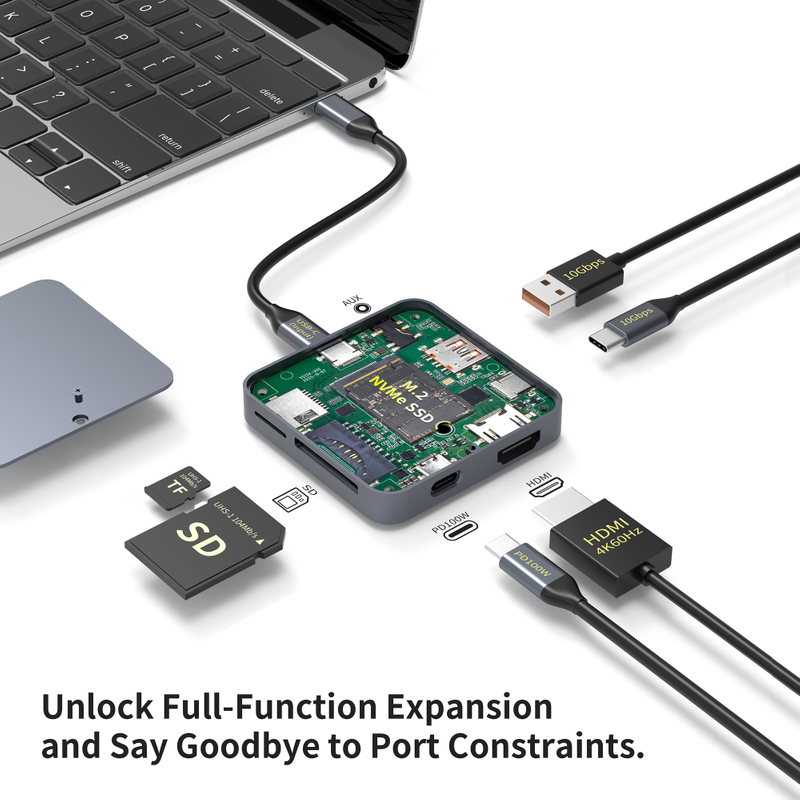
Common Connectivity Options in Docking Stations
Docking stations are equipped with various connectivity options, making them versatile tools for enhancing your laptop's functionality. Understanding these options helps you choose the right docking station for your needs. Let’s explore the most common connectivity features found in docking stations.
USB Ports
USB ports are essential for connecting multiple devices. Most docking stations feature different types of USB ports, including USB-A and USB-C.
● USB-A: This is the traditional USB port, widely used for many peripherals like keyboards and mice.
● USB-C: This newer connector supports faster data transfer rates and can also deliver power. It’s becoming the standard for many modern devices.
USB Port Type | Transfer Rate | Common Uses |
USB-A | Up to 5 Gbps | Keyboards, Mice |
USB-C | Up to 40 Gbps | External Drives, Monitors |
Compatibility is crucial, especially for older laptop models. You might need adapters to connect USB-C devices to USB-A ports. This ensures you can use all your peripherals without hassle.
Video Output Options
When it comes to video output, docking stations typically offer HDMI and DisplayPort options. Each has its strengths:
● HDMI: Widely used for TVs and monitors, it supports audio and video through a single cable.
● DisplayPort: Often preferred for computer monitors, it supports higher resolutions and refresh rates.
Docking stations can support multiple monitors, even allowing for dual 4K displays. Higher resolution displays enhance productivity by providing more screen real estate for multitasking. For instance, you can have spreadsheets open on one screen while browsing the web on another.
Network Connectivity
Network connectivity is another critical feature of docking stations. Many come with built-in Ethernet ports, offering a reliable alternative to Wi-Fi.
● Benefits of Ethernet: It provides a stable connection, reducing lag during activities like streaming or gaming. This is particularly important for gamers who rely on quick response times.
● Wi-Fi Connections: While convenient, Wi-Fi can be less stable, especially in crowded areas.
Direct connections through Ethernet ensure that you have a consistent internet experience, which is essential for work and entertainment.
Audio and Peripheral Connections
Audio jacks are also a common feature in docking stations. They allow you to connect external speakers or headphones easily. This is especially useful for video calls or listening to music.
Docking stations facilitate connections for various peripherals, such as keyboards, mice, and storage devices. Many users prefer wireless keyboards and mice for a cleaner setup. The compatibility of docking stations with these devices makes it easy to maintain a tidy workspace while enjoying the benefits of wireless technology.
In summary, understanding these common connectivity options helps you maximize the use of your docking station. Whether you need USB ports, video outputs, network connections, or audio options, docking stations provide the flexibility and convenience to enhance your laptop experience.
Types of Docking Stations
Docking stations come in various types, each designed to meet specific needs and environments. Understanding these types can help you choose the right one for your setup. Here’s a closer look at the most common types of docking stations.
Desktop Docking Stations
Desktop docking stations are designed for stationary use, typically in office environments. These models offer a range of features, including multiple USB ports, video outputs, and Ethernet connections.
● Features and Benefits: Desktop docks often include the ability to connect multiple monitors, which can significantly enhance productivity. They transform laptops into full desktop setups, allowing users to enjoy a more comfortable working position with larger screens.
Feature | Benefit |
Multiple Monitor Support | Increases screen real estate |
Ergonomic Design | Reduces neck and back strain |
High-Speed Connectivity | Ensures fast data transfer |
● Ideal Use Cases: These docks are perfect for professionals who spend long hours at their desks. They provide a seamless transition from mobile to desktop work, making it easy to connect and disconnect your laptop as needed.
Vehicle Docking Stations
Vehicle docking stations are specifically designed for use in transportation and logistics. These docks secure laptops in vehicles, ensuring they are safe and accessible while on the move.
● Specific Applications: Commonly used in delivery trucks, emergency vehicles, and fleet management, vehicle docks enable professionals to access data and applications while driving. This is crucial for industries like logistics and public safety.
● Safety Benefits: Using a vehicle docking station enhances safety by keeping devices secure and minimizing distractions. Drivers can focus on the road while having quick access to necessary information.
● Rugged Mobile PCs: Many vehicle docks are compatible with rugged mobile PCs, designed to withstand harsh conditions. These devices are built to endure vibrations, temperature changes, and other challenging environments, making them ideal for fieldwork.
Portable Docking Stations
Portable docking stations are lightweight and compact, making them perfect for travelers and remote workers. They offer versatility, allowing users to connect various devices quickly.
● Overview of Lightweight Options: These docks are designed to be easily transported, fitting into a laptop bag without adding significant weight. They typically include essential ports like USB-C, HDMI, and Ethernet, catering to a wide range of devices.
● Versatility: Portable docks are compatible with various operating systems, ensuring that users can connect their laptops to different peripherals wherever they go. This flexibility is particularly beneficial for those who work in multiple locations.
● Convenience for Hybrid Work: As more people adopt hybrid work setups, portable docking stations provide a convenient solution. They allow users to maintain productivity whether at home, in the office, or on the road.
In summary, understanding the different types of docking stations can help you select the best one for your specific needs. From desktop models that enhance office productivity to portable options ideal for travel, each type offers unique advantages tailored to various work environments.
Conclusion
This article explored the functions and benefits of docking stations for laptops. We discussed various types, including desktop, vehicle, and portable models, highlighting their unique features. Choosing the right docking station is crucial for enhancing productivity. It allows seamless connectivity and efficient workspace organization. Readers are encouraged to share their experiences and ask questions. For high-quality docking station options, consider products from YUANSHAN, which offer unique advantages and excellent service. Explore their offerings to enhance your setup today.
FAQ
Q: What is a docking station for a laptop?
A: A docking station is a device that expands a laptop's connectivity options, allowing users to connect multiple peripherals, such as monitors, keyboards, and external drives.
Q: How does a docking station improve productivity?
A: A docking station enhances productivity by enabling multiple connections and providing a seamless transition between mobile and desktop setups, making multitasking easier.
Q: Why should I use a docking station?
A: Using a docking station simplifies connectivity, reduces cable clutter, and allows for a more organized workspace, especially beneficial for remote or hybrid work setups.
Q: What types of devices can connect to a docking station?
A: Most docking stations support a variety of devices, including USB peripherals, monitors, and network connections, making them versatile for different setups.
Q: How much does a docking station typically cost?
A: The price of a docking station can vary widely, ranging from $50 to over $200, depending on features and brand.
Q: Can a docking station charge my laptop?
A: Yes, many docking stations come with power delivery capabilities, allowing them to charge your laptop while connected to other devices.



