English

Views: 0 Author: Site Editor Publish Time: 2026-02-11 Origin: Site
Custom docking stations have special features and ports. They work well for unique setups and special devices.
Standard docking stations are easy to use and cost less. They are good for daily tasks and common devices.
Think about what you need. Pick a custom dock for advanced features. Pick a standard dock for simple use and lower cost.
Always check if your devices work with the docking station. Make sure it meets your needs for performance and connection.
Look at the warranty and support choices. These can be very different for custom and standard docking stations.

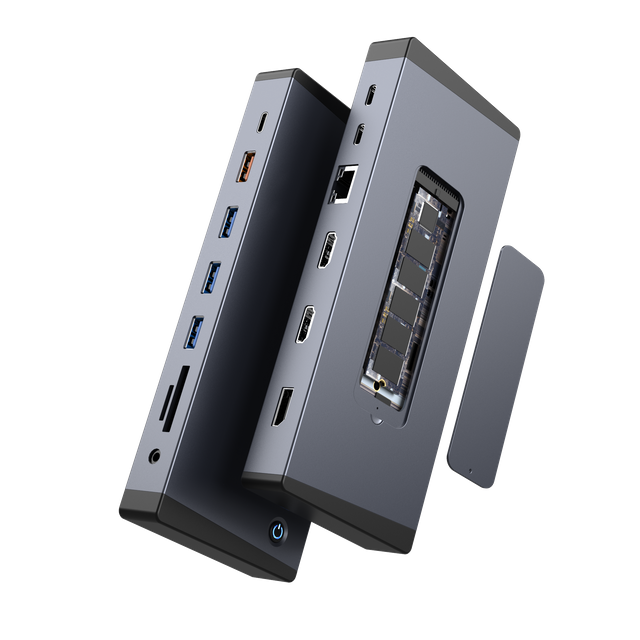
A custom docking station is made just for you. You can pick the ports and layout you want. You can choose features that fit your devices. Many companies use a custom docking station for special equipment. Some places like hospitals or police cars need them. Factories also use a custom docking station. It can work with rare devices. It can add extra security features. You get more control over how it works and looks.
A standard docking station is ready to use right away. You can buy it at most electronics stores. It works well with common laptops and tablets. It also works with monitors. A standard docking station has USB ports and HDMI. It has Ethernet and audio jacks too. You do not pick the features or design. You choose what the manufacturer offers. Most people use a standard docking station at home or in offices.
Tip: If you want a fast setup and do not need special features, a standard docking station saves you time and money.
You can see the main differences in this table:
Feature | Custom Docking Station | Standard Docking Station |
|---|---|---|
Design | Tailored to your needs | Fixed by manufacturer |
Device Compatibility | Supports rare/special devices | Supports common devices |
Features | You choose | Predefined |
Cost | Usually higher | Usually lower |
Warranty & Support | Varies by manufacturer | Standardized |
Warranty and support options are not always the same. For example, Gamber-Johnson gives a 3-year warranty for some custom docking station models. Other products have only a 1-year warranty. Targus has a limited warranty. You need a sales receipt for service.

Here are some popular brands for both custom docking station and standard docking station models:
Dell Technologies
HP Inc.
Lenovo Group
Toshiba Corporation
CalDigit
You can find many choices from these brands. You can pick a custom docking station or a standard docking station.

You can pick the features you want in a custom docking station. Many people ask for display support and port variety. Portability and power delivery are also important. Compatibility matters too. You can choose the ports you need for your devices. You might want HDMI or DisplayPort. Ethernet, audio jacks, and SD card readers are options. You can get a dock that supports high screen resolution. You can ask for high refresh rates. You can request a small design if you travel a lot. Power delivery keeps your laptop charged while you work. You can make sure your dock works with your laptop’s operating system. You can check the connection type. Custom docking stations give you more flexibility and control.
Here is a table showing the most popular features in custom docking stations:
Feature | Description |
|---|---|
Display Support | Supports high screen resolution and refresh rate for multiple monitors. |
Port Variety | Offers HDMI, DisplayPort, Ethernet, audio, or SD card readers. |
Portability | Compact and lightweight for easy travel. |
Power Delivery | Charges your laptop while you work. |
Compatibility | Works with your laptop’s OS and connection type, like USB-C or Thunderbolt. |
Standard docking stations have features set by the manufacturer. You get USB ports and HDMI. Ethernet and audio jacks are included. You do not choose the features. The company decides what each model has. You can use these docks with most laptops and tablets. You get basic connections for your devices. You can connect a monitor and keyboard. Mouse and speakers can be added too. You do not get special features for rare devices. Standard docking stations are simple and easy to use.
Note: Standard docking stations are good for daily tasks. You do not need to worry about setup. They work with common devices.
Custom docking stations work better for unique setups. You can use them with rare devices or special equipment. You can add features for many devices. Standard docking stations support common devices. You can connect laptops, tablets, and monitors easily. You get reliable connections for basic needs. Custom docking stations help if you need advanced features. Standard models are best for simple setups.
You pay more for a custom docking station. You pick the features you need, so the price goes up. You might need special ports or extra security. You pay for design and engineering. You also pay for unique compatibility. Custom docking stations cost more because they are made just for you. The price can be from $300 to $800 or higher. You pay more if you want advanced features. You also pay for support and warranty. Think about the price if your budget is tight.
Note: Custom docking stations let you choose what you want, but you pay more for that choice.
You pay less for a standard docking station. You get a set of features that do not change. You do not pay extra for custom design. You can find standard models in many stores. The price is usually from $80 to $250. You pay less because the manufacturer makes many units. You do not pay for special engineering. You pay for basic ports and connections. You save money if you only need common features. You also pay less for warranty and support.
Here is a quick comparison:
Docking Station Type | Typical Price Range | Custom Features | Support Cost |
|---|---|---|---|
Custom | $300-$800+ | Yes | Higher |
Standard | $80-$250 | No | Lower |
Each docking station gives you different performance. Custom docking stations work best for your devices. You pick the ports and layout, so you get good speed and reliability. You also get top performance if you need high-resolution displays or fast data transfer. Standard docking stations give good performance for common tasks. You connect your laptop and monitor easily. You may not get top performance if you use rare devices or need advanced features. Check the specs to make sure you get the performance you need.
Tip: If you want the best performance for a special setup, you should look at a custom docking station. If you want good performance for basic tasks, a standard docking station is a good choice.
There are many good things about custom docking stations. You can add more ports if you need them. This helps you connect more devices without extra adapters. You can charge your laptop and other devices with one cable. You can use more than one monitor for a bigger workspace. It is easy to connect and disconnect everything with one cable. You can make your setup work better by adding what you need. Custom docking stations let you pick features that fit you.
Makes it easy to connect many devices
Lets you charge your laptop and other devices
Works with more monitors for a bigger screen
Makes your work faster with simple connections
Gives you special features you want
There are some problems with custom docking stations. Some people say there are not enough ports for all their devices. The price is higher, so it may not be good for everyone. There can be security problems like data theft or malware. Someone could get into your files or messages without you knowing. Sometimes you do not get all the ports you want, like two HDMI ports. Custom docking stations cost more than regular ones. This can be hard for people who want to save money.
Note: Custom docking stations have cool features, but you should think about the price and safety.
Standard docking stations are good for most people. You can connect many devices like a mouse, keyboard, or printer. They help keep your cables neat and tidy. They are good for people who work from home or move around. They do not cost as much, so businesses can buy more for workers. Here is a table with the main good things:
Benefit | Description |
|---|---|
Enhanced Connectivity | Lets you connect many devices with different ports. |
Improved Cable Management | Helps keep your cables neat and not messy. |
Support for Remote Work | Makes it easy to work from different places. |
Cost-Efficiency | Saves money for companies that need more workstations. |
Standard docking stations are like a hub for your devices. You can connect screens, keyboards, and printers easily. You can switch from a laptop to a desktop setup fast.
Standard docking stations have some downsides. You cannot pick special features. You have to use what comes with it. Sometimes there are not enough ports for all your devices. They may not work with rare devices or special setups. You might not get enough value if you need more than basic things. Some people want better screens or faster data, but standard docking stations may not have that.
Tip: Standard docking stations are good for simple needs, but you may want more if you use lots of devices or need special features.
You need a docking station that helps your team work well. Many companies want docks that work with lots of devices. They also want easy management and strong security. These features help workers do their jobs and keep data safe. You want a dock that works with many laptops and monitors. You also want one that lasts and can handle busy days. Durability is important in offices.
Here is a table showing what top brands offer for business:
Company | Key Features | Sustainability Focus |
|---|---|---|
Dell Technologies | Works with many devices, easy management, strong security | Supports hybrid work |
HP Inc. | High-quality video, smooth setup, good power options | Cares about eco-friendly management |
Lenovo | Flexible, tough, works with many platforms | Solutions for different industries |
Targus | Simple to use, secure, works with many devices | Focuses on being green |
If you manage a big team, a standard docking station is a good choice. It is easy to set up and gives reliable support. You can buy many for your office. This saves money and keeps your workspace neat. If your company uses special gear or needs extra security, a custom docking station may be better. You can ask for more ports, special locks, or unique designs. This helps your team work faster and safer.
Tip: Always check if the dock works with your devices. Look at connection types and power delivery before you choose. These things help your docking station fit your business.
You want a docking station that keeps your home setup neat and simple. Many people work from home now. You may need to connect two monitors, a webcam, and a keyboard. Some people want a clean desk with no messy cables. Others want fast drives or smooth video calls.
Here is a table showing what different users like at home:
User Group | Preferences |
|---|---|
Remote Workers | Need docks for two monitors, webcams, and keyboards. |
Creatives | Like Thunderbolt docks with fast SSD and video support. |
Analysts/Developers | Want docks for 4K monitors with low lag. |
Casual Users | Use basic USB-C hubs with HDMI, USB-A, and power. |
Aesthetics | Want clean, simple desk setups at home. |
If you want a simple setup, a standard docking station is a good pick. You can connect your laptop, monitor, and other devices easily. If you need special features, like Thunderbolt or fast data, you may want a custom docking station. This helps you get the best performance for creative work or games. Durability matters if you move your dock a lot or use it every day.
Note: Think about what you do most and what devices you use. Pick a docking station that fits your daily needs and keeps your desk tidy.
You love technology and want the best features. You care about reliability, power delivery, and port options. You want a dock that supports two monitors and works well. You also want many ways to connect your devices. You may worry about USB port problems or connection issues.
Here are the top features tech fans look for:
Reliable connections, power delivery, and port options
Many ways to connect devices
Dual monitor support for multitasking
Good performance for tough tasks
If you want a special setup, a custom docking station gives you more control. You can pick the ports, layout, and power you need. This helps you use your devices better and enjoy new tech. If you want something fast and easy, a high-end standard docking station can work too.
Tip: Always check if the dock works with your devices and is tough. This helps you avoid problems and enjoy your tech setup.
When you ask who should pick which docking station, you need to think about your needs and where you use it. Business users often choose standard models for easy setup and saving money. Home users like standard docks for simple setups, but may want custom docks for creative work. Tech fans like custom docks for advanced features and flexibility. Always check compatibility, connections, power delivery, and durability before you decide. This helps you get the right docking station and makes your setup better.
You can spot the main differences between custom and standard docking stations. Custom docks let you pick special features. You get more control over how they work. Standard docks are simple to set up. They cost less than custom docks. Businesses need docks that are reliable and have good support. At home, you want easy connections for your devices. Tech fans want docks with advanced features. OEM docks usually cost more money. They may not work with many devices. Updates and support can take a long time. Always think about what you need before picking a dock.
Custom docks: more control, higher price
Standard docks: easy use, better value
OEM docks: limited compatibility, slow updates
You choose the number and types of ports with a custom docking station. Standard models come with fixed ports. Custom options fit special devices. Standard models work for most laptops and tablets. You get more flexibility with custom docking.
Check the product details. Look for terms like multiple display support or multi-displays. Many thunderbolt docking station models offer these features. You can connect two or more monitors for a bigger workspace.
You need to check your laptop’s ports. Some laptops need usb-c docking station support. Others use different connections. Always match your laptop’s port with the docking station for best quality and charging.
Ports let you connect devices like monitors, keyboards, and drives. More ports mean you can create desktop-like setups. You get high-speed data transfer, charging, and better performance requirements. Always count the ports before you buy.
Look for docking stations with strong charging power. Check reviews for quality. Make sure the docking station matches your laptop’s needs. Good charging keeps your devices ready. Quality docking stations last longer and work better.