Vague procurement documents hide significant risks for enterprise deployments. Poorly drafted requirements often lead to driver incompatibilities, fleet-wide power delivery failures, and severe thermal throttling. In modern enterprise setups, the humble hub serves as the central nervous system of the desk. When this critical junction fails, productivity stops entirely. Procurement teams often rely on manufacturer marketing sheets rather than defining internal parameters. This approach inevitably leads to mismatched hardware. Sourcing an OEM Docking Station requires moving far beyond basic port counts. A rigorous specification sheet bridges the critical gap between your organizational IT needs and the manufacturer's engineering realities. You need clear technical parameters to prevent widespread deployment disasters. This article provides a structured, enterprise-grade framework for drafting robust hardware specifications. We will show you how to define scope, outline technical requirements, and demand strict security protocols. Following this guide will help you mitigate deployment risks, ensure global compliance, and streamline your vendor evaluation process effectively.
Key Takeaways
- A robust specification sheet must define universal compatibility requirements to prevent vendor lock-in and support BYOD (Bring Your Own Device) environments.
- Precise documentation of the OEM dock port configuration, power delivery limits, and multi-display protocols is critical for baseline performance.
- Enterprise buyers must explicitly mandate network security features (MAC address pass-through, PXE boot) and firmware manageability.
- A standardized docking station RFQ accelerates shortlisting by forcing manufacturers to provide transparent data on MOQs, compliance certifications, and warranty SLAs.
Defining the Scope: IT Environments and Fleet Compatibility
The business problem framing requires a deep dive into your hardware refresh cycles. Are you keeping laptops for three years or five? A universal dock reduces long-term IT overhead because it survives multiple laptop refresh cycles. Universal docks utilize standardized protocols to maximize usability. For instance, if your workforce uses a mix of M2 MacBooks and Intel-based Windows laptops, universal docks become mandatory. Proprietary vendor-specific docks often lock organizations into single-brand ecosystems. They force you to purchase new hardware every time you switch laptop fleets. However, universal models require stricter compatibility specifications from the buyer. You cannot assume a dock will work perfectly with every laptop brand out of the box.
Host device baselines form the absolute foundation of your document. Specify supported operating systems explicitly. List Windows 11, macOS Sonoma, ChromeOS, and specific Linux distributions. Next, define the required generations of host interfaces. Note whether you need standard USB-C, Thunderbolt 3, Thunderbolt 4, or the latest USB4 connectivity. Different protocols dictate vastly different engineering requirements. A Thunderbolt 4 requirement changes the internal chipset architecture entirely.
Define the physical deployment scenarios next. Will employees use these devices for flexible hot-desking environments? Hot-desking requires maximum universal compatibility and durable casing. Are they intended for fixed executive workstations? Executives usually demand premium aesthetics and silent operation. Industrial or rugged environments demand specific footprint constraints, reinforced build quality, and dust resistance. Documenting the environment ensures the manufacturer uses appropriate housing materials and structural designs.
![Article image]()
Core Technical Requirements & OEM Dock Port Configuration
This section dictates the functional heart of the hardware. Precision here prevents catastrophic performance issues during deployment. Vague descriptions inevitably lead to underpowered workstations.
Power Delivery (PD) and Thermal Management
You must specify exact wattage requirements for host charging. Standard choices include 60W, 90W, or 100W PD 3.0 protocols. High-performance mobile workstations demand higher thresholds to prevent battery drain under heavy load. You must also allocate sufficient wattage for downstream peripheral power. If a user connects external hard drives, smartphones, and a tablet simultaneously, the unit needs significant power overhead. Specifying a 100W PD input ensures the laptop receives adequate power while peripherals operate stably. Watch out for cheaper manufacturers advertising the power adapter's total wattage rather than the actual wattage delivered directly to the laptop. Explicitly state the required output delivered to the host.
Thermal management requires strict baseline tolerances. Define maximum operating temperatures under continuous full load. Poor heat dissipation causes internal chip throttling. It accelerates hardware degradation and causes random monitor disconnections. Demand specialized thermal pads or specific extruded aluminum chassis designs if operating temperatures exceed standard limits. A common mistake is ignoring thermal design, resulting in plastic housings warping over time.
Video Output & Display Protocols
High-resolution multi-monitor setups drastically improve employee workflows. Define acceptable display configurations clearly and unambiguously. State whether you need Single 8K for graphic designers, Dual 4K at 60Hz for financial analysts, or complex Triple display outputs for software engineers.
Specify required video protocols like DisplayPort 1.4, HDMI 2.1, or USB-C Alt Mode. You must address Multi-Stream Transport (MST) limitations explicitly. Apple macOS handles MST differently than Windows environments. Windows allows daisy-chaining multiple unique displays via MST. macOS limits MST, meaning Mac users will experience mirrored screens instead of extended desktop modes unless you employ DisplayLink technology. Always require the manufacturer to state their compatibility parameters if bridging the macOS limitation is necessary.
Data & Peripheral Connectivity
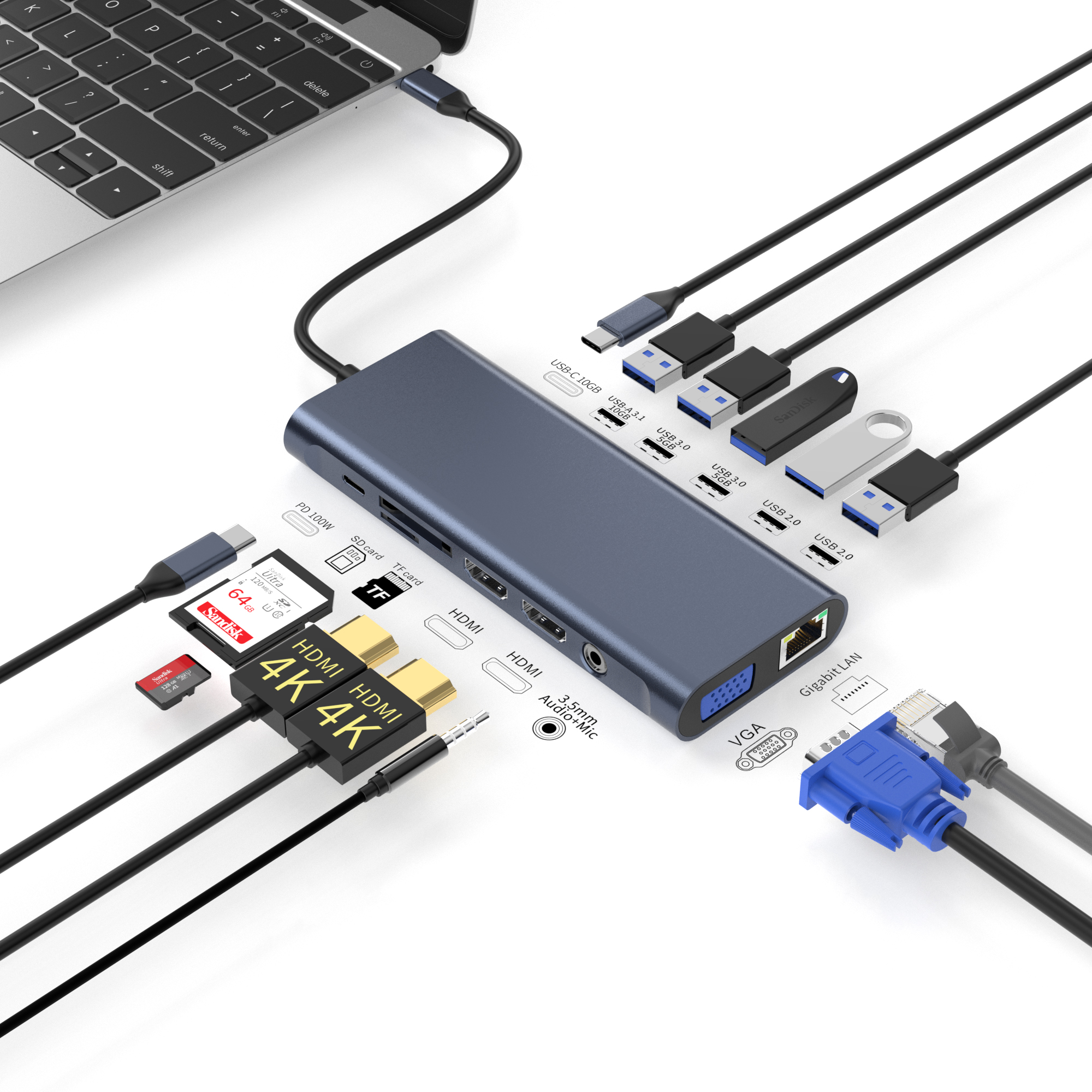
The physical layout dictates daily user efficiency. You must document the precise OEM dock port configuration. List exact quantities and bandwidth capacities.
Specify if USB-A ports operate at standard 5Gbps or high-speed 10Gbps. Detail the exact number of USB-C data ports needed. Include SD or MicroSD card readers if your creative teams require them. Finally, list any legacy connections required for older organizational hardware. Some enterprises still rely on legacy VGA for older projector systems or dedicated RJ45 for stable intranet access. Leaving port speeds open to interpretation guarantees the vendor will use cheaper, slower internal hubs, creating major data bottlenecks.
Enterprise IT Management and Security Specifications
Consumer-grade hardware ignores enterprise security needs. A professional spec sheet mandates strict IT manageability features. Deploying consumer models in a corporate network creates massive blind spots for administrators.
Network reliability stands as a top priority. Specify Gigabit or 2.5GbE Ethernet controller requirements. Note preferred chipsets, such as Realtek or Intel. Certain enterprise network environments play nicer with specific controller brands. Watch out for cheap network controllers dropping packets during large file transfers or losing connection during VoIP calls.
Sysadmin imperatives require explicit support for enterprise IT standards. Include the following core requirements in your documentation:
- MAC Address Pass-Through: This allows secure network authentication. It exposes the laptop's true MAC address rather than the dock's generic identifier. IT security teams rely on this for endpoint monitoring and whitelisting.
- PXE Boot (Preboot Execution Environment): Essential for remote imaging. IT staff need this to deploy fresh OS images across the network without manual USB drives.
- Wake-on-LAN (WoL): Permits remote boot sequences. It enables off-hours patch management and software updates without requiring the user to physically turn on the device.
Firmware lifecycle management is equally vital. Require documentation detailing how the manufacturer packages firmware updates. Large enterprise fleets need seamless rollout processes. Specify that updates must support silent installation via deployment tools like Microsoft SCCM or Intune. Manual firmware updates disrupt productivity and leave devices vulnerable.
Enterprise Specification Comparison Framework
| Feature Category | Consumer-Grade Baseline | Enterprise-Grade Requirement |
| Network Authentication | Standard MAC Address | MAC Address Pass-Through capability mandatory |
| Firmware Deployment | Manual user executable installation | Silent batch installation via SCCM/Intune |
| Thermal Tolerance | Standard ambient passive cooling | Continuous full-load thermal limits clearly defined |
| Remote IT Management | Not supported by internal chipsets | Full PXE Boot and Wake-on-LAN (WoL) support |
Hardware Customization and Certification Lenses
Organizations often need specialized builds rather than off-the-shelf units. Defining the exact scope of a custom docking station prevents misaligned prototypes and wasted engineering time.
Outline physical customization requirements meticulously. Specify preferred chassis materials like lightweight ABS plastic for budget deployments or premium CNC-machined aluminum for executive suites. Dictate bespoke dimensions if the hardware must fit specific under-desk mounting brackets or security cages. Note custom silkscreen branding needs and precise logo placements. Clear physical requirements minimize costly tooling revisions later.
Compliance and safety certifications protect your organization from legal liability and operational hazards. Mandate proof of regulatory compliance early in the document. List required regional certifications such as FCC for North America, CE for Europe, RoHS for material safety, and REACH.
Require rigorous safety laboratory testing for the external power supply unit (PSU). Specify an active UL or ETL listing. Faulty power bricks pose severe fire hazards and risk invalidating corporate insurance policies. Determine if official standard certifications are mandatory for your risk profile. Intel Thunderbolt certification and USB-IF certification add significant upfront cost. However, they guarantee strict protocol reliability and signal integrity. Note these requirements clearly to filter out unqualified vendors quickly during the bidding phase. Beware of vendors claiming mere compatibility rather than providing actual laboratory certification documents.
Structuring the Docking Station RFQ for Vendor Evaluation
Writing the specification document is only half the battle. You must structure your docking station RFQ to extract measurable, comparable vendor data. A well-structured RFQ standardizes vendor responses, making it much easier for your procurement team to evaluate competing bids objectively.
Begin by defining Minimum Order Quantities (MOQs) and scalability timelines. Contrast your initial pilot run sizes against your full fleet rollout volumes. Vendors must demonstrate the manufacturing capacity to scale production without compromising assembly quality.
Demand strict Quality Assurance (QA) tolerances. Request their internal vendor testing protocols upfront. You should establish baseline quality metrics to hold the manufacturer accountable. Common testing mandates include:
- Insertion cycle testing for all USB-C ports (e.g., minimum 10,000 insertion cycles to ensure longevity).
- Vibration and drop tests from specified standard desk heights to simulate accidental workplace knocks.
- Thermal burn-in testing over continuous 24-hour periods under maximum load to identify heat-induced component failures.
- Salt spray testing if the equipment will deploy in humid or coastal environments.
Service Level Agreements (SLAs) and lifecycle support dictate post-purchase stability. Define the required warranty period clearly within the RFQ. Decide between a standard 1-year commercial warranty or an extended 3-year enterprise agreement. Establish rigid terms for the RMA (Return Merchandise Authorization) process. Set an acceptable threshold for defective units before triggering contractual financial penalties.
Conclude the RFQ with actionable next steps. Instruct vendors to provide fully functional engineering samples. Require them to submit specific internal benchmarking data alongside those samples. This allows your IT department to perform initial physical evaluations against the vendor's claims before committing to a bulk purchase contract.
Conclusion
A comprehensive document outlining exact docking station specifications acts as an essential insurance policy. It protects your organization against poor manufacturing standards and large-scale IT deployment failures. Clear guidelines force manufacturers to align entirely with your precise engineering realities rather than pushing their standard inventory onto your procurement team.
- Always define universal compatibility to support diverse device fleets securely.
- Specify exact port speeds, power delivery minimums, and display protocols meticulously.
- Mandate crucial enterprise security features like MAC Pass-Through and PXE boot.
- Demand transparent QA testing data and compliance certificates during the bidding process.
We strongly advise buyers to finalize all internal IT requirements before engaging OEMs. Doing so ensures the quoting process focuses strictly on vendor manufacturing capability and pricing transparency. It entirely eliminates chaotic feature discovery phases that delay rollouts. Protect your infrastructure by demanding rigorous technical standards, secure network protocols, and verifiable global compliance metrics. Start building your standardized specification template today to guarantee a seamless, high-performance hardware rollout across your entire organization.
FAQ
Q: What is the difference between a custom docking station and a white-label OEM dock?
A: A white-label OEM dock usually involves simple logo swapping on pre-existing hardware. You buy an off-the-shelf design and apply your branding. A custom unit involves major chassis redesigns, specific port reconfigurations, and bespoke internal engineering to meet highly specialized operational requirements.
Q: Why is MAC Address Pass-Through necessary in enterprise docking station specifications?
A: MAC Address Pass-Through allows a network to identify the connected laptop rather than the dock itself. This feature is critical for network security, device tracking, and assigning accurate IP addresses. Without it, IT administrators cannot reliably authenticate devices or manage fleet access.
Q: How do I specify power requirements to ensure broad laptop compatibility?
A: You should standardize your requirements around 90W to 100W Power Delivery (PD). This ensures the hardware can rapidly charge power-hungry mobile workstations while simultaneously powering connected peripherals. Specifying lower wattages often results in slow charging or battery drain during heavy laptop usage.
Q: What testing data should I request in a docking station RFQ?
A: You should request comprehensive thermal burn-in reports to ensure heat dissipation under heavy loads. Additionally, demand multi-display compatibility matrices detailing exact resolution and refresh rate limits across different operating systems. Insertion cycle testing data for critical ports is also highly recommended.