Hardware marketing often oversimplifies device connectivity. Consumer packaging proudly highlights multiple display capabilities. Yet, enterprise IT professionals regularly face a contrasting reality. You deploy these devices across corporate offices. Almost immediately, you discover glaring hardware limitations. Poor procurement directly triggers helpdesk bottlenecks. It spikes hardware return rates. It severely increases user frustration across mixed operating systems.
We clearly need a more reliable approach. This guide provides a robust technical evaluation framework. It empowers IT procurement teams and technology consultants. You will learn to navigate obscure hardware specifications effectively. We explore compatibility pitfalls and baseline hardware standards. We also detail rigorous stress-testing methodologies required before mass deployment. Making informed choices ensures your workforce remains productive.
Key Takeaways
- Not all dual-screen claims apply to macOS; verifying protocol support (MST vs. DisplayLink) is mandatory for mixed fleets.
- Sustained power output is critical—a true 100W PD dock prevents workstation battery drain under heavy peripheral loads.
- An enterprise-grade system integrator docking station must support IT manageability protocols like MAC Address Pass-Through and PXE Boot.
Resolving the Compatibility Gap in Mixed Environments
Deploying universal hardware remains a significant challenge for IT departments. Operating systems handle external monitors very differently. Understanding these fundamental protocol differences prevents catastrophic deployment failures.
macOS devices present the most common deployment pitfall. You connect two monitors into a standard hub. You expect extended desktops. Instead, macOS simply mirrors the exact same image across both external screens. Apple hardware does not support Multi-Stream Transport (MST) over standard USB-C Alternate Mode natively. It only reads the first video stream. You must bridge this compatibility gap intentionally. A well-engineered dual 4K docking station solves this problem by utilizing the correct internal chips.
You need a reliable way to evaluate connection protocols. We recommend utilizing a standardized matrix. This simplifies the decision-making process for your team.
| Protocol | Technology Base | Best Fit Ecosystem | Hardware Implication |
| USB-C Alt Mode (MST) | Native GPU output routing | 100% Windows environments | Highly cost-effective |
| DisplayLink | Software-driven rendering | Mixed Windows & Mac (M1/M2/M3) | Requires driver installation |
| Thunderbolt 3/4 | High-bandwidth PCIe lanes | Premium workstations | Higher initial investment |
You must standardize your evaluation around your specific hardware ecosystem. Consider your company's projected device fleet. Do you manage an eighty percent Windows and twenty percent Mac environment? DisplayLink becomes a highly attractive universal fallback. Do you run a strictly pure Windows fleet? MST provides excellent hardware-accelerated performance without requiring additional software drivers. Make your protocol decision before evaluating specific ports.
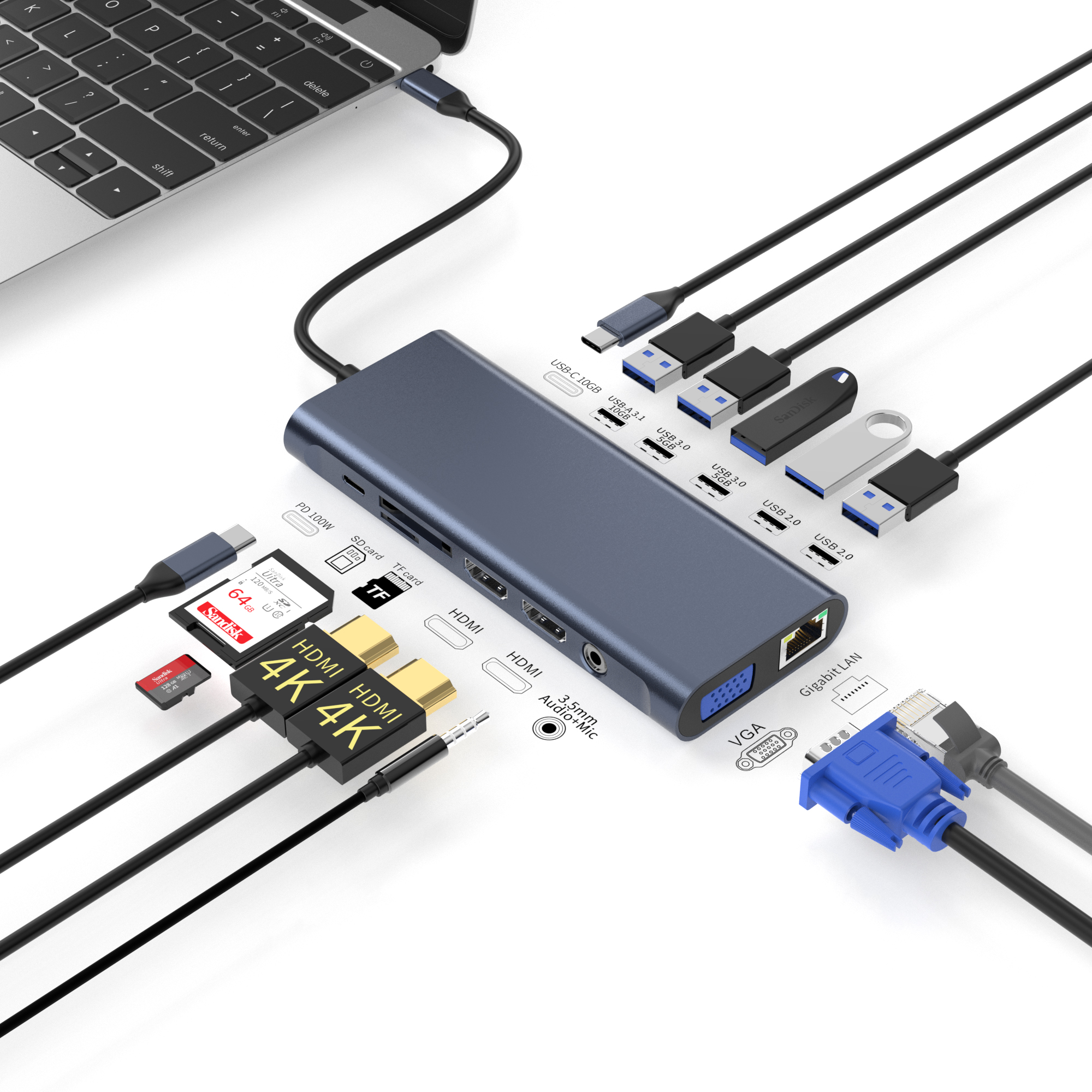
Core Hardware Criteria for a Multi Monitor USB C Dock
Modern professionals demand pristine video quality alongside rapid data transfer. Delivering both simultaneously pushes connectivity standards to their absolute limits. You must inspect the underlying architecture of a multi monitor USB C dock.
Bandwidth Allocation and Refresh Rate Realities
Video signals consume massive amounts of data bandwidth. Achieving genuine 4K resolution at sixty hertz on two monitors simultaneously requires specific DisplayPort standards. You must verify DP 1.4 support alongside Display Stream Compression (DSC). Older DP 1.2 hubs physically cannot push enough pixels for dual 4K at sixty hertz. They will forcefully drop the refresh rate down to thirty hertz. This causes noticeable cursor lag.
Beware of bandwidth hijacking. A standard Type-C cable contains four high-speed data lanes. Some hubs allocate all four lanes entirely to video streams. They downgrade the remaining USB ports to outdated 2.0 speeds. Users plug in external solid-state drives. They suddenly face sluggish 480Mbps transfer limits. High-quality hardware splits these lanes intelligently. It preserves at least ten gigabits per second for peripheral data.
Power Delivery (PD) Stability and Thermal Management
Power specifications frequently confuse buyers. You must clearly differentiate between power input and power output. The input rating denotes the maximum capacity of the wall charger. The output rating reveals the actual wattage delivered directly to the host computer. The internal circuitry consumes up to fifteen watts for its own operation.
A true 100W PD dock serves as the baseline for modern high-performance laptops. Underpowered alternatives drain the laptop battery during intensive tasks. Heavy peripheral loads demand stable power negotiation.
Furthermore, thermal management requires strict scrutiny. Sustained 4K video rendering combined with intense charging generates significant heat. Inadequate thermal dissipation triggers component throttling. Overheating hubs drop video signals randomly. They disconnect Ethernet connections unexpectedly. Premium aluminum enclosures and dedicated thermal pads prevent these daily disruptions.
IT Manageability for a System Integrator Docking Station
Consumer devices work fine on home desks. Enterprise deployments require a fundamentally different tier of functionality. A competent system integrator docking station must integrate seamlessly into your existing security infrastructure.
Network security protocols dictate enterprise access. Your IT team requires Preboot Execution Environment (PXE) support. PXE boot allows administrators to push operating system images over the network to entirely blank laptops. You also need MAC Address Pass-Through capability. Network Access Control (NAC) systems identify authorized machines by their unique MAC address. A basic hub presents its own internal Realtek chip address to the network. The NAC system subsequently blocks it. Pass-through technology ensures the network correctly identifies the connected laptop.
Physical security matters deeply in open-plan offices. Hubs represent highly desirable targets for casual theft. You must check for integrated Kensington lock slots. Supporting both Standard and Nano lock formats offers maximum flexibility. VESA mounting options further improve security. You can mount the unit securely behind the monitor. This enforces clean-desk policies while reducing tamper opportunities.
Finally, evaluate firmware consistency. Manufacturers occasionally swap internal components without alerting buyers. This wreaks havoc on standardized fleets. Evaluate the vendor's firmware update utility. Mass deployments require command-line interfaces for SCCM integration. Graphical user interfaces only suffice for individual updates. Historical support lifecycles indicate vendor reliability.
Structural Reliability and Failure Point Mitigation
Hardware durability determines long-term deployment success. We see specific failure points repeatedly in enterprise environments. Addressing these structural elements drastically reduces support tickets.
The host cable represents the primary point of physical failure. Users constantly bend, pull, and twist this cable. You face a critical debate: tethered versus detachable cables. Tethered cables permanently attach to the chassis. A damaged cord renders the entire unit useless. Detachable cables allow instant replacements. They significantly reduce Return Merchandise Authorization (RMA) rates. You simply swap a broken cable and keep the employee working.
Port layout logic directly impacts daily ergonomics. Poorly designed layouts create messy, tangled desks. We advise following strict physical arrangement guidelines:
- Front-facing ports: Headset jacks, a single high-speed USB-A port for flash drives, and the primary host connection. Users interact with these elements multiple times daily.
- Rear-facing ports: HDMI or DisplayPort connections, Gigabit Ethernet, and the primary power supply input. These represent permanent connections.
Sensible port placement prevents accidental cable disconnections. It shields fragile connectors from user interference.
Shortlisting Logic and Proof of Concept (PoC)
Technical specifications mean nothing without real-world validation. You must establish a rigorous shortlisting process before committing to a bulk purchase order.
Begin by defining your success criteria clearly. Map specific hardware features directly to tangible business outcomes. Universal compatibility eliminates secondary adapter purchases. Robust PD charging eliminates separate OEM charger requirements. A capable Dual 4K Docking Station should resolve multiple friction points simultaneously.
Next, implement a mandatory Proof of Concept stress test. Do not trust vendor datasheets blindly. Subject the evaluation units to extreme daily scenarios. We recommend executing three specific stress tests:
- Sleep/Wake Cycle Recovery: Force the laptop into deep hibernation. Wake it up multiple times. Ensure both external 4K monitors reconnect instantly without flickering or requiring cable reseating.
- Sustained Network Throughput: Transfer fifty gigabytes of data across the local network via the built-in Ethernet port. Monitor the connection for sudden speed drops caused by internal thermal throttling.
- Cross-Platform Hot-Swapping: Unplug the host cable from a Windows PC. Plug it directly into an Apple MacBook. The external peripherals, monitors, and network should initialize without requiring a system reboot.
Failing any of these tests indicates a flawed internal chipset design. Disqualify the unit immediately.
Conclusion
Procuring enterprise connectivity solutions requires a dramatic shift in mindset. You are no longer simply buying basic specifications. You are sourcing reliable IT infrastructure. Device compatibility directly dictates workforce productivity.
Emphasize long-term stability over initial sticker prices. The cheapest unit often causes the highest hidden friction in deployment hours. Dealing with mirrored macOS screens wastes valuable helpdesk resources. Struggling with thermal throttling destroys user confidence. You must demand robust protocols, strong power delivery, and rigorous manageability features.
Take proactive steps today. Request an evaluation unit from your chosen vendor. Ask for a comprehensive technical compliance matrix. Begin your Proof of Concept testing immediately to secure a seamless technology deployment.
FAQ
Q: Why does a dual monitor dock only mirror screens on a MacBook?
A: Apple macOS inherently limits Multi-Stream Transport (MST) capabilities over standard USB-C Alt Mode. It only processes the primary video stream. Standard hubs simply duplicate this single stream across both monitors. Achieving extended displays on a MacBook requires hardware utilizing DisplayLink software technology or a premium Thunderbolt connection.
Q: Is it safe to use a 100W PD dock on a laptop that only requires 65W?
A: Yes, it is completely safe. Modern USB Power Delivery protocols actively negotiate required wattage between devices. The host laptop communicates its maximum power limits to the charger. It only draws the specific wattage it safely handles. Extra capacity simply provides operational headroom without causing thermal damage.
Q: Can any USB-C cable connect the dock to the host laptop?
A: No. Standard charging cables lack the physical data lanes required for video and network bandwidth. Enterprise deployments strictly require certified high-speed cables. You need a twenty or forty gigabit-per-second rating. The cable must also contain an integrated E-marker chip to safely handle high-wattage power delivery alongside dual 4K video streams.



