You wrap up a massive 4K video shoot. You sit at your workstation, ready to edit. Instead, you stare at a progress bar for hours. A major hardware bottleneck is choking your workflow. Many buyers pick up a peripheral based purely on its sleek aesthetic or budget-friendly price tag. They completely overlook the crucial technical details. It isn't until they plug the device in that they realize it fails to support their memory card's maximum speed. Sometimes, it doesn't even match their computer's port. Understanding the technical jargon on a spec sheet is the ultimate solution to this frustrating scenario. As hardware engineers often point out, the devil is in the controller chip and the printed circuit board layout. This guide breaks down complex hardware specifications. It equips everyone from everyday consumers to enterprise purchasers with the exact knowledge needed to select the right device.
Key Takeaways for Hardware Selection
Interface Selection: Match modern connections for seamless integration with newer devices.
Format Compatibility: Verify explicit support for specific media to avoid capacity limits and file corruption.
Speed Standards: Align the USB generation and UHS standard with your physical media's capabilities.
Thermal Management: Prioritize aluminum alloy builds for sustained high-speed transfers without thermal throttling.
Enterprise Customization: Tailored hubs solve specific workflow and branding challenges for large-scale operations.
Demystifying the Specs: Industry Trends and Controller ICs
Before evaluating individual metrics, you must understand what a spec sheet actually communicates. Standard layouts categorize information into hardware interfaces, supported media, transfer rates, and physical dimensions. Misinterpreting these categories is the leading cause of buyer's remorse. Specifically, confusing theoretical peak speeds with actual sustained speeds causes major workflow disruptions.
Looking at current industry trends, the digital storage sector is experiencing a massive shift. The explosion of 8K video recording and high-bitrate RAW image bursts demands unprecedented bandwidth. As media files grow exponentially, the peripheral market is rapidly transitioning away from standard legacy interfaces. Modern workflows require advanced protocols capable of sustaining massive data loads. Consequently, spec sheets are evolving. Manufacturers are now prioritizing transparency around internal chipsets and advanced thermal management systems. Navigating these modern spec sheets is no longer just for tech enthusiasts. It is a mandatory skill for anyone handling digital media.
Connection Interfaces: The Shift to Type-C
The physical connection is your first filtering step. The rise of the USB-C reader has completely revolutionized modern connectivity. Thanks to a reversible 24-pin connector, you never fumble in the dark trying to plug it in correctly. More importantly, this interface guarantees seamless compatibility with the latest high-speed ports on modern laptops, premium tablets, and flagship smartphones. You get direct access without requiring cumbersome adapters.
In contrast, legacy rectangular connections are far from obsolete. If you operate a traditional desktop workstation or an older laptop, standard plugs remain highly relevant. They provide stable, widespread compatibility across older infrastructure.
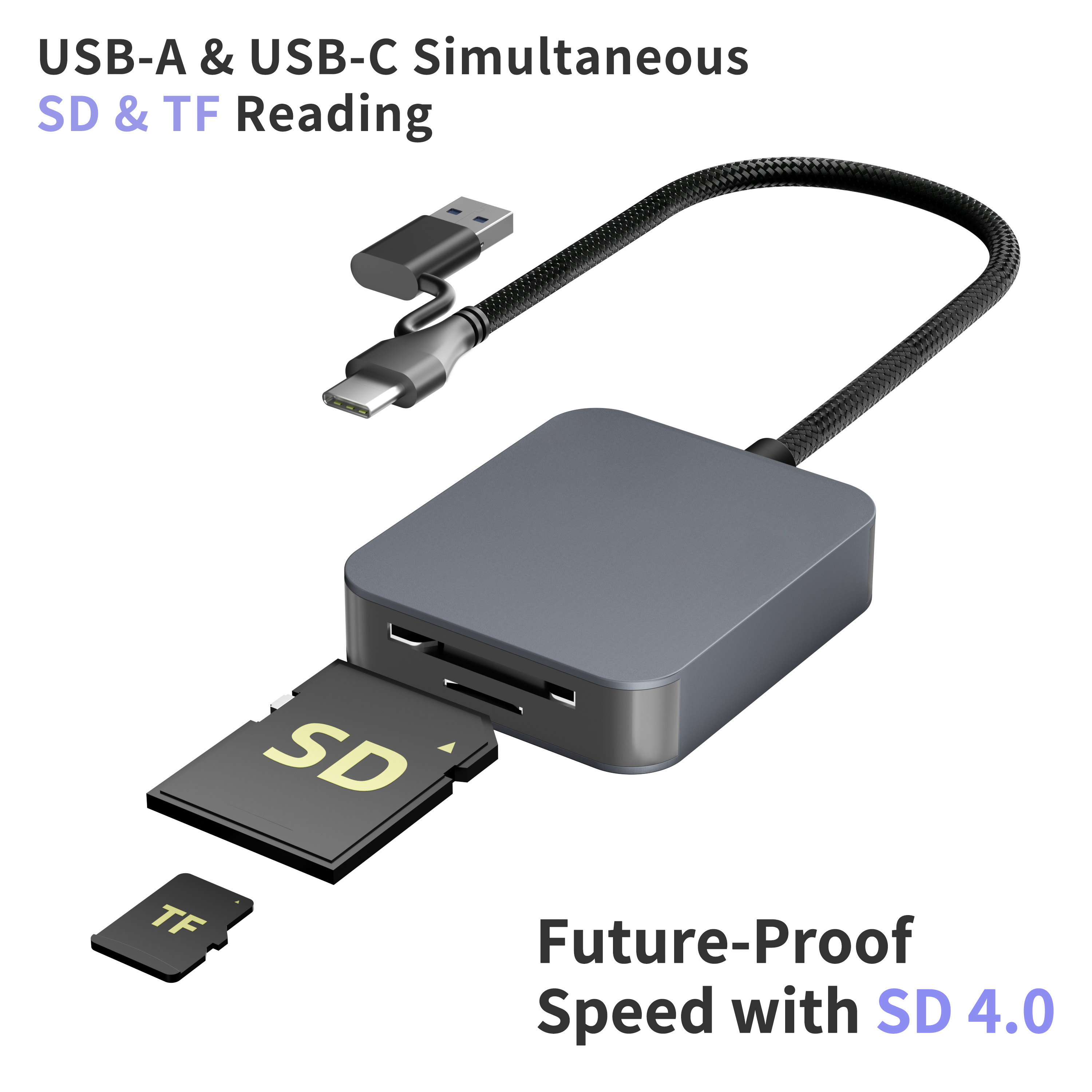
For users bridging the gap between old and new ecosystems, dual-interface devices offer a highly practical solution. By featuring both modern and legacy connectors on a single chassis, these versatile tools ensure you are never caught off guard.
Supported Memory Formats: Beyond Basic Compatibility
Never assume a device supports your specific memory media just because the slot looks like a physical match. When scrutinizing an SD card reader specification, pay close attention to capacity limits. Standard older formats max out at a mere 32GB. This limit is woefully inadequate for modern high-resolution workflows. Ensure the spec sheet explicitly lists support for extended capacity formats like SDXC and SDUC that scale up to 2TB. Future-proofing your setup with ultra-capacity support is always a smart investment.
Similarly, drone operators and action camera users rely heavily on micro-sized media. In technical documentation, TF, or TransFlash, is entirely synonymous with these smaller formats. Therefore, a capable TF card reader must explicitly state compatibility with high-capacity micro formats. Failing to verify this can lead to corrupted media and lost footage.
Furthermore, you must investigate the controller's Logical Unit Number architecture. Multi-slot models featuring dual-LUN support allow you to transfer files between two different slots simultaneously. This drastically cuts down data management time compared to single-LUN models that force a one-at-a-time reading process.
Analyzing Data Transfer Speeds: The Engineer's Checklist
Decoding speed ratings is arguably the most confusing part of analyzing hardware documentation. Bandwidth limits dictate your actual transfer times. Yet, these limits are often hidden behind confusing naming conventions. From an engineering perspective, the internal controller IC determines the true performance ceiling.
For example, older protocols max out at a theoretical 480 Mbps. This creates a painful bottleneck for anyone moving modern video files. You must look for newer generation standards offering a robust 5 Gbps or 10 Gbps pipeline.
The physical architecture of your media also plays a critical role. There is a stark physical difference between standard and premium high-speed cards. Premium cards feature a second row of gold pins specifically designed to multiply data throughput. If you invest in these premium cards, you must verify that your card reader possesses the corresponding internal pins. Without explicit support for this second row of pins, the device defaults to much slower speeds. This completely negates your expensive memory investment.
| Specification Focus | Standard Protocol | Premium Protocol UHS-II | Real-World Impact |
| Pin Architecture | Single Row | Dual Row | Determines hardware compatibility for maximum speed. |
| Theoretical Speed | Up to 104 MB/s | Up to 312 MB/s | Cuts massive file transfer times by two-thirds. |
| Controller IC Support | Single-LUN standard | Dual-LUN supported | Enables simultaneous reading and writing across multiple slots. |
Build Quality and Thermal Management
High-speed data transfers generate a surprising amount of heat. The controller IC works overtime during sustained read and write operations. This heat can cause thermal throttling. Thermal throttling is a self-preservation mechanism where the device intentionally slows down to prevent internal circuit damage.
To combat this, professional-grade models utilize specific thermal management techniques. Look for spec sheet mentions of an aluminum alloy housing and internal thermal pads. These materials act as effective heat sinks. They draw heat away from the printed circuit board and dissipate it rapidly into the surrounding air.
Beyond thermal management, consider the physical form factor. A direct-plug stick style model is highly portable. However, it might physically block adjacent ports on a slim laptop. Conversely, a dongle style variant utilizes a short, flexible cable. This design keeps your other ports accessible and reduces physical strain on your computer's delicate internal connectors.
System Compatibility and Advanced Customization
Even the most robust hardware is completely useless if it clashes with your operating system. Always check for driverless plug-and-play support across all major desktop and mobile ecosystems. This ensures seamless operation right out of the box. You should never have to hunt for obscure software downloads.
In addition, mobile workflows require specific protocols. If you plan to use a modern peripheral with a smartphone out in the field, the spec sheet must confirm On-The-Go functionality. This feature allows your mobile device to act as a host. You gain the power to manage, back up, and edit files directly from your phone while on location.
For enterprise buyers, creative agencies, and professional photographers, a standard off-the-shelf solution might not suffice. B2B purchasers often require specific port configurations tailored to unique workflows. Customizing a hub can integrate essential connections into a single, branded chassis. You can combine high-speed media slots with external monitor outputs and additional peripheral ports. This level of integration streamlines desk clutter and boosts productivity across entire teams.
Conclusion
An ideal peripheral flawlessly matches your device's ports, supports your specific media formats, and aligns perfectly with the speed class of your hardware. By looking past the glossy marketing jargon and focusing on the hard data embedded in the spec sheet, you protect your workflow from unnecessary bottlenecks. Evaluate your current data transfer needs carefully. Consider customizable hub options if outfitting a professional team. Always invest in a high-performance solution that truly delivers on its promises. For tailored, high-performance connectivity solutions that meet rigorous engineering standards, buyers can explore professional customization options at Yuanshan Technology to find the exact match for their workflow demands.
FAQ
What is the difference between an SD card reader and a TF card reader?
The larger format refers to the standard secure digital cards typically used in professional cameras and audio recorders. TF, or TransFlash, is simply the original technical name for micro-sized cards. These smaller cards are commonly used in drones, action cameras, and smartphones. Fortunately, many modern multi-slot devices include dedicated slots for both physical sizes.
Does a modern reversible connector automatically mean faster data transfer?
No, it does not. The connector shape is purely structural. It does not dictate the transfer speed. The underlying protocol listed on the spec sheet is what actually determines the maximum data transfer rate. The internal controller chip dictates how fast the data moves, regardless of the plug's shape.
Can any standard peripheral read a premium dual-row memory card?
Yes, they are generally backwards compatible. However, a standard device lacking the extra row of physical internal pins will only be able to read a premium card at significantly slower speeds. You need a dedicated compatible device to unlock the maximum potential throughput.
Why is my device transferring files slower than the spec sheet claims?
Spec sheets list theoretical maximum speeds under perfect laboratory conditions. In the real world, actual speed is bottlenecked by the slowest link in your digital chain. This could be the media's native write speed, your computer's older port generation, or even the file type being transferred. Moving thousands of tiny photos will always transfer slower than moving one massive, continuous video file.
How do I know if my hardware is bottlenecking my transfer speeds?
Check the rated read and write speeds printed directly on your memory media. Next, compare that number to the maximum bandwidth listed on your peripheral's spec sheet. If your media is rated for 300 megabytes per second, but your peripheral only supports an older 480 megabits per second protocol, the peripheral is actively choking your transfer speeds.
Does a multi-slot peripheral split the transfer speed when using both slots?
This depends entirely on the internal controller architecture. Single-LUN models can only read one slot at a time. Dual-LUN models allow simultaneous transfers. However, if you are transferring data from both slots at the exact same time, they will share the total maximum bandwidth of the host connection. Premium hubs utilize advanced chipsets to manage this bandwidth efficiently, minimizing noticeable slowdowns.



