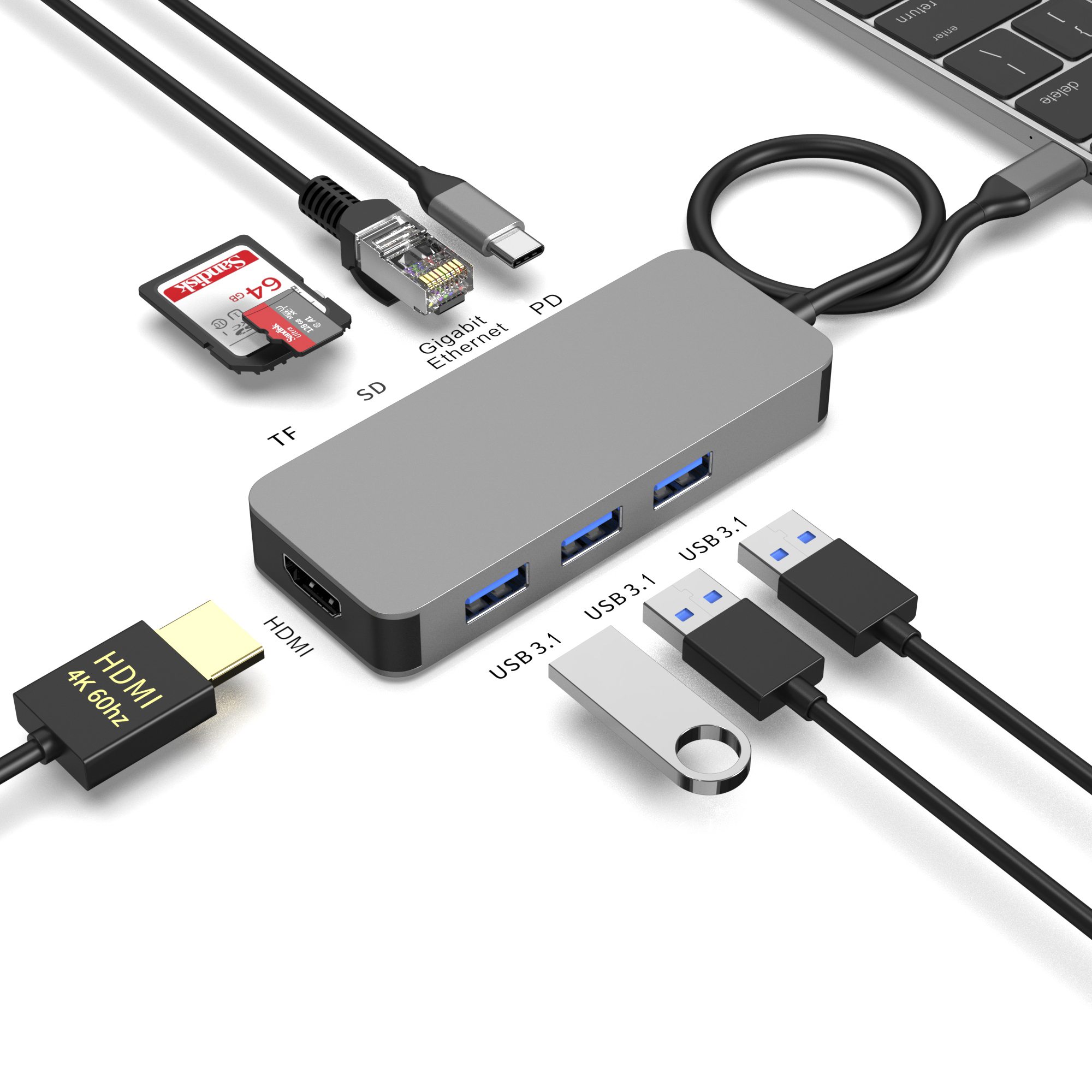
High return rates on bulk electronics erode distributor margins, damage retailer relationships, and inflate reverse logistics costs. You spend significant resources acquiring these products. Watching profits vanish through continuous RMAs frustrates everyone involved. For accessories like USB-C hubs, returns rarely stem from catastrophic hardware failures. Instead, they happen because of intermittent connectivity, severe thermal throttling, and unmet compatibility expectations. Consumers plug in their devices and face sudden drop-offs. They get frustrated and immediately ship the item back. To achieve sustainable hub return rate reduction, distributors must shift from reactive RMA processing to proactive supplier evaluation. You need to enforce strict quality control and technical verification before finalizing purchase orders. Moving quality assurance upstream secures your supply chain. It also keeps your end-users satisfied. This comprehensive guide explores the root causes of device returns and details actionable strategies for rigorous sourcing, testing, and supplier evaluation.
Key Takeaways
- Addressing thermal management and chipset compatibility during the sourcing phase prevents the most common consumer complaints (e.g., slow data transfer, display flickering).
- Implementing a standardized multiport USB C hub QC framework—including full-load stress testing—is mandatory for bulk orders.
- Clear documentation of Power Delivery (PD) limits and firmware upgradeability significantly mitigates end-user frustration and unjustified returns.
- Distributors must evaluate suppliers based on their verifiable AQL (Acceptable Quality Limit) history and transparent reverse logistics support.
1. Analyzing the Root Causes of High Return Rates
You must understand why users return products to fix your supply chain. Identifying the exact end-user pain points reveals gaps in your current sourcing strategy. We frequently see peripheral disconnects, slow data transfer rates, and display ghosting. Consumers expect plug-and-play simplicity. They connect a mouse, an external hard drive, and a 4K monitor. They expect flawless, simultaneous performance. If the monitor flickers or the mouse cursor lags, they blame the hardware. This triggers an immediate return.
Thermal throttling failures act as a massive hidden culprit. Insufficient heat dissipation causes internal chips to overheat rapidly. Modern hubs pack multiple high-performance controllers into tiny enclosures. Temperatures can easily exceed safe operating limits. To protect themselves from permanent damage, these chips throttle their performance. This sudden drop in processing power causes dropped connections. Heavy peripheral loads trigger this failure mode constantly. Users assume the product broke, but it merely overheated.
The Power Delivery (PD) trap drives a significant portion of buyer remorse. Many manufacturers advertise a 100W PD rating on the box. However, they fail to mention the hub itself consumes power. The actual pass-through wattage delivered to the host device might only hit 85W. The hub reserves 15W for internal operations. Consumers notice this discrepancy. A premium laptop displays a "slow charging" warning. The user feels cheated and returns the item.
Compatibility misalignment ruins the user experience from day one. Selling generic hubs to consumers using proprietary OS updates carries high risk. Specific macOS updates often restrict display output protocols. For example, macOS does not natively support Multi-Stream Transport (MST). Without proper disclaimer mapping on your packaging, consumers buy a hub expecting dual independent 4K monitors. They plug it in and end up with mirrored displays. This software limitation feels like a hardware defect to the average buyer.
![Multiport USB C hub internal component inspection]()
2. Essential Technical Specifications to Validate Prior to Purchase
You must evaluate the underlying hardware architecture before signing any purchase order. We recommend starting your assessment at the chipset level. Reliable docking station reliability hinges on mature, well-integrated chipsets. Look for controllers from established vendors like Realtek, DisplayLink, or VIA Labs. Do not settle for patched-together legacy integrated circuits (ICs). Older ICs often fail under complex, multi-port bandwidth demands.
Next, strictly inspect the thermal materials and housing design. Evaluate the use of aluminum alloy chassis instead of dense plastics. Aluminum acts as a passive heatsink. You should also demand internal thermal pads. These thermally conductive silicone pads bridge the gap between hot ICs and the metal shell. Adequate printed circuit board (PCB) spacing guarantees proper heat dissipation. A cramped PCB layout traps heat and guarantees the throttling issues we discussed earlier.
Verify the presence of adequate EMI/RFI shielding. Shielding is absolutely critical around USB 3.0 ports. High-speed data transfer generates broadband noise. This noise easily interferes with 2.4GHz wireless peripherals. If you skip this check, expect high return volumes from office workers dealing with lagging wireless mice and keyboards. Proper grounding and metal shielding around the USB receptacles block this radiation effectively.
Finally, require documented evidence of built-in safety protocols. You need robust overcurrent and short-circuit protection. These safeguards protect both the hub and the user's expensive host device. Unexpected power surges happen frequently. A well-designed hub will sacrifice an internal fuse rather than passing a voltage spike to a $2,000 laptop. Ask vendors for their schematic safety limits.
- Verify primary controller IC brands for network and display outputs.
- Inspect the thickness and placement of internal thermal conductive pads.
- Check for dedicated metal shielding cages surrounding USB 3.0 receptacles.
- Request schematic proofs for overvoltage and overcurrent protection circuits.
3. Structuring Multiport USB C Hub QC and Bulk Inspection Protocols
Your quality control framework dictates your ultimate return volumes. Begin by establishing Acceptable Quality Limit (AQL) standards. You must define the acceptable defect limits for minor, major, and critical flaws. Set these benchmarks prior to initiating any bulk hub inspection. A standard industry approach might allow 4.0% for minor aesthetic flaws but 0% for critical functional failures. Hold your factories accountable to these exact metrics.
Mandate full-load stress testing at the factory level. A rigorous multiport USB C hub QC process cannot rely on testing individual ports in isolation. Testing a single HDMI port proves nothing about overall stability. Factory QC must test all ports simultaneously. Instruct them to charge a laptop at 100W, push a 4K video feed, and transfer data from a solid-state drive all at once. This mimics real-world power user scenarios. It exposes bandwidth bottlenecks instantly.
Verify the mechanical durability of the connectors. The main Type-C connector and internal USB-A or HDMI receptacles undergo immense physical stress. Implement standardized mechanical cycling. Testing plug and unplug lifecycles ensures long-term physical integrity. A connector should withstand 10,000 insertion cycles without losing its friction fit. Loose ports create intermittent connections, which lead straight to RMA requests.
Deploy independent inspection agencies to verify compliance. Third-party auditing provides an objective look at the batch quality. They verify factory compliance before shipment consolidation. Relying solely on the manufacturer's internal QC reports introduces a conflict of interest. Independent inspectors will pull random samples and conduct the full-load stress tests on your behalf.
| Inspection Parameter | Standard Electronics QC | Rigorous Hub Inspection |
| Port Testing Method | Tested individually for basic signal. | Concurrent full-load stress testing. |
| Thermal Evaluation | Basic ambient temperature check. | Continuous monitoring under maximum power draw. |
| Mechanical Durability | Visual inspection of connectors. | Automated plug/unplug lifecycle cycling. |
| Interference Testing | Rarely performed. | Live testing with 2.4GHz wireless peripherals. |
4. Mitigating Risk Through Transparent Marketing and Packaging
Consumers return products when reality falls short of marketing claims. Clear, honest messaging stops this friction immediately. Ensure your packaging explicitly states pass-through power versus total power. This sets correct consumer expectations regarding charging speeds. If the box says "100W PD," but 15W is reserved for the hub, print "85W Pass-Through Charging" clearly on the back. Transparency builds trust and prevents misunderstandings.
Provide clear operating system and device compatibility lists. Reduce buyer errors by clearly delineating supported protocols. Mention if Thunderbolt 3 or 4 compatibility exists. State clearly if DisplayPort Alt Mode is a requirement for video output. Many consumers attempt to use hubs with budget smartphones lacking DisplayPort Alt Mode. When no video appears, they assume the hub is broken. A simple compatibility chart prevents these misguided purchases.
Include accessible troubleshooting documentation inside the box. Insert "Quick Fix" guides or QR codes directing users to support pages. Focus on solutions for common issues like slow data transfer or display scaling problems. Often, a simple driver update fixes a "broken" display output. Empowering the user to solve minor software conflicts reduces premature return initiations. We recommend placing a highly visible troubleshooting card right above the product tray.
- Print distinct pass-through wattage ratings on all retail packaging.
- List incompatible popular devices to prevent accidental incorrect purchases.
- Provide QR codes linking directly to up-to-date driver downloads.
- Include a clear distinction between mirrored and extended display capabilities.
5. Vendor Shortlisting: Framework for Supplier Evaluation
Choosing the right manufacturing partner removes major downstream headaches. Assess whether the manufacturer provides ongoing firmware updates. Operating systems evolve constantly. A premium Multiport USB C Hub with upgradeable firmware resolves future compatibility bugs. When Apple or Microsoft release major updates, legacy protocols sometimes break. Post-purchase firmware support extends the product's viable lifespan and prevents massive return spikes after OS rollouts.
Clarify the manufacturer’s defect liability period and RMA terms. You need favorable terms and smooth reverse logistics. Understand their return shipping cost allocation. Do they cover freight for defective batches? Document the credit-back processes for confirmed defective units before signing an agreement. A vendor who resists transparent RMA terms usually struggles with product reliability.
Ask actionable, data-driven questions during your evaluation process:
- What is your standard defect rate for this specific hub model over the last 12 months?
- Can you provide the EMI/RFI testing reports from a certified third-party lab?
- What specific thermal management solutions are integrated into the PCB design?
| Evaluation Criteria | Low-Tier Supplier | High-Tier Supplier |
| Firmware Support | None. Static ICs used. | Flashable firmware with ongoing updates. |
| Defect Transparency | Claims 0% defect rate without proof. | Provides 12-month historical AQL data. |
| RMA Policy | Distributor absorbs return costs. | Clear credit-back or replacement terms defined. |
| Testing Documentation | Internal factory checklist only. | Third-party EMI/RFI and thermal lab reports. |
Implement this vendor evaluation framework strictly. Refuse to compromise on engineering standards. Suppliers who willingly share thermal reports and firmware upgrade paths consistently produce reliable hardware. Treat your suppliers as engineering partners rather than just assembly lines.
Conclusion
Reducing return rates requires moving quality assurance upstream. Distributors protect their bottom line by focusing heavily on chipset integrity, full-load QC testing, and accurate consumer messaging. Reactive RMA processing drains your profits and damages your brand reputation. By implementing concurrent port testing and insisting on thermal management solutions, you eliminate the most common failure points before products leave the factory.
Urge your procurement teams to update their Supplier Code of Conduct immediately. Revise your RFP (Request for Proposal) templates today. You must include strict thermal and full-load testing requirements for any future procurement. Demand transparent AQL histories and firmware support guarantees. Taking these proactive steps safeguards your margins and ensures your retail partners receive highly reliable hardware.
FAQ
Q: What is the industry-standard return rate for consumer electronics like USB-C hubs?
A: The baseline expectation for consumer electronics accessories typically hovers between 3% and 5%. If your return rates exceed this threshold, it usually points to systemic quality control failures or severe compatibility issues. High returns often indicate poor thermal management or misleading packaging rather than random manufacturing defects.
Q: How does bulk hub inspection differ from standard electronics QC?
A: Standard electronics QC often tests components individually. Bulk inspection for hubs requires concurrent multi-port stress testing. These hubs usually pass isolated tests but fail when power, video, and data process simultaneously. Full-load testing mimics real-world usage, exposing thermal throttling and chipset bottlenecks before units ship.
Q: Can firmware updates actually lower hub return rates?
A: Yes. Post-purchase firmware support resolves evolving host-device operating system conflicts. When Apple or Microsoft release updates, they can disrupt external display or data protocols. Firmware updates fix these software-level communication errors, preventing the need for consumers to initiate physical hardware returns.
Q: Why do USB 3.0 ports on hubs interfere with wireless mice and keyboards?
A: USB 3.0 data transfer generates broadband noise in the 2.4GHz frequency spectrum. This noise directly interferes with receivers used by wireless mice and keyboards. Proper internal EMI/RFI shielding blocks this radiation. Checking for adequate shielding is a crucial QC checkpoint to prevent this highly common return trigger.