Procuring B2B peripherals carries incredibly high stakes today. When you order docking stations in bulk, you directly impact enterprise IT support queues. Hardware return rates and overall operational efficiency hang in the balance. The market reality has shifted dramatically over the past few years. The transition to advanced connectivity standards introduces strict protocol requirements. You can no longer rely on "white-labeling" generic hubs. This approach is now a high-risk strategy fraught with compatibility issues. If a deployment fails, it paralyzes workstations and overwhelms IT helpdesks instantly.
To prevent these scenarios, distributors and IT procurement managers need a rigorous technical evaluation framework. You must thoroughly vet suppliers and verify strict hardware compliance before signing contracts. We designed this guide to help you minimize post-deployment failures and ensure seamless end-user experiences. You will learn how to assess chipsets, evaluate enterprise features, and audit supplier manufacturing capabilities. Securing a reliable custom Thunderbolt 4 docking station requires strategic vetting and technical foresight.
Key Takeaways
Intel Certification is Non-Negotiable: Validating the use of authentic Goshen Ridge chipsets (e.g., JHL8440) prevents system recognition failures and compatibility drops.
Enterprise-Grade Features Drive Adoption: Features like MAC Address Pass-Through, PXE Boot, and driverless deployment are mandatory for large-scale IT rollouts.
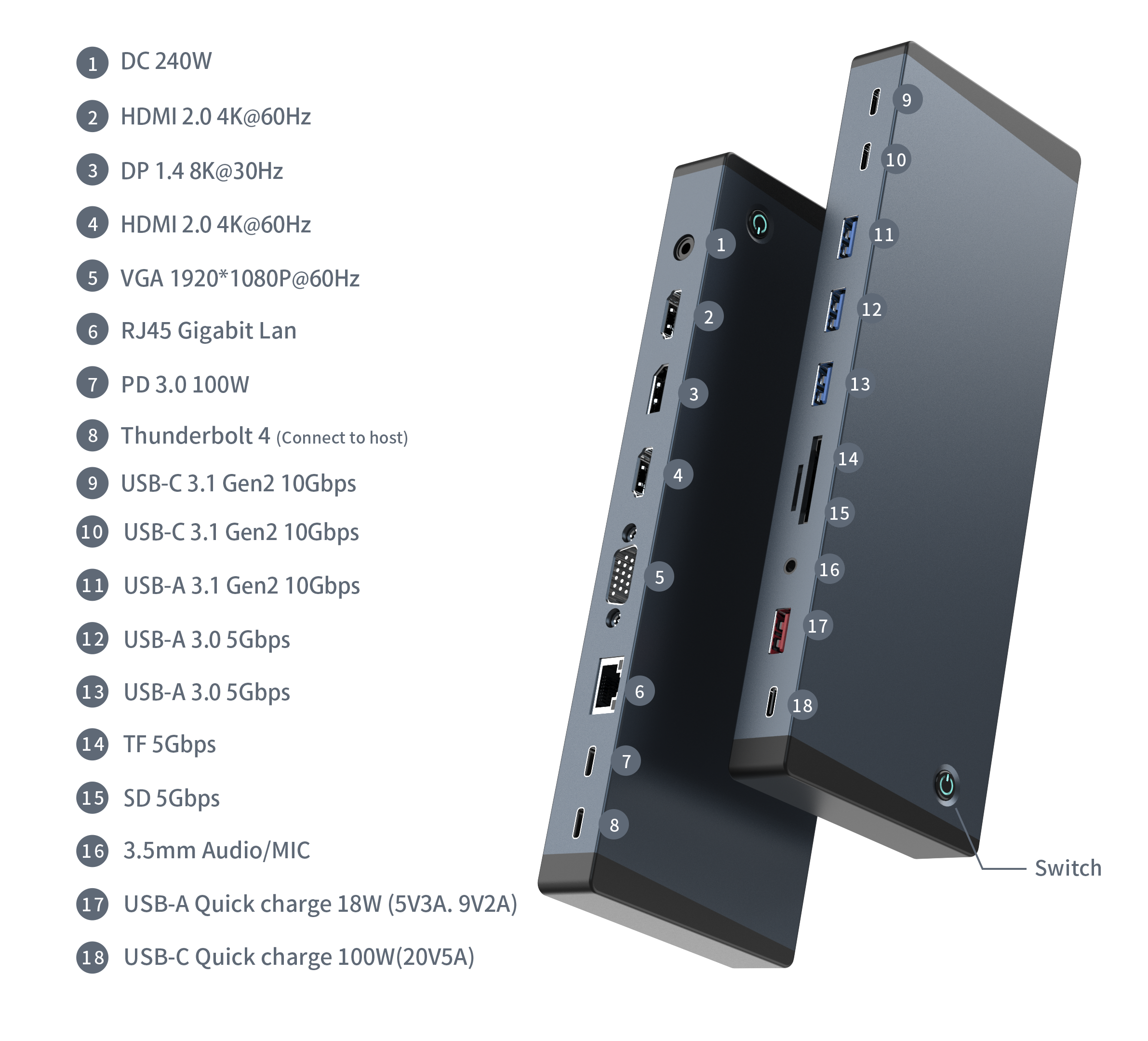
Thermal Design Dictates Lifespan: High-density configurations (like an 18-in-1 docking station) require strict thermal management and robust PCBA layouts to prevent throttling.
Partner Vetting Minimizes Risk: A reliable Thunderbolt dock supplier must provide transparent firmware update paths, demonstrable QA testing, and clear ODM design capabilities.
Verifying Intel Thunderbolt 4 Certification and Chipset Architecture
Authentic hardware architecture serves as the foundation of peripheral stability. You must look beyond glossy marketing claims and examine the internal silicon. True functionality requires specific controllers engineered for extreme data loads.
The Goshen Ridge Requirement
Intel dictates strict hardware standards for this generation of connectivity. You must ensure the manufacturer uses the Intel JHL8440 controller. This specific Goshen Ridge chipset guarantees true functionality across all connected devices. It provides an uncompromised 40Gbps of bidirectional bandwidth. Furthermore, it handles dynamic PCIe allocation efficiently, reserving at least 32Gbps strictly for data transfers when necessary. If a dock lacks this chip, system recognition failures will occur frequently. You will face sudden connection drops during heavy data transfers or video rendering tasks.
Certification Proof
Distributors must actively verify a manufacturer's official Intel certification status. Do not confuse clever marketing terminology for engineering truth. Many factories label products "Thunderbolt 4 Compatible" to drive quick sales. This term usually means the device utilizes a generic USB4 controller. It might function adequately for basic tasks, but it lacks rigorous Intel laboratory validation. You need devices explicitly labeled "Thunderbolt 4 Certified". Certified products pass extensive compliance testing. They meet strict electrical, thermal, and protocol standards mandated by Intel.
Comparison: Certified vs. Compatible Docks
Feature
Thunderbolt 4 Certified
Thunderbolt 4 Compatible
Controller Chipset
Intel JHL8440 (Goshen Ridge)
Generic USB4 or alternative silicon
Bandwidth Guarantee
Strict 40Gbps bidirectional routing
Up to 40Gbps (often unstable under load)
PCIe Data Minimums
32Gbps reserved for external data
Highly variable; often drops to 16Gbps
Intel Testing
Mandatory laboratory validation
None required by governing bodies
Downward Compatibility Testing
Modern workspaces utilize highly diverse laptop fleets. Hot-desking environments demand seamless backward compatibility to function properly. You should mandate rigorous testing criteria before approving any bulk hardware orders.
Test connections using older Thunderbolt 3 host devices to ensure stable fallback modes.
Verify full functionality using standard USB4 laptops deployed in modern enterprise fleets.
Confirm video output capabilities via legacy USB-C Alternate Mode protocols.
Check peripheral recognition speeds when users switch host machines rapidly.
Evaluating Enterprise IT Deployment and Security Features
Enterprise IT environments demand significantly more than just extra ports. System administrators require deep network integration and robust hardware security to manage sprawling infrastructures.
Network Management Capabilities
Remote management is absolutely crucial for large-scale IT rollouts. You must address core sysadmin pain points directly during the procurement phase. Verify support for MAC Address Pass-Through. Corporate networks rely on MAC filtering for security authentication. This feature ensures corporate networks recognize the laptop's unique address, rather than the dock's generic MAC. Test Wake-on-LAN (WoL) capabilities thoroughly across different subnets. Administrators need WoL to deploy crucial OS updates overnight while employees sleep. PXE Boot support is equally mandatory. IT teams rely on PXE Boot for remote OS imaging and zero-touch provisioning. If a dock fails these network tests, enterprises will reject the deployment entirely.
Driverless "Plug and Play" Execution
Software dependencies create massive deployment hurdles for support desks. Native Alternate Mode (Alt-Mode) DP connections offer superior reliability. They draw video directly from the host GPU without software intervention. This execution is truly plug-and-play. Users simply connect the cable and monitors illuminate instantly. In contrast, DisplayLink architectures require specific software drivers. Driver installations consume valuable IT resources. They often conflict with strict corporate security policies regarding unauthorized software. Native Alt-Mode is heavily preferred for secure, seamless corporate settings.
Physical Device Security
Shared enterprise workspaces present unique physical security risks. Expensive peripherals disappear easily without proper tethers. You must check for standardized physical security integrations on every chassis.
Verify the presence of a standard Kensington lock slot (T-Bar) for traditional security cables.
Check for Nano lock slot compatibility, which accommodates modern ultra-thin locking mechanisms.
Ensure the internal lock chassis integrates directly into the metal frame, preventing forced extraction.
Robust physical security prevents hardware theft and protects your initial procurement investments.
Assessing Bandwidth Allocation and High-End Display Support
High-resolution visual workflows push peripheral bandwidth to absolute limits. You must evaluate how the internal hardware distributes massive data and video signals simultaneously.
Validating Display Protocols
Professional environments increasingly demand extreme monitor resolutions. If you market an 8K laptop dock, technical precision is paramount. Break down the display requirements carefully. A true 8K output usually relies on Display Stream Compression (DSC). Ensure the host GPU actually supports DSC before making guarantees. More commonly, enterprises require rock-solid dual 4K monitors. The dock must guarantee dual 4K @ 60Hz minimums. It cannot drop to 30Hz when a user connects a high-speed USB drive. Dynamic bandwidth allocation handles this task seamlessly.
Daisy-Chaining Capabilities
Power users often connect multiple high-bandwidth devices in series. You must evaluate the downstream ports for multi-device daisy-chaining. The standard allows connecting up to five additional devices through a single host port. Users might connect RAID storage arrays or external GPUs (eGPUs). The controller must route these complex signals without creating bandwidth bottlenecks. Poorly designed hubs fail spectacularly during intense daisy-chaining tests, causing downstream devices to disconnect randomly.
Power Delivery (PD) Stability
Host charging stability is absolutely critical for continuous operation. You must verify strict Power Delivery (PD) 3.0 implementation. Ensure the dock sustains 90W to 100W upstream charging dynamically. It must deliver this power to the host consistently, even under heavy CPU loads. Simultaneously, it must maintain stable power to downstream USB-A and USB-C peripherals. Voltage drops cause connected hard drives to unmount randomly, risking data corruption. We recommend rigorous dummy-load testing to confirm PD stability across all ports.
Vetting the Thunderbolt Dock Supplier for Customization & ODM Capabilities
Selecting the right manufacturing partner mitigates long-term operational risks. You need a Thunderbolt dock supplier capable of scaling complex designs and maintaining strict quality control.
Thermal and Acoustic Engineering
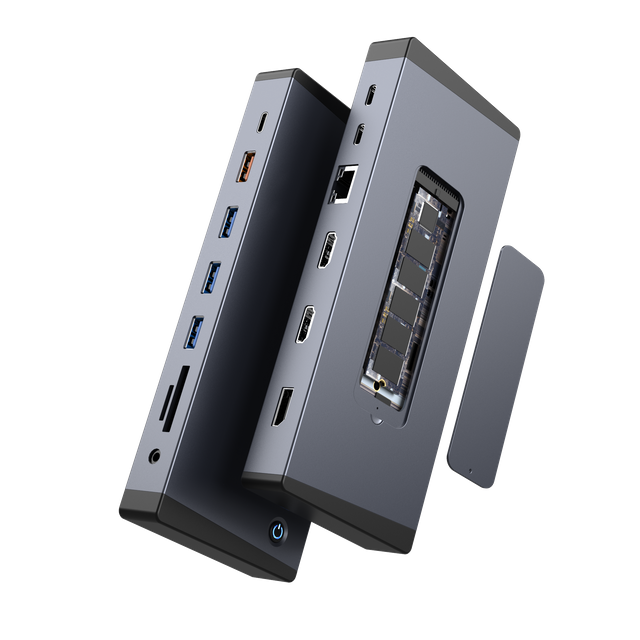
High-density port configurations generate immense heat during operation. Consider the physical realities of an 18-in-1 docking station. When all ports run simultaneously, internal temperatures spike dramatically. You must assess the housing materials carefully. Extruded aluminum cases dissipate heat far better than injected plastic enclosures. Inspect the internal heat sink designs and silicone thermal pad placements. Poor thermal engineering leads to severe thermal throttling. Throttling drops connection speeds and frustrates end users immensely.
Customization Thresholds
Distributors must understand different manufacturing engagement models. Frame your expectations around firmware customization and bespoke port configurations. Purchasing an off-the-shelf wholesale docking station is straightforward but severely limits market differentiation. Building a true ODM docking station allows casing modifications and tailored functionality. Ensure your supplier outlines clear Minimum Order Quantities (MOQs) for these custom thresholds before you invest resources.
PCBA and Component Quality
Internal construction quality ultimately determines field failure rates. Always ask for comprehensive component validation reports from the factory floor.
Examine the quality of internal solid-state capacitors utilized for power smoothing.
Check for internal copper shielding against RF interference. Proper shielding prevents 2.4GHz WiFi and Bluetooth conflicts.
Verify physical connector durability specifications. Enterprise ports should withstand over 10,000 mating cycles without degrading.
Establishing Firmware Support and RMA Risk Mitigation
Hardware represents only half the deployment equation. Software maintenance and factory warranties dictate long-term operational viability.
Lifecycle Firmware Management
Operating systems evolve constantly in the enterprise sector. Windows 11 updates and macOS Sonoma changes often introduce unforeseen hardware bugs. Evaluate the supplier's internal process for rolling out firmware updates. They must monitor OS beta releases proactively to catch issues early. Ask how they distribute patches to end-users globally. A transparent update path prevents mass peripheral obsolescence. If the factory abandons firmware support prematurely, your enterprise clients suffer greatly.
Quality Assurance Protocols
Do not accept verbal quality assurances from any manufacturer. Detail the expected factory testing standards directly in your procurement contract. Mandate automated bandwidth testing on the assembly line for every unit. Every device must undergo strict burn-in tests, typically running at full electrical load in a 40°C chamber for 24 hours. Request thermal imaging reports from early pre-production batches. Strong QA protocols catch micro-soldering defects before they reach your distribution warehouse.
Warranty and Failure Rate Baselines
Enterprise clients tolerate very little hardware downtime. Define acceptable enterprise failure rates strictly during negotiations. We consider anything above a 1% failure rate unacceptable for enterprise rollouts. Establish clear terms for bulk RMAs upfront. Define your technical support Service Level Agreements (SLAs) in writing. A reliable factory absorbs replacement costs willingly when manufacturing defects arise.
Conclusion
Sourcing these advanced peripherals goes far beyond simple hardware purchasing. It represents a strategic investment in IT network stability. Large-scale deployments succeed only when hardware matches network demands perfectly.
Prioritize verifiable Intel chipsets to ensure systemic compatibility across host devices.
Demand strict thermal integrity to prevent data throttling under heavy peripheral loads.
Validate enterprise IT features like PXE boot and MAC pass-through over raw port counts.
Look beyond the lowest unit price to secure reliable, long-term firmware support.
Take immediate action before signing any bulk purchase agreement. Request a fully functional engineering sample from your shortlisted supplier. Ask for a comprehensive PCBA schematic overview to verify component quality. Finally, conduct a rigorous pilot test alongside your internal IT department. These precise steps protect your investment and guarantee seamless enterprise integration.
FAQ
Q: What is the difference between an OEM and an ODM docking station?
A: OEM (Original Equipment Manufacturer) uses existing, pre-engineered designs. You simply apply your custom branding and logos to these standard units. ODM (Original Design Manufacturer) involves ground-up engineering. You dictate specific port configurations, power delivery requirements, and custom chassis designs tailored to your specific enterprise needs.
Q: Does a custom Thunderbolt 4 dock require new Intel certification?
A: Yes, in most cases. If you make significant PCBA changes or alter port configurations, Intel mandates recertification. This ensures the new layout maintains strict electrical and bandwidth standards. Keep in mind, this recertification process adds considerable time to your overall production lead times.
Q: Why do some 8K laptop docks require driver installations?
A: Docks utilizing native Alt-Mode output run directly off the host GPU. They are completely driverless. However, some docks utilize DisplayLink chipsets to force extended dual displays on base-level Apple Silicon devices. These specific DisplayLink hardware architectures always require manual software driver installations.
Q: What is a typical Minimum Order Quantity (MOQ) for a wholesale docking station with custom firmware?
A: Standard white-label orders often start at 500 units. However, requesting custom firmware or bespoke PCBA layouts increases the threshold. Suppliers typically demand an MOQ of 1,000 to 3,000 units for deep ODM customization. This volume justifies their internal R&D, engineering time, and rigorous factory testing costs.