Are you tired of tangled cables and limited connectivity? Laptop docking stations can simplify your workspace and enhance productivity. Choosing the right docking station is crucial, especially when purchasing in bulk. In this article, we’ll explore key factors to consider, types of docking stations, and how to make an informed decision.
Understanding Laptop Docking Stations
What is a Laptop Docking Station?
A laptop docking station is a device that allows you to connect multiple peripherals to your laptop using a single connection. It acts as a central hub, enabling seamless integration of various devices.
Definition and Purpose
Docking stations enhance the functionality of laptops by providing additional ports and connections. They simplify the process of connecting monitors, keyboards, mice, and other peripherals. This makes it easier for users to switch from a mobile setup to a desktop environment quickly.
Types of Devices That Can Be Connected
You can connect a variety of devices to a docking station, including:
● Monitors: Extend your screen real estate with additional displays.
● External Hard Drives: Increase storage capacity and speed up data transfer.
● Printers: Easily connect to printers for efficient document handling.
● Audio Devices: Connect speakers or headphones for better sound quality.
Device Type | Connection Type | Example Devices |
Monitors | HDMI, DisplayPort | 4K monitors, projectors |
External Drives | USB-A, USB-C | SSDs, HDDs |
Printers | USB-A | Laser printers, inkjet |
Audio Devices | 3.5mm jack, USB | Speakers, headsets |
Benefits of Using Docking Stations
Using a docking station offers several advantages:
1. Enhanced Connectivity: Docking stations provide a range of ports, allowing you to connect multiple devices without hassle.
2. Improved Workspace Organization: They help reduce cable clutter, creating a cleaner and more organized workspace.
3. Increased Productivity: Switching between mobile and desktop setups becomes effortless, allowing you to focus on your tasks.
Why Purchase in Bulk?
Buying docking stations in bulk can be a smart choice for businesses and educational institutions.
Cost-Effectiveness of Bulk Purchasing
Purchasing docking stations in bulk often leads to significant savings. Many suppliers offer discounts for larger orders, making it more economical for organizations. This approach not only reduces upfront costs but also lowers per-unit expenses.
Benefits for Businesses and Educational Institutions
Organizations benefit from bulk purchases in various ways:
● Consistency: Having the same model across devices simplifies support and training.
● Streamlined Setup: Quick deployment of multiple devices can enhance operational efficiency.
● Warranty and Support: Bulk orders may come with extended warranties or dedicated support services, ensuring peace of mind.
Streamlining Device Management and Support
Managing multiple devices can be challenging. Docking stations simplify this process by providing a standardized solution. This means:
● Easier Troubleshooting: IT departments can resolve issues faster when all devices use the same docking station model.
● Reduced Training Time: Staff and students require less training to use familiar equipment.
● Centralized Updates: Keeping firmware and software up to date is easier when using the same devices.
In summary, understanding the purpose and benefits of laptop docking stations is crucial for making informed purchasing decisions, especially when considering bulk options.
Key Factors to Consider When Choosing Bulk Laptop Docking Stations
Compatibility
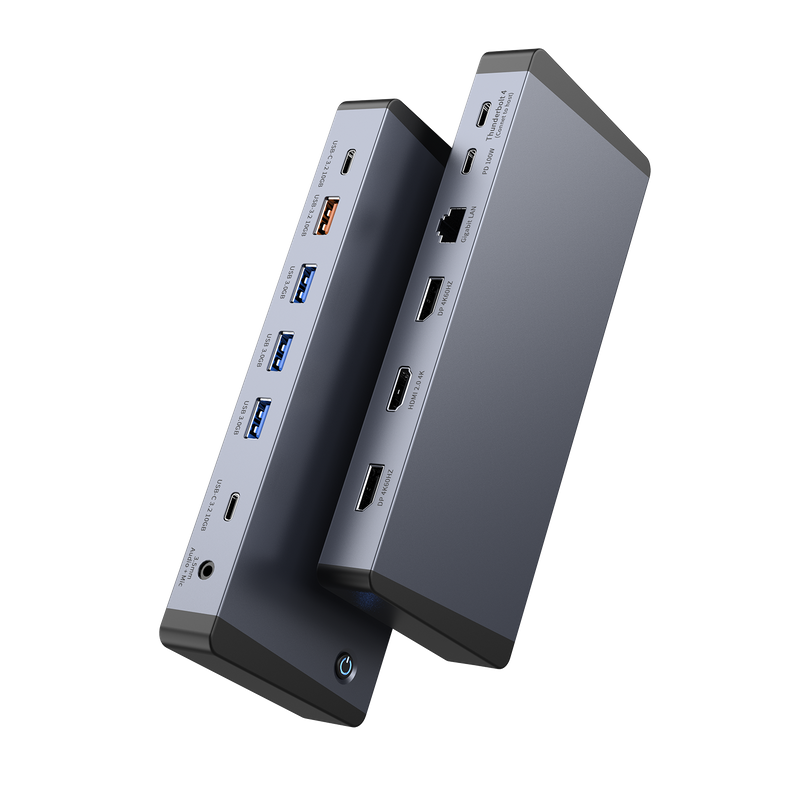
When selecting bulk laptop docking stations, compatibility is crucial. Ensuring the docking stations work well with various laptop brands—like Dell, HP, Lenovo, and Apple—can save time and reduce frustration.
Device Compatibility
Different laptop brands may have specific requirements. For instance, Dell and HP laptops often utilize USB-C and HDMI connections, while Lenovo models may leverage Thunderbolt technology. Apple devices typically require docks that support Thunderbolt 3 or 4.
Additionally, consider the operating systems in use. Ensure the docking station supports Windows, macOS, and ChromeOS. This is especially important for organizations with diverse devices in their inventory.
Port Availability
The types of ports on a docking station can greatly influence its functionality and usability.
Types of Ports to Look For
When evaluating docking stations, focus on these essential ports:
● USB-C: Offers high-speed data transfer and charging capabilities.
● Thunderbolt: Provides superior speed and the ability to connect multiple devices.
● HDMI and DisplayPort: Crucial for connecting monitors and projectors.
● Ethernet: Important for stable internet connections.
Port Type | Purpose | Benefits |
USB-C | Data transfer & charging | Versatile and fast |
Thunderbolt | High-speed connections | Supports multiple devices simultaneously |
HDMI | Video output | Connects to most monitors |
Ethernet | Wired internet connection | Reliable and faster than Wi-Fi |
Future-proofing is essential, so look for docking stations that offer a variety of ports. This way, you can ensure compatibility with upcoming devices and technology trends.
Power Delivery Capabilities
Power Delivery (PD) is a significant feature in modern docking stations.
Explanation of Power Delivery (PD)
PD allows devices to charge faster through a single cable. It’s a game-changer for users who need to connect multiple peripherals while keeping their laptops charged.
Importance of PD for Charging Laptops and Peripherals
Having adequate power delivery is vital, especially in a busy office or classroom setting. It ensures that laptops and connected devices remain powered throughout the day, reducing downtime.
Recommended Wattage for Different Laptop Types
Different laptops require varying wattages to charge effectively. Here’s a quick reference:
Laptop Type | Recommended Wattage |
Ultrabooks | 30W - 65W |
Standard Laptops | 65W - 90W |
Gaming Laptops | 90W - 150W |
Display Support
Display capabilities can significantly impact productivity, especially in multi-monitor setups.
Multi-Monitor Setup
Using multiple monitors can enhance workflow and efficiency. Many docking stations support dual displays, which allow users to multitask more effectively.
● Supported Resolutions: Look for docking stations that support high resolutions, such as 4K, for clearer visuals and better detail.
DisplayPort and HDMI Support
Understanding the differences between DisplayPort and HDMI is essential for choosing the right docking station.
● DisplayPort: Typically offers higher bandwidth, making it suitable for high-resolution displays.
● HDMI: More commonly used for TVs and monitors, providing good quality for most tasks.
Choosing the right dock for your display needs can make a significant difference in user experience and productivity.
Performance and Speed
Performance and speed are vital factors when selecting docking stations, especially for data-intensive tasks.
Data Transfer Rates
Different connections offer varying data transfer rates.
● USB 3.0: Typically provides speeds up to 5 Gbps.
● USB-C: Offers speeds up to 10 Gbps.
● Thunderbolt 3/4: Can reach speeds of up to 40 Gbps, making it ideal for heavy data tasks.
Stability and Reliability
Ensuring consistent performance across multiple devices is essential for any organization. A reliable docking station minimizes connectivity issues and enhances productivity. It’s important to choose a reputable brand known for quality and performance.
By considering these key factors, you can make informed decisions when choosing bulk laptop docking stations that meet your organization’s needs.
Types of Laptop Docking Stations
Choosing the right type of laptop docking station is crucial for maximizing productivity and ensuring compatibility with various devices. Here are the main types of docking stations available today, each with unique features and benefits.
USB Docking Stations
USB docking stations are among the most common options available. They connect to your laptop via USB ports, making them easy to use and widely compatible.
Overview and Benefits
These docking stations typically offer multiple USB ports, HDMI, and Ethernet connections. They are user-friendly and often require no additional drivers, making setup a breeze.
Benefits include:
● Cost-Effective: Generally more affordable than other types.
● Easy Setup: Plug-and-play functionality means quick installation.
● Wide Compatibility: Works with various laptop brands and models.
Ideal Use Cases
USB docking stations are perfect for everyday office tasks, home setups, and educational environments. They suit users who need to connect basic peripherals like monitors, keyboards, and mice without high-performance requirements.
Thunderbolt Docking Stations
For users who demand speed and performance, Thunderbolt docking stations are the go-to choice.
Advantages of Thunderbolt Technology
Thunderbolt technology allows for faster data transfer rates, supporting up to 40 Gbps. This makes it ideal for handling large files and multiple high-resolution displays.
Key advantages include:
● High-Speed Data Transfer: Great for video editing and graphic design.
● Daisy-Chaining: Connect multiple devices through a single port, reducing cable clutter.
● Power Delivery: Many Thunderbolt docks can charge your laptop while connected.
Suitable Scenarios for High-Performance Needs
These docking stations are best for professionals in creative fields, such as video editing, graphic design, or software development. If you frequently work with large files or run multiple applications simultaneously, a Thunderbolt dock is a smart choice.
Hybrid Docking Stations
Hybrid docking stations combine features from both USB and Thunderbolt technologies, offering versatility.
Definition and Benefits
A hybrid dock typically includes a variety of connection options, allowing users to connect devices via USB-C, USB-A, HDMI, and more.
Benefits include:
● Flexibility: Supports different types of devices and connections.
● Future-Proofing: As technology evolves, hybrid docks can accommodate new devices.
● Convenience: Ideal for mixed environments where users have different needs.
Versatility for Diverse Environments
These docking stations are perfect for offices with varied hardware setups. They allow users to connect their devices without worrying about compatibility issues.
Standalone vs. Port Replicators
When selecting a docking station, understanding the difference between standalone docks and port replicators is essential.
Differences in Functionality
● Standalone Docking Stations: Provide additional ports and functionality, allowing for more extensive connectivity options. They often support multiple monitors and high-speed data transfer.
● Port Replicators: Primarily focus on replicating existing ports on the laptop. They are simpler and usually more affordable but may lack advanced features.
Choosing the Right Type Based on User Needs
Deciding between these options depends on your specific requirements. If you need extensive connectivity and high performance, a standalone docking station is the way to go. However, if you simply need to replicate existing ports for basic tasks, a port replicator could suffice.
Type | Key Features | Ideal For |
USB Docking Stations | Multiple USB ports, HDMI, Ethernet | Everyday office tasks |
Thunderbolt Docking Stations | High-speed data transfer, daisy-chaining | Creative professionals |
Hybrid Docking Stations | Versatile connections, future-proofing | Mixed environments |
Standalone Docking Stations | Extensive connectivity options | High-performance needs |
Port Replicators | Simple port replication | Basic connectivity requirements |
Understanding these types of docking stations will help you make informed decisions when choosing the best solution for your bulk laptop needs.
Assessing Your Bulk Purchase Needs
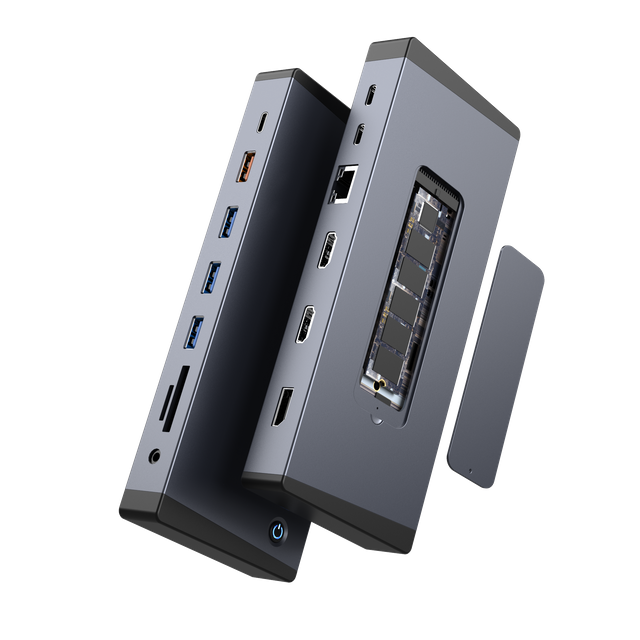
When considering bulk laptop docking stations, it’s essential to evaluate your specific needs. This involves assessing your workspace, analyzing peripheral devices, and keeping budget considerations in mind. Each of these factors plays a crucial role in making the right choice.
Evaluating Your Workspace
The first step in selecting docking stations is to evaluate your workspace.
Space Considerations for Docking Stations
Consider the physical space available for each docking station. Will they fit comfortably on desks? If multiple monitors are involved, ensure there’s enough room for both the dock and the peripherals.
● Desk Size: Measure your desk space to avoid overcrowding.
● Cable Management: Think about how cables will be organized to keep the workspace tidy.
Importance of Design and Build Quality
The design and build quality of the docking stations matter, especially for bulk purchases. High-quality materials ensure durability, while a thoughtful design can enhance usability.
● Durability: Look for docks made from robust materials that can withstand daily use.
● Aesthetics: A sleek design can improve the overall look of your workspace, making it more inviting.
Analyzing Peripheral Devices
Next, take stock of the peripheral devices you plan to connect to the docking stations.
Inventory of Devices to Connect
Make a comprehensive list of all devices that will be used alongside the docking stations. This includes monitors, keyboards, mice, printers, and external drives.
● Monitors: Determine how many monitors each user will need.
● Other Devices: Include any additional devices that require connection.
Ensuring the Docking Station Meets All Connectivity Needs
Once you have your inventory, ensure that the chosen docking station can accommodate all devices.
● Port Availability: Check if the dock has enough USB ports, HDMI outputs, and other necessary connections.
● Compatibility: Verify that the dock works well with the specific brands and models of your devices.
Device Type | Required Ports | Example Devices |
Monitors | HDMI, DisplayPort | 4K monitors, projectors |
Keyboards/Mice | USB-A, USB-C | Wireless and wired peripherals |
Printers | USB-A | Laser and inkjet printers |
External Drives | USB-C, USB-A | SSDs, HDDs |
Budget Considerations
Finally, consider your budget when selecting docking stations in bulk.
Price Ranges for Different Types of Docking Stations
Docking stations come in various price ranges based on features and capabilities. Basic USB docking stations may start around $50, while advanced Thunderbolt options can exceed $200.
● USB Docking Stations: Typically range from $50 to $100.
● Thunderbolt Docking Stations: Usually priced between $150 and $300.
● Hybrid Options: These can vary widely, often falling between the two.
Balancing Features with Budget Constraints
While it’s tempting to opt for the cheapest option, balancing features with your budget is crucial.
● Essential Features: Identify which features are non-negotiable for your needs.
● Long-Term Investment: Consider the potential longevity and reliability of the dock, as this can save money in the long run.
Importance of Warranty and After-Sales Support
Don’t overlook the importance of warranty and after-sales support. A solid warranty can protect your investment, while good customer service can help resolve any issues quickly.
● Warranty Length: Look for warranties of at least one year.
● Support Availability: Ensure that the manufacturer offers reliable support channels.
By carefully assessing your workspace, analyzing peripheral devices, and considering budget constraints, you can make informed decisions when purchasing bulk laptop docking stations. This approach ensures that you choose the right solutions for your organization’s needs.
Choosing the Right Supplier for Your Docking Stations
Selecting the right supplier for your bulk laptop docking stations is crucial for ensuring a smooth purchasing experience. A reliable vendor can significantly impact the quality of your products and the overall satisfaction of your organization.
Why Partner with a Reliable Supplier?
When making bulk purchases, vendor reliability is paramount.
Importance of Vendor Reliability in Bulk Purchases
Working with a dependable supplier ensures that you receive consistent quality and timely delivery. This is especially important when you need to equip multiple workstations or classrooms.
● Quality Assurance: Reliable suppliers maintain high standards, reducing the risk of defective products.
● Timely Delivery: A trustworthy vendor can meet deadlines, ensuring your team has the necessary tools to work efficiently.
Benefits of Working with Established Companies
Partnering with established companies, such as Yuanshan Technology, brings numerous advantages.
● Experience: Established suppliers have a proven track record in the industry, which often translates to better product knowledge and customer service.
● Wide Range of Products: Companies like Yuanshan Technology offer a variety of docking stations, catering to different needs and preferences.
Assurance of Quality and Support for Bulk Orders
When you choose a reputable supplier, you gain assurance regarding product quality and support.
● Warranty and Support: Reliable vendors typically provide warranties on their products, offering peace of mind for bulk purchases.
● Customer Service: Access to responsive customer support can help resolve any issues quickly, ensuring minimal disruption to your operations.
How to Contact Us
If you’re considering bulk purchases of docking stations, don't hesitate to reach out for quotes and inquiries.
Encouragement to Reach Out for Quotes and Inquiries
We encourage you to contact us to discuss your specific needs. Our team is here to assist you in finding the right docking stations for your organization.
● Custom Quotes: We can provide tailored quotes based on your requirements and budget.
● Expert Guidance: Our knowledgeable staff can help you navigate the options available to ensure you make the best choice.
Highlighting the Range of Docking Stations Available at Yuanshan Technology
At Yuanshan Technology, we offer a diverse range of docking stations to meet various needs. Whether you need USB, Thunderbolt, or hybrid docking stations, we have the right solutions to enhance your workspace. Reach out today to explore our offerings and find the perfect fit for your bulk purchase needs.
Conclusion
This article outlines key considerations for choosing bulk laptop docking stations. It emphasizes the importance of compatibility, functionality, and budget. Reliable suppliers play a crucial role in ensuring quality and support. We encourage you to make informed decisions when purchasing. Explore options and compare models to find the best fit for your needs. Consider YUANSHAN for high-quality docking stations that provide excellent value and support for your bulk purchases.
FAQ
Q: What is a docking station?
A: A docking station is a device that expands the connectivity options of a laptop, allowing users to connect multiple peripherals easily.
Q: How do I choose the right docking station for my needs?
A: Consider factors like compatibility, port availability, and the specific devices you plan to connect when selecting a docking station.
Q: Why is vendor reliability important when purchasing docking stations in bulk?
A: Reliable vendors ensure consistent quality and timely delivery, which is crucial for bulk orders of docking stations.
Q: What are the advantages of using a docking station?
A: Docking stations enhance productivity by providing additional ports for monitors, keyboards, and other devices, streamlining workspace organization.
Q: How much do bulk docking stations typically cost?
A: Prices for bulk docking stations vary based on features and specifications, generally ranging from $50 to $300 per unit.
Q: Can I connect multiple monitors to a docking station?
A: Yes, many docking stations support multiple monitors, allowing for an expanded workspace and improved multitasking capabilities.



