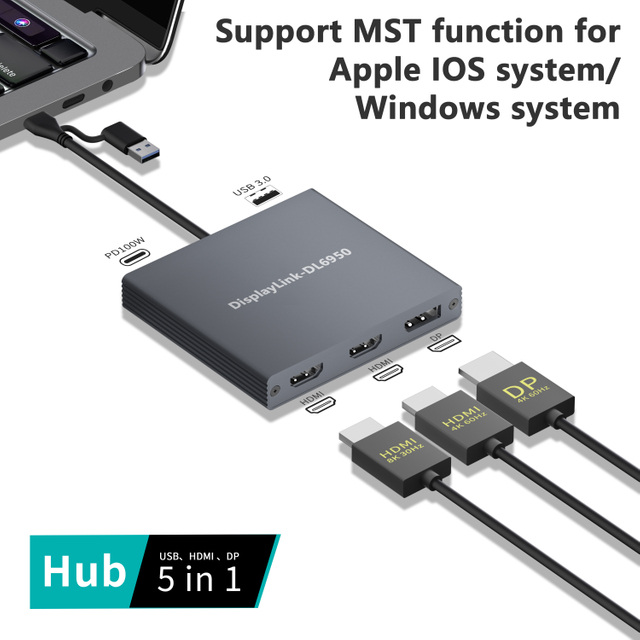
Is your laptop's mobility a double-edged sword? While sleek designs offer freedom, they often lack essential ports. A Laptop Docking Station bridges this gap, creating a powerful workstation through one cable. In this guide, you will learn how it transforms your productivity.
Key Takeaways
● Desktop Transformation: A Laptop Docking Station bridges the gap between mobile flexibility and desktop performance by turning your laptop into a high-powered workstation through a single connection.
● Single-Cable Efficiency: These devices centralize power, data, and video, allowing you to connect peripherals like monitors, keyboards, and mice with just one plug.
● Enhanced Productivity: Docks expand limited laptop ports and support multiple high-resolution 4K monitors, which is essential for data analysts, designers, and gamers.
● Ergonomic Benefits: By connecting external peripherals, users can create a more organized and comfortable workspace that promotes better posture and reduces physical strain.
● Cost-Effectiveness: Investing in a docking station maximizes the life of existing peripherals and allows multiple laptops to share the same workstation setup, reducing overall hardware costs.
The Primary Functions: How a Laptop Docking Station Empowers Your Device
At its core, a Laptop Docking Station is a hardware device designed to fix a portable computer in a single location while significantly enhancing its functionality. It functions by providing multiple connections and ports that allow you to link your laptop to a desktop environment via a single cable. This effectively transforms the laptop into the "brain" of a larger, more powerful system.
Instant Desktop Transformation
A dock allows you to enjoy the best of both worlds. When you are on the move, you have a lightweight laptop; when you arrive at your desk, the Laptop Docking Station enables you to utilize full-sized peripherals like mechanical keyboards, precision mice, and large-format printers without connecting them individually. It immobilizes the device—sometimes through a sliding lock mechanism—to ensure a stable connection while you work.
Single-Cable Centralization
The modern Laptop Docking Station usually relies on a single general-purpose connector, such as USB-C or Thunderbolt. This one-step plug-in handles everything: data transfer, video output, and power delivery. It saves significant time and effort, reducing the wear and tear on your laptop’s internal ports since you aren't constantly plugging and unplugging various wires.
High-Speed Port Replication
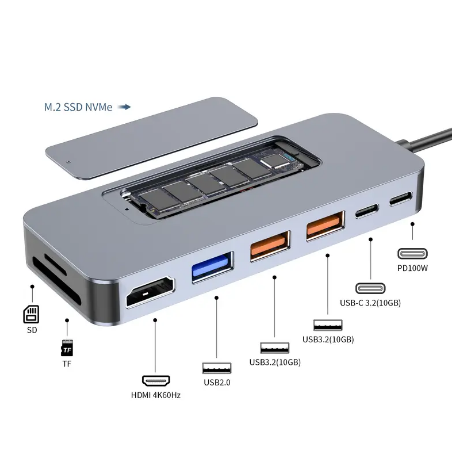
Most modern laptops have ditched legacy ports to save space. A dock restores these and adds more. It provides a variety of connection types including USB-A for older peripherals, USB-C for newer gadgets, and specialized slots like SD card readers or eSATA connectors. These high-speed ports are essential for professionals who need to move large files quickly from external drives or cameras.
Integrated Power Delivery
One of the most practical benefits is that many docking stations include their own power adapter. This allows the dock to supply enough electricity to charge your laptop while you work, eliminating the need to carry your travel charger between your home and the office.
Stable Wired Networking
While Wi-Fi is convenient, it can be unstable for high-stakes video calls or large data transfers. A Laptop Docking Station typically includes a dedicated Ethernet port. This provides a secure, high-speed wired internet connection that is often required in corporate or industrial environments to prevent data leakage and ensure consistent performance.
Native Audio and Specialized Inputs
For creative professionals, the loss of dedicated audio jacks on laptops is a major hurdle. Docks bring back these audio outputs for speakers and headsets. Some advanced models even offer specific inputs for specialized equipment used in audio-visual projects.
Note: Not all USB-C hubs are docking stations; true stations usually plug into a wall outlet for power, whereas hubs often rely on the laptop's battery.
Expanding Your Visual Horizon: Multi-Monitor Support
The most visible change a Laptop Docking Station brings to your setup is the ability to break free from a small 13-inch or 15-inch screen. Video editors, designers, and data analysts prize docks specifically for their support of high-resolution multiple displays.
Breaking the Single-Screen Barrier
A quality Laptop Docking Station can support dual or even triple 4K monitor setups. This extra screen real estate allows you to keep your email on one screen, a research document on the second, and your primary workspace on the third. This setup significantly enhances productivity by reducing the time spent alt-tabbing between applications.
Resolution and Refresh Rates
To maintain high-fidelity visuals, docks utilize advanced connection standards like HDMI 2.1, DisplayPort 1.4, and Thunderbolt 4. These connections ensure that your external monitors run at their native resolutions and high refresh rates, which is critical for reducing eye strain during long work sessions.
Specialized Display Technologies
Even if your laptop's internal graphics card has limitations, certain docks use specialized chips like DisplayLink or Silicon Motion. These technologies allow the dock to handle the video processing, enabling multi-monitor support on laptops that might otherwise only support a single external display.
Feature | Travel Hub | Desktop Docking Station |
Power Source | Bus-powered (Laptop) | Wall-powered (Independent) |
Monitor Support | Usually 1 external | Dual or Triple 4K |
Charging | Pass-through only | Full laptop charging |
Best For | Coffee shops/Travel | Fixed office/Home desk |
Enhancing Workflow Efficiency and Ergonomics
Beyond just adding ports, a Laptop Docking Station fundamentally changes how you interact with your workspace. It addresses the physical and psychological toll of a cluttered or poorly positioned desk.
Seamless Hot-Desking
In modern "hot-desking" environments, employees don't have permanent seats. A dock makes this transition painless. You can walk up to any desk, plug in one cable, and your entire workstation—including monitors and network—is ready in seconds.
Eliminating "Cable Clutter"
A mess of wires on a desk can be a major distraction. A dock centralizes all connections to a single device, which can often be tucked under a monitor or mounted under a desk. This creates a more organized, professional workspace that promotes focus and reduces the risk of cables becoming frayed or damaged.
Posture and Physical Health
Laptops are inherently un-ergonomic because the screen and keyboard are attached, forcing you to hunch over. By using a Laptop Docking Station to connect external monitors at eye level and a separate keyboard, you can configure your desk to suit your posture needs. This reduces strain on your neck and back, leading to increased comfort during extended periods of work.
Tailoring the Experience: Different Docks for Different Needs
Not all docking solutions are created equal. The right choice depends on where you work and what you do.
Portable Hubs vs. Stationary Stations
Portable hubs are lightweight and designed for nomadic professionals who work in cafes or coworking spaces. However, stationary Laptop Docking Stations are "compact powerhouses" that offer more ports, more power, and more stability for a permanent office setup.
Specialized Vehicle and Industrial Docks
In sectors like logistics, law enforcement, or field services, standard office docks won't suffice. These industries use rugged vehicle docks and cradles. A vehicle dock provides charging and connectivity to external radio antennas (RF passthrough), allowing operators to use the device safely while seated in a cabin. These units are built to handle bumps, sharp turns, and extreme vibrations.
Thunderbolt 4 vs. Standard USB-C
For power users like video editors, the bandwidth difference is crucial. A Thunderbolt Laptop Docking Station offers much faster data transfer speeds and better support for high-resolution displays compared to standard USB-C docks.
Security and Enterprise Features
In a corporate environment, security is paramount. Advanced docks include built-in encryption technologies to protect against data leakage. Some also feature Kensington lock slots to physically secure the dock to the desk and specialized software that can "blank" a device screen while a vehicle is in motion to prevent distracted driving.
Note: A "cradle" is purely for mounting a device, whereas a "dock" provides both mounting and active connectivity.
Real-World Applications Across Industries
The "what" of a dock is best understood through the "who" uses it. Diverse professions rely on this technology to unlock their laptop's potential.
● The Creative Suite: Graphic designers and video editors use docks to connect high-speed RAID storage and color-accurate monitors. They need the massive bandwidth provided by Thunderbolt to scrub through 4K footage without lag.
● Finance and Data Analysis: Financial analysts often require three or more monitors to track real-time market data, spreadsheets, and news feeds simultaneously.
● Engineering and Architecture: Architects use multiple high-resolution monitors for design work and CAD software. Docks allow them to use a powerful laptop for site visits and then return to a full workstation for heavy rendering.
● Industrial Labs and Workshops: In auto repair garages or labs, docks are often attached to swivel arms. This holds the device in a convenient orientation, allowing workers to access digital manuals or diagnostic data while keeping their hands free.
Critical Selection Criteria: Choosing the Right Laptop Docking Station
Investing in a dock maximizes the use of your existing peripherals, but choosing the wrong one can lead to frustration.
Verifying Operating System Compatibility
The first step is ensuring the dock works with your specific operating system (Windows, macOS, or ChromeOS). For example, some macOS versions require specific drivers to support multiple external monitors through a single port.
Calculating Power Requirements
Ensure the dock provides enough "Pass-Through Power" or direct charging to actually charge your laptop host. If your laptop requires 90W of power and the dock only provides 60W, your battery may still drain while you are working.
Future-Proofing Your Setup
Think about your needs three years from now. You may only have one monitor today, but a Laptop Docking Station with multiple HDMI or DisplayPort connections will save you from buying a new dock if you decide to upgrade your visual setup later.
Conclusion
A Laptop Docking Station removes hardware limits from thin laptops, letting them act as powerful desktop brains. Whether you work in a corporate office or a rugged vehicle, these devices provide essential connectivity. yuanshan-tech offers high-performance solutions that transform portable computers into efficient workstations. By upgrading your desk setup with our technology, you gain the power and ergonomic support needed to conquer daily tasks.
FAQS
Q: What is a Laptop Docking Station used for?
A: It expands ports via a single cable to transform your laptop into a desktop.
Q: Why should I buy a Laptop Docking Station?
A: It increases productivity and improves ergonomics by connecting multiple high-resolution monitors and peripherals.
Q: How much does a Laptop Docking Station cost?
A: Prices range from budget-friendly basic hubs to premium Thunderbolt models with advanced features.
Q: Is a dock different from a hub?
A: Yes, docks usually offer more ports and wall-powered charging for stationary workstation setups.