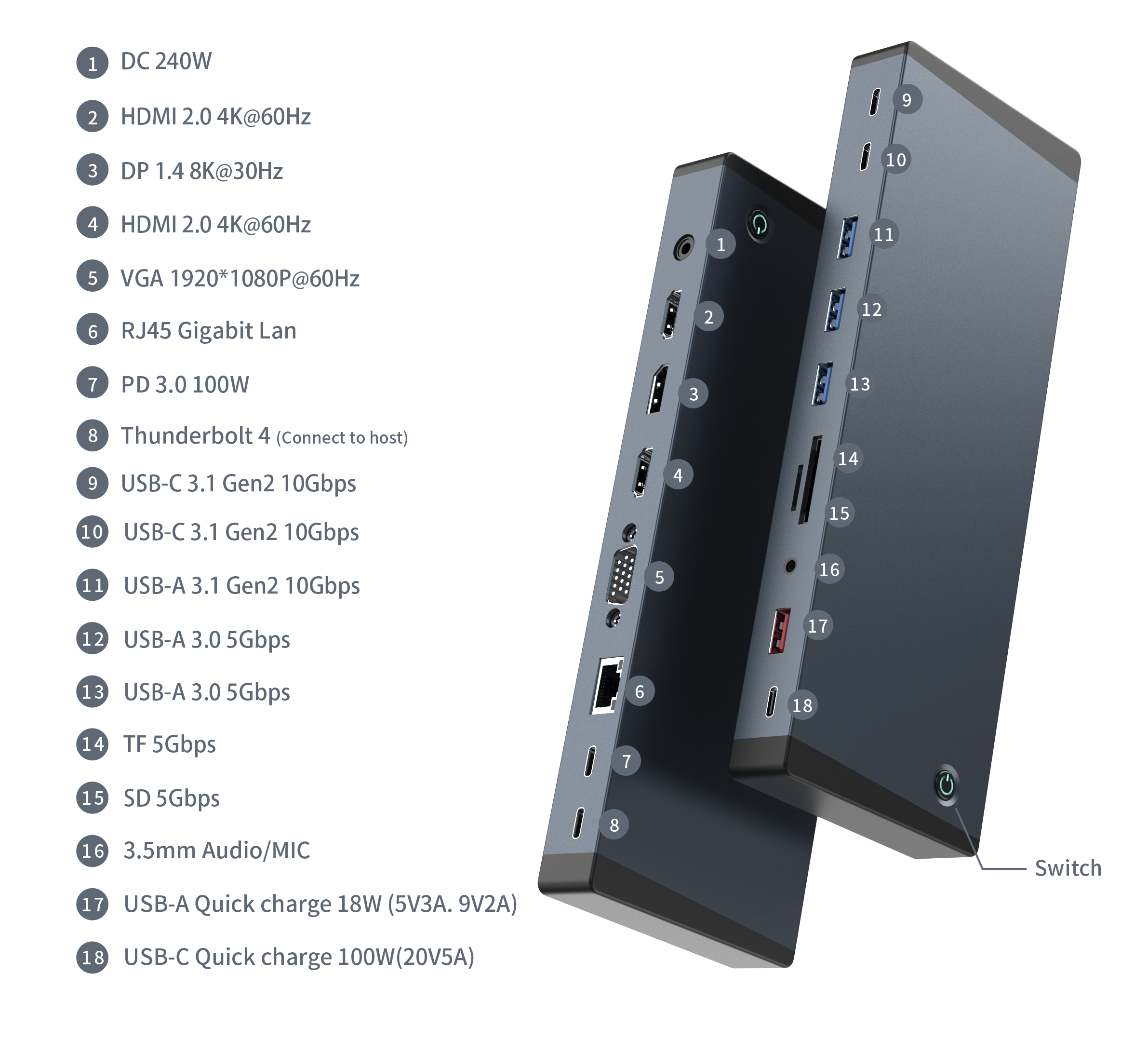
During an OEM quote, a buyer might ask for a dock that runs from the USB-C power supplies already installed at their desks. The same buyer might also tick the box for a dedicated USB-C port that can charge an accessory at up to 100 W. Both features can appear on a product sheet. The question to settle before quoting is whether they work together in the intended setup.
Consider a sample demonstration. The supplier powers the dock with its DC adapter and shows the two charging ports working. The buyer takes the sample back to the office and powers it through USB-C instead. The dock powers on and the two dedicated charging ports are off. On the X760, both observations are consistent with the design. To compare the two results, first confirm which input powered the dock. That detail can easily be missing from the quote.
X760 Fast-Charging Outputs by Power Source
| How the X760 is powered | Dedicated USB-A charging output | Dedicated USB-C charging output |
| 240 W supply through the DC input only | Available, up to 18 W | Available, up to 100 W |
| USB-C PD input only, rated up to 100 W | Off | Off |
![Numbered X760 ports with DC and USB-C PD inputs and dedicated USB-A and USB-C charging outputs]()
X760 port layout. No. 1 is the 240 W DC input, No. 7 is the USB-C PD input, and Nos. 17 and 18 are the dedicated fast-charging outputs.
With the DC supply connected, the USB-A charging port is rated for 5 V at 3 A or 9 V at 2 A. The dedicated USB-C charging port is rated up to 20 V at 5 A. Those are individual port ratings. The device and cable in the proposed setup still matter when you check the charging rate you need.
A port list often places the wattage next to a connector. For the X760, add the power condition to the same line as the output rating. A person reading the sheet should be able to find that condition without looking up the power supply in a separate document.
Follow the Direction of the Two 100 W Ratings
The X760 has a USB-C PD input rated up to 100 W. Power flows from the supply into this connector to run the dock. There is also a dedicated USB-C charging output rated up to 100 W. Power flows from that connector to a device attached for charging when the X760 is powered through its DC input.
On a drawing or a port list, use a label that tells the reader which of those jobs the connector does. “USB-C PD input, up to 100 W” identifies where to connect the power supply. “USB-C accessory charging output, up to 100 W with 240 W DC power” identifies where to connect the device being charged and the setup in which the rating applies. Match those names to the physical port positions on the approved drawing.
It helps to use the same words when handing a project from product development to sales. If the purchase brief says “100 W USB-C” and the quote says “100 W charging,” the two teams may sign off on different things. Ask the buyer which device is supposed to receive power. The answer tells you whether to discuss the dock's power input, the accessory output or a separate laptop-charging requirement.
Choose the Setup Before You Choose the Bundle
For a fixed desk that needs accessory charging. Say a brand wants to offer a workstation dock with a place for users to plug in a phone and a second USB-C accessory. If the two dedicated fast-charging ports are part of the offer, quote the X760 for operation from the 240 W DC supply. Confirm the adapter part number or supply specification and how the adapter will be provided. The order can then say whether the supplier includes it in the kit or the buyer supplies it separately. That decision can affect which configuration the buyer receives and what they can demonstrate when a sample arrives. For a rollout in several markets, give each order line the supply or mains lead required at the destination. The dock model can stay the same while the contents of the kit differ. If the adapter is sold separately, identify it on its own order line so the buyer can tell what will arrive with the dock.
For an installation that will reuse compatible USB-C PD supplies. Start with the supply the customer actually plans to deploy. Put the model or specification of that supply in the project brief and identify the USB-C PD input as the intended power connection. If the purchase request also calls for dedicated charging outlets, settle that point while the configuration is still open. The buyer can decide which requirement takes priority at that location and quote a setup that matches it. The desk team should have a copy of the approved configuration when it prepares installation instructions.
For a distributor that offers both setups. Two customers may order the same dock and use it differently. One buys a complete desk kit with the DC adapter. Another already has compatible USB-C PD supplies and buys the dock for use with those. Keep a separate configuration line for each offer. Have the person preparing the quote identify the supply included or expected, then show the charging features that go with that setup. A distributor can keep the same dock model in its catalog and still give each customer an accurate description of the bundle it is selling.
What to Put on the OEM Quote
When the port list is part of a purchase specification, give the supplier enough detail to quote the same setup you will use. Four fields are enough to document the charging requirement.
| Field | What to record |
| Power source in use | The input the installed dock will use, plus the supply model or specification when available |
| Supply responsibility | Whether the adapter comes in the purchased kit or is provided by the buyer |
| Charging output | The physical port, the output rating and the power condition under which it applies |
| Expected load | The device models or required charging profiles, including any devices that must charge at the same time |
For an X760 order that calls for both dedicated outputs, a usable line is “With the X760 connected to its 240 W DC power supply, the dedicated USB-A charging output supports up to 18 W and the dedicated USB-C charging output supports up to 100 W.” If the host computer also needs to receive a specified wattage, record that requirement on its own line with the port and power setup that will be used. What to include in an OEM docking station specification sheet
The load field is worth filling in even when the buyer has already chosen the dock. If you know the accessory make and model, include it. If you are buying for a range of accessories, list the profile or minimum rate needed for the ones the project depends on. That gives the supplier a specific request to check before confirming the quote.
When Two Ports Need to Charge at Once
A buyer might see 18 W and 100 W on the port list and ask whether two accessories can receive those rates at the same time. The two figures in the table describe individual ports. Ask the supplier for a combined-load result with both devices connected and record the rate required at each connector. If charging a phone at its top rate is optional and keeping the other accessory powered is essential, say so. That detail gives the supplier a more useful target than a total wattage written on its own.
Handle laptop charging in the same way. Define the host computer or its charging requirement, then ask for a measurement on the host connection under the intended setup. If the workstation also needs to transfer files while the laptop is charging, list that workload in the project brief alongside the power requirement. You can then compare results with the same host, power supply and peripherals connected. How OEM buyers verify 100 W PD charging performance · Can a USB hub charge a laptop while transferring data?
For a desk setup that depends on accessory charging throughout the workday, note the expected run time with the devices attached. A supplier's result is easier to interpret when it says how long the load stayed connected and which outputs were in use. How thermal design and power management affect USB-C hub reliability
Specify What Happens When the Power Source Changes
Some sites plan to use one power source every day and another when a desk is moved or reconfigured. Ask the customer whether that change is an installation step or something users will do while their devices are connected. A team that moves a dock overnight can follow a different procedure from a team that expects an accessory to keep receiving power while someone swaps supplies.
The X760 figures above describe each source on its own. If the project calls for both supplies to stay connected or for a changeover while the dock is running, ask the supplier which source has priority and how the dedicated outputs behave during the change. Identify the outcome the customer cares about, such as whether a connected accessory can lose power briefly during a desk move. Include that scenario in the quote review so both sides can agree on what needs to be demonstrated.
Record Which Setup Was Shown on the Sample
When you review an X760 sample, write the power source beside any observation about the dedicated charging ports. If it was demonstrated with the 240 W DC adapter, include that detail in the approval note. If your team plans to offer both configurations, ask for an observation under each one. A short note with the dock model, input in use and the two charging-port states is enough to identify which behavior you observed.
This is especially useful when the person handling the sample is based at a different office from the person writing the purchase order. A photo of the port in use or the supply label can clear up which configuration was on the desk. Keep it with the approval note so the buyer can match what was shown to what was quoted. If the power supply in the final kit changes, check that the quote and the charging statement still describe the setup the customer will receive.
Keep the Condition With the Rating When You Sell the Dock
A buyer may only read the feature list and the kit contents before placing an order. A single line saying “up to 100 W USB-C charging” leaves the power setup to be worked out later. Put the DC requirement on the same line as the output claim and identify which power supply is part of the offer. If the customer brings their own USB-C PD supply, show what the dedicated charging ports do in that setup before they choose the bundle.
Pay particular attention when the same listing has several configurations. A table that shows the supply included and the charging outputs available beside each option can do more work than a long explanation below the product details. Use the same wording on the quote, product listing and any sheet that gets forwarded to a reseller. The customer should be able to match the charging promise to the configuration they are ordering with one look. How distributors can reduce returns on multiport USB-C hubs