You sit down with a sleek ultra-thin notebook. Suddenly, you face a tangled mess of cables. External monitors, mechanical keyboards, wireless mice, and portable hard drives all demand a connection. Manufacturers continue to strip away essential ports. This forces professionals to rely heavily on external connectivity solutions. Does plugging all your peripherals into a single device compromise your machine's basic functionality?
The straightforward answer is yes. A modern USB hub can absolutely charge a laptop while transferring data simultaneously. You just need the correct equipment. This setup relies on specialized hardware. It acts as a bridge between your wall charger and your entire peripheral ecosystem. The result is a clean and highly productive desk environment.
Key Takeaways
Simultaneous Functionality: A high-quality connectivity device transfers data seamlessly. You can migrate large video files while keeping your battery fully charged.
Power Delivery is Mandatory: To replenish a battery, you must use an accessory equipped with Power Delivery and a passthrough port. A cheap standard splitter will fail.
Hardware Compatibility: Your computer's Type-C port must specifically support both information exchange and power input.
Wattage Matters: The accessory itself consumes electricity. You must ensure your wall charger provides enough total wattage for both the peripherals and the motherboard.
The Core Mechanism of Simultaneous Operation
Older Type-A connections were engineered for rudimentary functions. They powered basic optical mice or read small thumb drives. Modern Type-C architecture is entirely different. Hardware engineers designed it to carry massive amounts of information, stream high-definition video, and deliver substantial electrical currents. All of this happens at once through a single reversible connector.
Not every dongle possesses these multitasking capabilities. A basic data transfer hub is typically unpowered. It draws a tiny amount of electricity directly from the host machine merely to run small gadgets. A true Power Delivery variant operates in reverse. It intercepts electricity from a wall outlet. It powers its own internal circuitry first. Then, it funnels the remaining current directly into the computer's battery cell.
How a PD Charging Hub Works at the Hardware Level
To understand this dual functionality, we must look inside the cable. A standard Type-C connector houses multiple microscopic pins. Certain lanes are strictly reserved for information exchange. They move massive video files to an external SSD. They push pixels to an external display. Completely separate copper lanes handle the electrical current. These pathways are physically and logically isolated. They never interfere with one another.
This introduces a technical concept known as passthrough charging. Connecting a robust PD charging hub introduces an intelligent power manager into your circuit. The internal IC intercepts the incoming electricity from the wall outlet. It takes exactly what it needs to operate connected peripherals. Then, it seamlessly passes the remaining wattage directly to your machine.
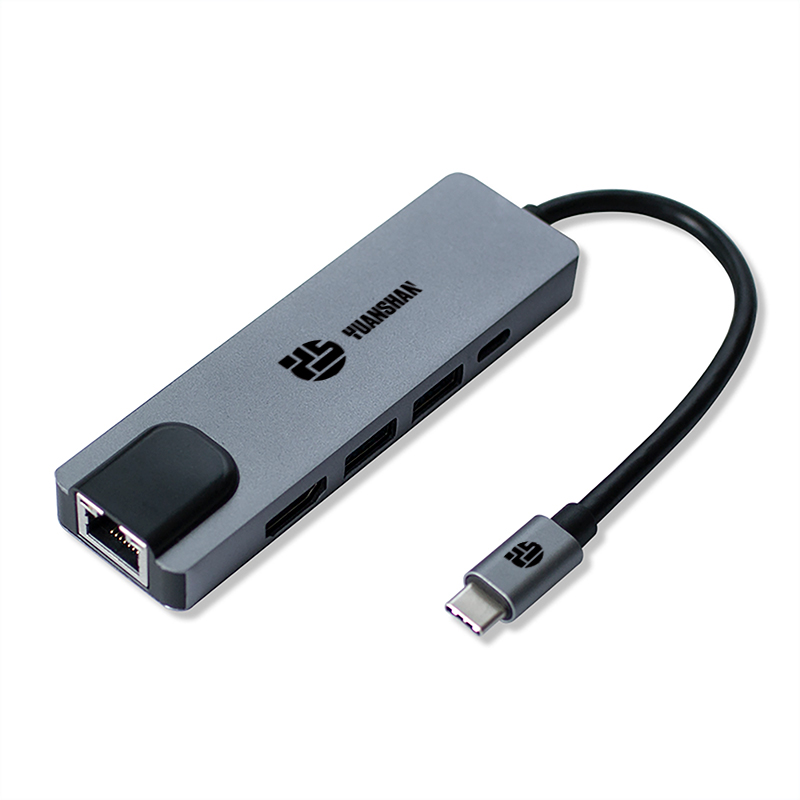
Let us look at a real-world engineering example. Consider a professional 5-in-1 USB-C multiport adapter. This type of device typically handles a 100W PD input. Internally, the power management chip reserves about 10 to 15 watts. This leaves up to 85 watts passed directly to the motherboard. Meanwhile, separate data lines handle an HDMI 4K 30Hz output, dual USB-A 3.0 ports running at 5Gbps, and an RJ45 Ethernet connection at 1000Mbps. The data streams and power currents run simultaneously without any bottleneck.
Essential Requirements for a Stable Setup
Before upgrading your workstation, verify your existing hardware. Not all Type-C connections are identical. Entry-level machines often feature ports that handle information only. Your computer must possess a port explicitly labeled with a battery icon, a Thunderbolt symbol, or the PD specification.
The dongle itself does not generate electricity. It merely channels it. To keep your battery topped up while working, you need a robust laptop adapter plugged into the wall. A 60W, 100W, or higher capacity brick is usually required. This ensures sufficient current flows through the entire chain.
Always verify the product specifications of the connectivity device. Look specifically for the phrase USB-C PD Passthrough. If this feature is missing, you likely have a standard splitter. That will drain your battery rather than replenish it.
Understanding Wattage and the Hub Tax
When calculating energy requirements, engineers always account for the hub tax. The device consumes a baseline amount of electricity to operate its internal microprocessors, display chips, and connected flash drives. If you plug a standard 65W charger into an accessory that consumes 15W internally, only 50W reaches your computer. For highly demanding tasks, this deficit results in a slow battery drain.
Navigating wattage ratings is critical for stability. A 60W rating works fine for lightweight notebooks used for word processing. Larger machines used for graphic design or video editing demand a 100W threshold. This prevents the battery from depleting during resource-intensive applications.
| Feature | Standard Data Hub | 100W PD Charging Hub |
| Power Source | Draws power from the host machine | External wall adapter |
| Battery Charging | No. Slowly drains battery | Yes. Provides up to 85W-100W passthrough |
| Ideal Use Case | Connecting a basic mouse or thumb drive | Running 4K monitors, external SSDs, and charging |
Industry Trend: The Shift Towards High-Wattage Unified Workstations
Looking at broader industry trends, the demand for simultaneous high-wattage delivery and ultra-fast data processing is skyrocketing. Remote work environments are now permanent. The creation of high-resolution media like 4K and 8K video is standard. Professionals expect desktop-tier performance from incredibly thin portable machines.
The hardware industry is responding rapidly. We are seeing widespread adoption of the newer Power Delivery 3.1 specification. This standard pushes capabilities up to 140W or even 240W. Future connectivity devices will not just trickle-charge notebooks. They will easily power massive mobile workstations while managing multi-gigabit data streams without breaking a sweat.
Does Charging Slow Down Data Speeds?
A common concern is whether pushing 100 watts of electricity through a single cable bottlenecks file transfers. Rest assured, power and information operate on completely independent parameters. Blasting a high-wattage current into your machine will absolutely not slow down the read or write speeds of your connected external drives.
Slowdowns only occur when you overwhelm the actual bandwidth capacity. If you attempt to run dual 4K monitors while transferring terabytes of footage across two external SSDs, you might experience a bottleneck. You are maxing out the data lanes. This is entirely unrelated to the charging status.
Troubleshooting Common Power Failures
If your battery indicator refuses to budge, start with the most common culprit. Most multi-port devices feature several Type-C inputs. Typically, only one specific port is hardwired for power input. If you plug your wall charger into an input designated strictly for information exchange, the current will not flow.
Another frequent scenario involves using an inadequate power brick. Attempting to use a standard smartphone charger peaking around 20W will fail. The accessory itself consumes the majority of that 20W just to stay on. There is virtually zero energy left over for the computer.
Thermal dynamics also play a major role. Managing massive file migrations and external displays generates heat. If the accessory becomes excessively hot, its internal safety chips might temporarily throttle the electrical current. This prevents a fire hazard. Giving the unit time to cool down usually resolves the issue.
Engineering Guide: Choosing the Right Connectivity Solution
When upgrading your workspace, prioritize passthrough specifications. Look for devices offering an 85W to 100W passthrough capability. This ensures your machine remains fully charged even during heavy workloads.
Map out exactly what you need to connect. Ensure the accessory provides the correct mix of legacy Type-A inputs, modern Type-C slots, HDMI for external monitors, and an Ethernet jack for stable internet connectivity. For an all-in-one solution, a docking station for laptop with a 5-in-1 configuration often hits the sweet spot for most professionals.
Pay close attention to physical construction. Always opt for aluminum enclosures over cheap plastic alternatives. Aluminum acts as a natural heatsink. It efficiently dissipates the thermal energy generated during heavy data processing and rapid charging. This extends the lifespan of your investment.
Conclusion
Modern hardware engineering has elegantly solved the single-port dilemma. You can absolutely charge your machine and transfer massive files at the exact same time using a single well-chosen device. The golden rule is to verify your hardware. Ensure you purchase a dedicated passthrough unit. Pair it with a sufficiently powerful wall charger.
By understanding these technical nuances, you can confidently upgrade your workspace. You will eliminate frustrating cable clutter and enjoy a seamless desktop experience. If you are looking for reliable, professional-grade connectivity solutions, explore the high-performance options at Yuanshan Tech to find the perfect match for your workflow.
FAQ
Can any USB port charge a laptop?
No. Only Type-C connections equipped with the Power Delivery specification have the capability to charge a computer. Older Type-A iterations lack the pin architecture and wattage capacity required for such demanding tasks.
Will using a USB hub damage my laptop's battery?
No, provided you utilize a reputable brand. Modern computers and quality connectivity accessories feature intelligent internal microchips. These chips constantly communicate with one another to negotiate and deliver the exact right amount of voltage. This effectively prevents dangerous overcharging scenarios.
Can I use my phone charger with a laptop adapter hub?
Generally, no. Smartphone chargers typically max out between 20W and 30W. The accessory itself requires roughly 10W to 15W just to operate its internal components. There is almost zero electricity left to replenish the computer's battery. You need a dedicated brick rated for 60W or higher.
What is the difference between a USB hub and a docking station?
A hub is typically a compact portable device that draws its operational energy directly from your computer or a standard wall charger. A docking station is a much larger stationary unit designed to stay on your desk. It comes with its own dedicated power supply specifically engineered to run multiple high-end monitors and rapidly charge the computer simultaneously.
Does using a USB hub slow down charging?
Yes, slightly. Every hub consumes a small portion of the incoming power to run its internal chips and connected peripherals. If you use a 65W charger, the hub might reserve 15W, leaving 50W for your computer. To achieve maximum charging speed, you should use a higher-wattage power brick.
Can I leave my laptop plugged into a hub all the time?
Yes. Modern power management systems are highly advanced. Once your battery reaches 100 percent capacity, the internal circuitry stops drawing current for the battery and runs the machine directly from the wall power. This bypass prevents overcharging and preserves battery health over time.



