Hybrid work policies often promise ultimate workplace flexibility. However, the physical transition between home setups and the corporate office frequently causes significant friction. Employees face lost productivity, rising IT helpdesk tickets, and frustrating desk cable clutter daily. The fundamental success of any hoteling or hot-desking strategy relies heavily on universal, single-cable connectivity. Without reliable connections, modern workspaces fail to support mobile professionals effectively. A standardized USB C Hub for Office deployment essentially eliminates this frustrating hardware friction. It allows your employees to plug in a single cord upon arrival. They can instantly access reliable power, dual external displays, and secure enterprise networks. We will explore how selecting the right connectivity tools ensures seamless desktop transitions. We will also detail how these devices improve daily workflows and drastically reduce overwhelming IT support burdens.
Key Takeaways
- Single-Cable Efficiency: USB-C hubs transform bare mobile workstations into full desktop setups in seconds, reducing employee downtime.
- Hub vs. Dock: Clarify the distinction—portable hubs suit hybrid workers' everyday carry (EDC), while stationary desktop docks are better for fixed IT deployments.
- IT Standardization: Standardizing connectivity reduces IT support tickets related to missing chargers, mismatched display cables, and peripheral compatibility.
- Procurement Priority: Power Delivery (PD) wattage, external monitor refresh rates (e.g., 4K @ 60Hz), and OS compatibility are the non-negotiable evaluation metrics.
The Business Problem: Eliminating Friction at the Hot Desk
When hybrid employees arrive at the office, they expect an immediate workflow start. Unfortunately, the reality often involves a frustrating time sink during the first ten minutes. Workers spend valuable morning time hunting for missing power adapters. They struggle constantly while untangling messy HDMI and DisplayPort cables left behind by previous users. Employees frequently search adjacent desks for specific dongles needed to connect their unique devices. This annoying routine causes daily delays across unassigned seating zones. It also creates a highly disjointed user experience.
Consequently, the IT support burden rises sharply across the organization. Helpdesk tickets spike dramatically when employees encounter legacy monitors they cannot connect to. Modern ultrabooks often lack native connectivity ports like HDMI or Gigabit Ethernet. Users submit urgent tickets because they cannot project presentation screens. They complain loudly about blocked access to the wired corporate intranet. IT teams spend countless hours troubleshooting these repetitive hardware mismatches. This reactive support cycle drains valuable departmental resources.
Your primary goal involves resolving this daily disruption entirely. You must define clear success criteria for shared office hardware. Achieving a true plug-and-play environment means any laptop integrates seamlessly. Whether users bring an Apple Mac or a Windows PC, they should connect instantly. They need immediate access to standard office peripherals without downloading temporary software. Reliable connectivity creates a stress-free workspace and keeps mobile workers productive from minute one.
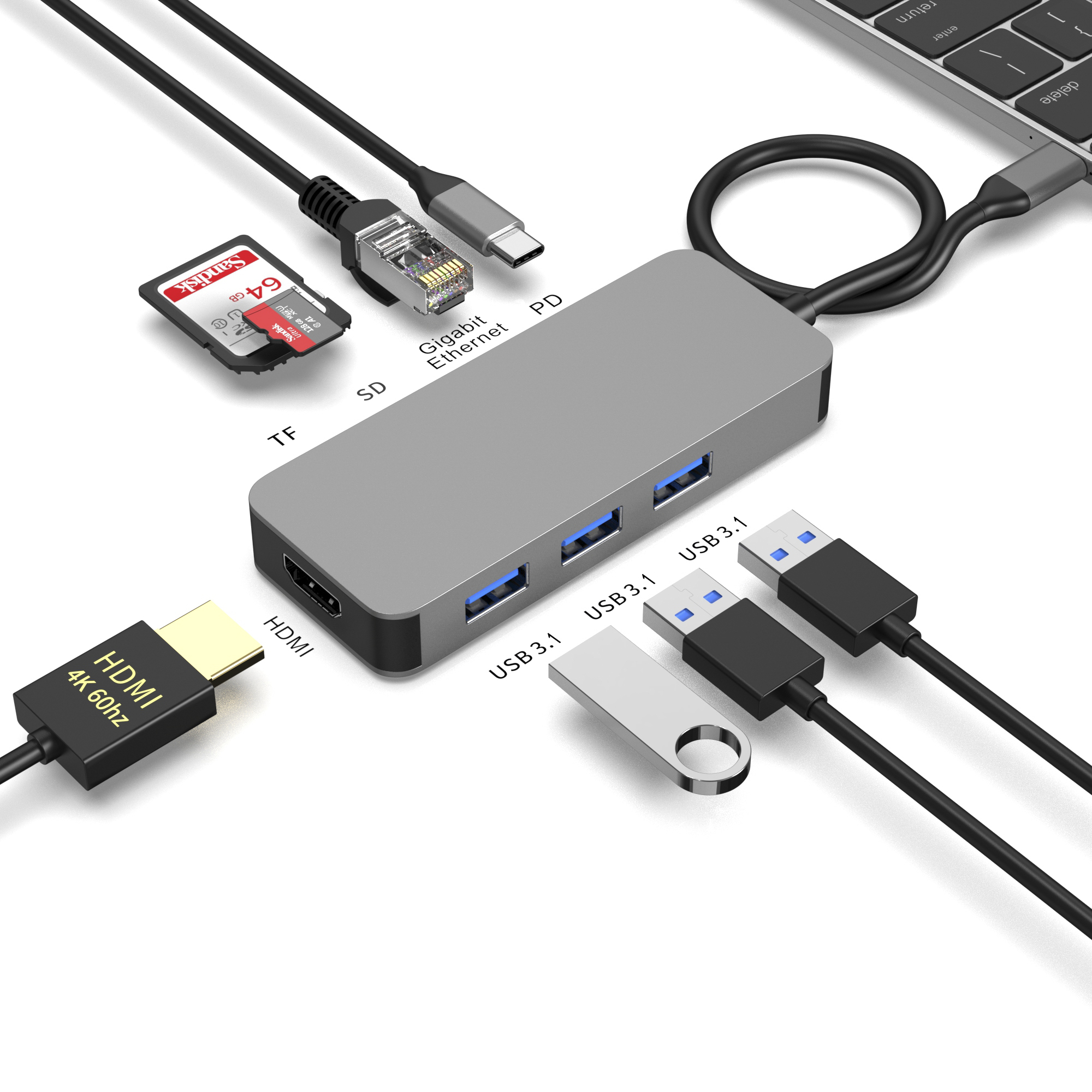
USB C Hub vs. Hybrid Office Docking Station: Categorizing Solutions
Companies must understand their distinct hardware options before outfitting shared desks. You generally face two main categories for expanding laptop connectivity. Choosing incorrectly leads to wasted budget and user frustration.
The Portable USB-C Hub (The EDC Approach)
This portable option serves highly mobile workers perfectly. They often split their busy days between home offices, local cafes, and unequipped office touchdown spaces. A portable hub slides easily into a slim laptop bag. It acts as an essential part of their everyday carry gear.
- Pros: They offer a highly cost-effective and lightweight physical solution. Users enjoy instant port expansion wherever they decide to work.
- Cons: They rely entirely on the laptop's power supply unless they feature active pass-through. They also may lack older legacy IT ports like VGA or DVI. They offer fewer total connection points compared to larger units.
The Stationary Hybrid Office Docking Station (The IT Approach)
This robust solution works best for fixed hot desks. The hardware stays on the table permanently, serving whoever books the seat for the day. A dedicated hybrid office docking station handles robust daily usage easily. IT departments typically bolt these down or secure them carefully.
- Pros: They offer dedicated, built-in power supplies. You can secure them using physical Kensington lock slots to prevent accidental theft. They deliver superior multi-monitor support using advanced DisplayLink or Thunderbolt technologies.
- Cons: They require a significantly higher upfront investment per desk. They occupy more physical space on smaller shared workstations. They lack the portability required for off-site client meetings.
Core Evaluation Criteria for an Enterprise Connectivity Hub
Selecting a reliable enterprise connectivity hub requires rigorous technical evaluation. You must prioritize specific performance metrics to ensure optimal daily operation. Ignoring these metrics leads to widespread user complaints.
Power Delivery (PD) Realities
Always check the precise wattage specifications before buying. You need a device offering robust Power Delivery pass-through. A hub providing 100W PD passthrough ensures high-performance laptops charge efficiently. Devices will not drain unexpectedly during intensive, power-hungry tasks like video editing or compiling code. Insufficient power delivery causes laptops to slowly lose battery life even while plugged into the wall.
Display Output and Resolution Standards
You should warn procurement teams against vague marketing fluff. Many consumer devices advertise as broadly "4K compatible" without context. Advise buyers to verify strict 4K at 60Hz support through HDMI 2.0 or DP 1.4 connections. Lower refresh rates like 30Hz cause visible cursor lag. This lag induces severe eye strain over an eight-hour shift. Furthermore, you must carefully address Alt-Mode versus DisplayLink technology. Dual or triple monitor setups require precise planning. This proves especially true for base-level M-series MacBooks, which natively support only one external screen.
Data and Network Reliability
Never underestimate wired networking capabilities in large office buildings. Gigabit Ethernet remains a strict necessity for secure, low-latency intranet access. It helps hybrid employees bypass congested, unreliable office Wi-Fi networks entirely. Fast wired connections ensure stable video conferencing calls. They also accelerate massive file transfers to local enterprise servers.
| Specification Category | Minimum Recommended Standard | Common Pitfalls to Avoid |
| Power Delivery (PD) | 100W Pass-through support | Hubs drawing too much power, draining laptop batteries slowly. |
| Display Output | 4K @ 60Hz (HDMI 2.0 / DP 1.4) | Accepting 4K @ 30Hz, causing severe screen lag and eye strain. |
| Network Connectivity | Gigabit Ethernet (RJ45 port) | Relying solely on unstable office Wi-Fi for heavy data transfers. |
| Multi-Monitor Support | DisplayLink for mixed OS fleets | Assuming Alt-Mode works natively for all dual-screen Mac setups. |
Implementation Risks When Deploying a USB C Hub for Hot Desking
Rolling out shared connectivity devices introduces several practical deployment challenges. A standardized USB C hub for hot desking requires proactive physical and digital management.
Hardware "Wandering" and Durability
Portable devices often disappear from shared office spaces. Discuss the real risk of small hubs being misplaced or stolen accidentally. Employees often pack them into their bags out of pure habit. You must address overall build quality immediately. Look for durable aluminum chassis constructions. You should also demand reinforced braided connection cables. High-wear environments easily break cheap plastic components within weeks. Constant plugging and unplugging weakens internal cable wiring quickly.
OS and Driver Compatibility
Note the significant pitfalls of deploying unverified hardware. You should never distribute hubs without rigorously testing them first. Test them across the company's specific fleet of varying devices. Windows laptops, macOS machines, and ChromeOS Chromebooks interact with external displays differently. Incompatible display drivers will generate immediate user frustration. They also trigger massive waves of identical support calls to your helpdesk team.
Security Considerations
You must briefly touch on vital enterprise network security policies. Strict environments often have MAC address pass-through requirements for proper network authentication. Without this feature, the network sees the hub's MAC address instead of the authenticated laptop. IT administrators might also need hardware capable of disabling unauthorized USB mass storage. Evaluating these security features prevents dangerous network vulnerabilities. It stops employees from copying sensitive files to unapproved personal flash drives.
Shortlisting Your Office Laptop Dock: Next Steps for Procurement
Transitioning to a structured hardware setup requires careful forward planning. Follow these essential steps to select the right office laptop dock for your unique workspace.
- Audit the Existing Fleet: Instruct purchasing buyers to map out current laptop port specifications carefully. Identify exactly if deployed machines use Thunderbolt 3, Thunderbolt 4, or standard USB-C 3.2 Gen 2 ports. You must also catalogue existing desk peripherals. Knowing whether desks feature HDMI or older DisplayPort monitors changes your procurement requirements completely.
- Run a Pilot Program: Recommend purchasing three to five units of the shortlisted models. Test them strictly in a controlled hot-desking pod first. Gather direct user feedback regarding setup ease and daily reliability. Do this before committing to a costly, site-wide hardware rollout.
- Standardization vs. BYOD: Suggest creating an approved internal hardware catalogue immediately. You want to prevent peripheral compatibility chaos completely. Employees bringing cheap, non-compliant personal hubs often compromise network security. They also cause unpredictable external monitor failures at shared desks.
Conclusion
Successful hybrid work demands strict hardware consistency across all office zones. Employees thrive when they transition effortlessly between remote setups and central office environments. The right connectivity tool bridges the physical gap between lightweight portability and desktop-grade productivity. You eliminate daily setup friction by providing reliable, universal plug-and-play workstations.
IT decision-makers must prioritize reliable power delivery and modern external display standards. Do not get distracted by unnecessarily high port counts on cheaper consumer models. Focusing strictly on core enterprise functionality ensures immediate employee satisfaction. Thoughtful, standardized procurement guarantees long-term usability and a vastly improved daily desk experience.
FAQ
Q: What is the difference between a USB-C hub and a Thunderbolt dock?
A: The main differences lie in data bandwidth and price. USB-C hubs typically offer 10 to 20 Gbps bandwidth. They remain highly budget-friendly and universally compatible across most devices. Thunderbolt docks deliver a massive 40 Gbps bandwidth. They serve as premium, high-bandwidth solutions designed specifically for power users handling massive data files.
Q: Will a standard USB-C hub charge my laptop while hot desking?
A: Yes, it will charge your device effectively. However, the hub must support USB-C Power Delivery (PD) pass-through specifically. You must also pair it with an adequate power adapter. Typically, you need a 65W or higher charger to maintain battery levels during active use.
Q: Do I need DisplayLink drivers for my hybrid office docking station?
A: You only need DisplayLink drivers in specific scenarios. You need them if you require multiple extended displays on base-level Apple Silicon MacBooks, like the M1 or M2. You also need them when standardizing across a highly mixed OS fleet where native Alt-Mode proves inconsistent.



