Quick Answer
Yes. A Thunderbolt 5 computer supports Thunderbolt 4 and Thunderbolt 3 accessories.
Backward compatibility does not guarantee full Thunderbolt 5 speed or every feature. The host, dock, device, and cable must support a common connection mode. The setup then operates within the limits of the older or less capable component.
Connection direction matters. A Thunderbolt 5 computer can use Thunderbolt 4 and Thunderbolt 3 accessories. A newer Thunderbolt 5 dock can work with an older computer only if that dock supports the required host mode.
Intel documents Thunderbolt 5 support for Thunderbolt 4 and Thunderbolt 3 accessories. See Intel's Thunderbolt 5 guide for the official compatibility and performance overview.
What Does Thunderbolt 5 Backward Compatibility Cover?
Compatibility depends on which device is the host and which product is the accessory. The table separates standard backward compatibility from support that depends on the dock model.
| Connection | Compatibility | Main Limitation |
| Thunderbolt 5 computer + Thunderbolt 4 accessory | Supported | Operates within Thunderbolt 4 limits |
| Thunderbolt 5 computer + Thunderbolt 3 accessory | Supported | Limited by the older device and cable |
| Thunderbolt 4 computer + Thunderbolt 5 dock | Model-specific | The dock must support Thunderbolt 4 hosts |
| Thunderbolt 3 computer + Thunderbolt 5 dock | Model-specific | Check the dock's documented host support |
| USB4 computer + Thunderbolt 5 dock | Model-specific | Display, PCIe, and data features may vary |
| Standard USB-C computer + Thunderbolt 5 dock | Do not assume support | The USB-C connector alone does not prove Thunderbolt capability |
Why Does Connection Direction Matter?
Thunderbolt 5 was designed to support Thunderbolt 4 and Thunderbolt 3 accessories. The reverse path depends on the newer dock. Its controller, firmware, and supported host modes determine whether it can connect to a Thunderbolt 4, Thunderbolt 3, or USB4 computer.
Compatibility is not always symmetrical. Support for an older accessory on a new host does not mean that every new dock supports every older host. Check the supported host types for the exact dock model.
Backward Compatible Does Not Mean Full Performance
A working connection is only the first step. Available features and speed still depend on the complete system.
1
Can It Connect?
The host and dock must support a common Thunderbolt, USB4, or fallback mode.
2
Which Features Work?
Display modes, PCIe devices, charging, wake functions, and downstream ports may change.
3
How Fast Is It?
The older host, device, cable, or internal dock path can limit total performance.
What Can Change on an Older Host?
DISPLAY
Display Support
Monitor count, resolution, and refresh rate depend on the host GPU, operating system, dock design, and display connection. An older host may support fewer displays or lower settings.
DATA
Storage and Bandwidth
NVMe storage and other high-speed devices stay within the bandwidth available from the host connection and dock controller.
POWER
Charging Power
The laptop, dock, cable, and power supply negotiate USB Power Delivery. A high-power dock cannot force an older laptop to accept more power than it supports.
FEATURES
Downstream Functions
USB ports, PCIe tunneling, daisy chaining, wake behavior, networking, and other functions can vary by host and operating system.
Is Every USB-C Port Compatible With Thunderbolt 5?
USB-C Is Not Thunderbolt
USB-C describes the physical connector. It does not tell you whether a port supports Thunderbolt, USB4, PCIe tunneling, video output, or high-power charging.
Check the computer's technical specifications instead of relying on the connector shape.
How This Applies to Thunderbolt 5 Docking Stations
For a docking station, backward compatibility is useful only when the ports and features you need remain available on the older host. A high port count does not guarantee the same experience across Thunderbolt 5, Thunderbolt 4, and USB4 systems.
Product in Context
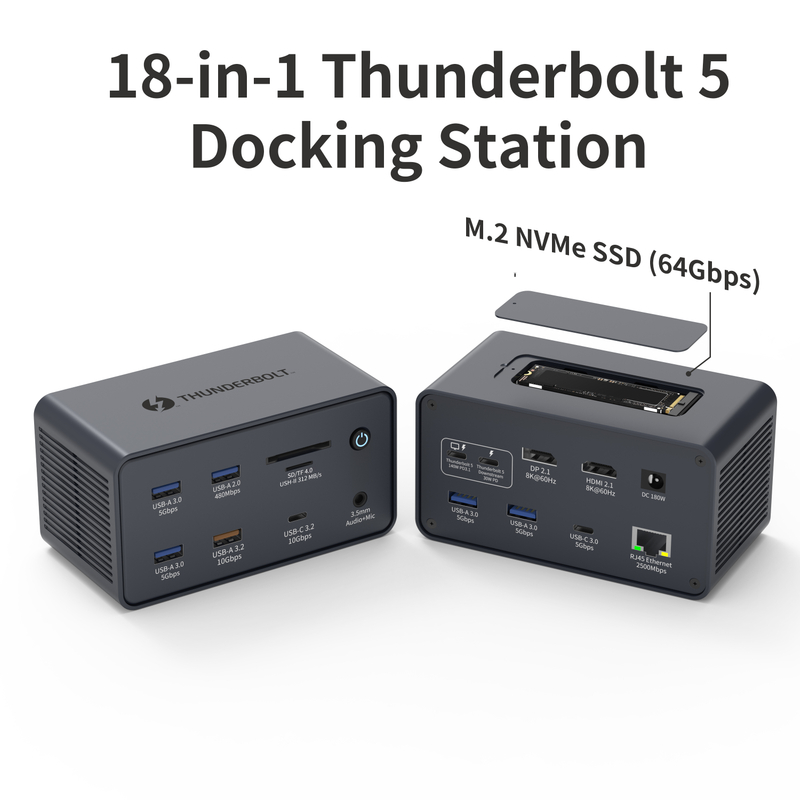
18-in-1 Thunderbolt 5 Docking Station
Our 18-in-1 Thunderbolt 5 Docking Station combines an 80 Gbps Thunderbolt 5 host connection with HDMI 2.1, DisplayPort 2.1, downstream Thunderbolt 5, 2.5 Gbps Ethernet, USB connectivity, M.2 NVMe expansion, and up to 140W PD 3.1 host charging.
This model supports Thunderbolt 5, Thunderbolt 4, and USB4 hosts. Available display modes, charging power, and data performance still depend on the connected computer and the rest of the system.
View the 18-in-1 Thunderbolt 5 Dock Another option is our 11-in-1 Thunderbolt 5 Docking Station. It offers a more compact port configuration with an 80 Gbps Thunderbolt 5 host connection and M.2 NVMe expansion. Before using any dock with an older host, compare the documented host support with your display, charging, and data needs.
What Should You Check Before Choosing a Thunderbolt 5 Dock?
Start with the oldest computer the dock must support. Then review the complete setup instead of choosing by Thunderbolt generation alone.
Compatibility Checklist
Host standard: Identify whether each computer uses Thunderbolt 5, Thunderbolt 4, Thunderbolt 3, USB4, or standard USB-C.
Dock model: Check its documented support for each required host type.
Displays: Review monitor count, resolution, refresh rate, GPU, and operating system.
Storage and networking: Review the speed required when several devices are active.
Charging: Match dock output with laptop, power adapter, and cable requirements.
Software: Check firmware, drivers, and operating-system-specific limits.
Thunderbolt 5 Docking Solutions
Choose the Dock Around the Systems You Need to Support
For mixed-device environments, begin with the oldest host and the features that must work across every workstation. Then compare display support, storage, networking, charging, and port layout.
Explore Our Thunderbolt 5 Docking Stations