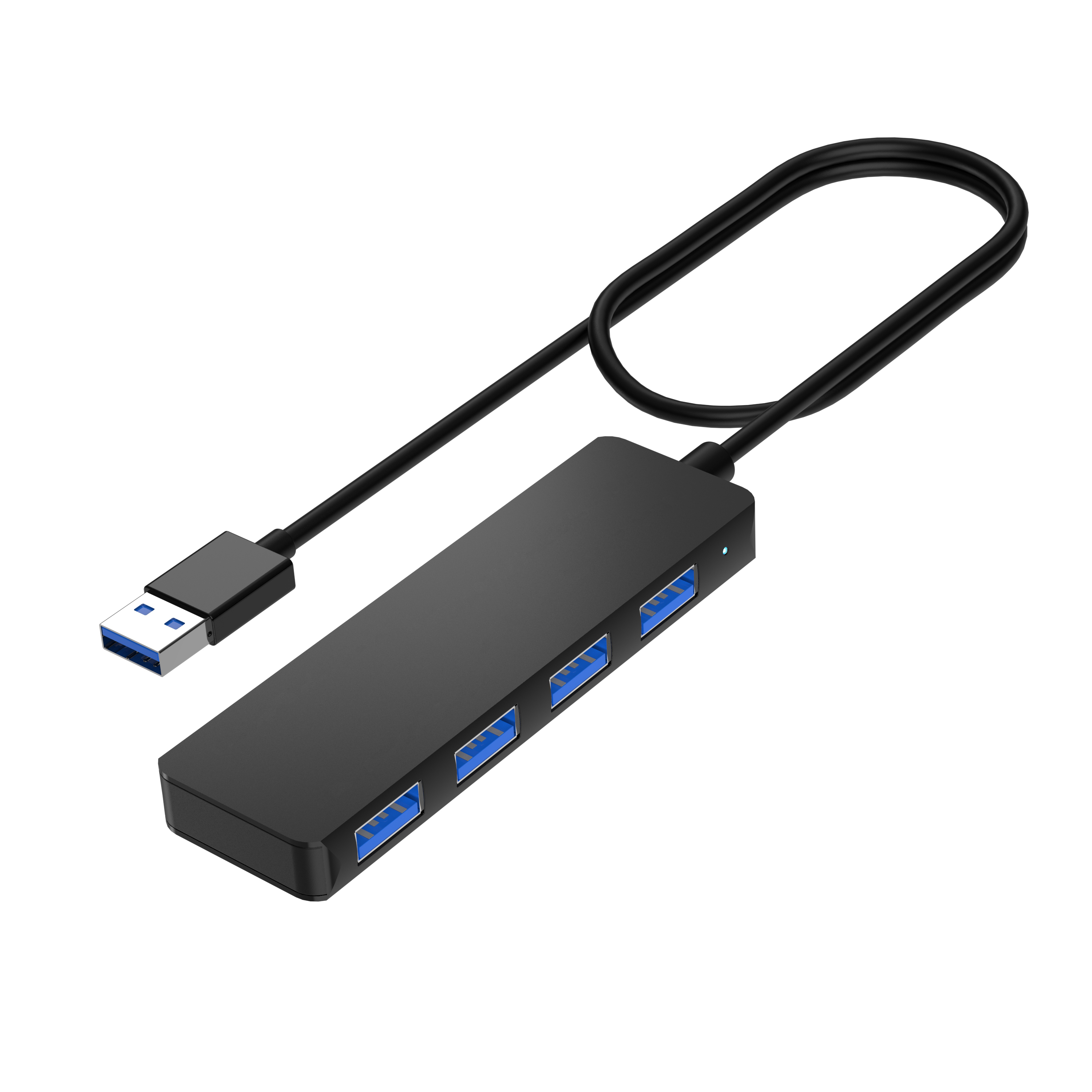
A USB hub is a device that expands one USB connection on a computer, tablet, or another host into multiple USB ports. Instead of repeatedly unplugging a keyboard, mouse, flash drive, card reader, or other peripheral when ports run out, you connect the hub to the host and attach several USB devices through it.
The basic idea is simple, but choosing the right hub requires more than counting ports. USB-A and USB-C describe connector forms, USB generations determine supported data capability, and power architecture affects which devices a hub can reliably operate. Some multiport USB-C products also add video, Ethernet, card readers, or Power Delivery, which can blur the line between a basic USB hub and a more capable docking solution.
Quick Answer
A USB hub gives one host USB connection access to multiple downstream USB ports. It is mainly a port-expansion device. The connector may be USB-A or USB-C, while the actual data speed and power behavior depend on the USB implementation, hub design, host connection, cable, and connected devices.
What Does a USB Hub Do?
The primary job of a USB hub is USB port expansion. A laptop with one available USB port can use a hub to connect several peripherals without adding individual host ports for every device.
In a simple data hub, that may mean connecting devices such as keyboards, mice, USB flash drives, printers, external storage, webcams, or other USB peripherals. More multifunctional hubs can combine USB data ports with features such as charging, Ethernet, card readers, or display outputs, depending on the model.
This is why “USB hub” should be understood as a product category rather than one fixed specification. Our USB hub range includes both straightforward data-expansion products and more multifunctional USB-C hub configurations.
How Does a USB Hub Work?
A hub sits between the host and its USB peripherals. One connection faces the computer or other host, while multiple ports face the connected devices. In USB terminology, these roles are commonly described as the upstream connection and downstream ports.
Basic USB Hub Connection Path
STEP 01
Host Device Laptop, desktop, tablet, or another compatible USB host →
STEP 02
Upstream Connection USB-A or USB-C connection from the hub to the host →
STEP 03
USB Hub Manages communication between the host and attached USB devices →
STEP 04
Downstream Devices Keyboards, storage, mice, printers, and other peripherals The hub does not create an independent host connection for every downstream port. Communication still travels through the upstream USB link to the computer. This becomes important when several high-bandwidth devices operate at the same time.
Upstream and Downstream Ports Explained
Understanding upstream and downstream ports makes USB hub specifications much easier to read.
| Connection | Direction | Purpose | Example |
| Upstream | Hub to host | Connects the complete hub to the computer or host device | USB-A or USB-C host plug |
| Downstream | Hub to peripherals | Provides ports for connected USB devices | USB-A or USB-C peripheral ports |
For product sourcing, this distinction matters. “Four USB ports” describes the downstream side, but buyers should also specify how the hub connects upstream to the intended host.
What Are the Common Types of USB Hubs?
USB hubs can be classified in several ways. The most useful categories for buyers are connector type, function, power architecture, and form factor.
| Hub Type | What Defines It | Typical Reason to Choose It |
| USB-A Hub | Uses USB-A for the host connection | Expanding traditional USB-A ports on desktops and laptops |
| USB-C Hub | Uses USB-C for the host connection | Modern laptops, tablets, and devices built around USB-C |
| Data Hub | Primarily expands USB data ports | Keyboards, mice, storage, printers, and general peripherals |
| Multifunction Hub | Combines USB with functions such as Ethernet, display, card reading, or charging | Expanding several laptop interfaces through one compact accessory |
| Bus-Powered Hub | Receives operating power through the host USB connection | Portable, lower-power peripheral setups |
| Powered / Self-Powered Hub | Uses an external power source | Configurations that need additional or more stable power for attached devices |
USB-A vs USB-C Hub: What Is the Difference?
USB-A and USB-C mainly tell you about the physical connector. They should not be treated as automatic speed ratings.
USB Type-C is a connector and cable system. A USB-C-shaped port can be implemented with different USB data capabilities and, depending on the product and host, may support additional features. A USB-A hub can likewise support different USB data generations.
Connector Shape ≠ Data Speed Do not approve a hub simply because it says “USB-C.” Check the actual supported USB data rate. Likewise, a USB-A connection should be evaluated by its implemented USB performance rather than by connector shape alone.
If your project specifically centers on modern Type-C laptops and multifunction connectivity, our guide to USB-C hubs goes further into that product category. For the broader question “what is a USB hub,” however, USB-C is only one possible upstream connector form.
Do USB Hubs Share Bandwidth?
Yes. Multiple downstream devices ultimately communicate with the host through the hub's upstream USB connection. That means the upstream link is a shared resource.
If a hub supports a particular maximum USB data rate, that figure describes the capability of the relevant link under specified conditions. It does not mean every attached device receives that full bandwidth simultaneously.
Shared-Bandwidth Principle
One Upstream Link → Multiple Downstream Devices
A keyboard and mouse use very little bandwidth, so sharing is rarely noticeable. Several high-speed storage devices transferring large files at the same time can compete much more heavily for the available upstream data capacity.
USB-IF's performance-oriented naming guidance has used labels based on data capability, such as 5Gbps and 10Gbps. For procurement, specifying the required data rate is therefore clearer than relying only on terms such as “USB 3.x.”
Does a USB Hub Slow Down Connected Devices?
A hub does not automatically make every connected device slow. Whether users notice a performance reduction depends largely on what is attached and what those devices are doing.
Low-bandwidth peripherals such as keyboards and mice normally require only a small fraction of the available USB data capacity. The effect becomes more relevant when several bandwidth-intensive devices operate simultaneously—for example, multiple storage drives transferring large files through the same hub.
The finished result can also depend on the host port, hub controller, cable, connected device, protocol generation, and workload. Buyers should therefore distinguish between a hub's maximum interface capability and the throughput of a complete multi-device setup.
Product Example: A Simple 4-Port Data Hub
A straightforward data hub makes the basic concept easy to see. Our 4-in-1 USB Hub expands one host connection into four USB-A data ports and is specified for data transfer up to 5Gbps.
Product in Context
4-in-1 USB Hub for Data Expansion
4× USB-A Ports Up to 5Gbps USB-A / USB-C Host Compatibility Bus-Powered Plug & Play
This type of hub is designed around the core USB-hub use case: adding more data ports without turning the product into a full desktop docking station. The product page lists use with devices such as keyboards, mice, flash drives, laptops, desktops, and tablets.
View the 4-in-1 USB Hub → Explore USB Hubs →
Can a USB Hub Charge Devices?
Some USB hubs can provide power to attached devices, but “USB hub” does not automatically mean “charging hub.” Charging behavior depends on the product design, power source, port implementation, and connected device.
A bus-powered hub receives its operating power through the host connection and shares the available power with its electronics and connected peripherals. A powered or self-powered hub uses an external power source, which can make it more appropriate when the connected equipment needs additional power.
YUANSHAN's USB hub FAQ likewise distinguishes models powered through the computer from hubs using an external power adapter and notes that simultaneous charging and data behavior depends on the specific model.
Powered vs Bus-Powered USB Hubs
Power architecture is one of the most useful distinctions when selecting a hub, but it does not need to be complicated at the basic buying stage.
Quick Power Decision
PORTABLE / LOWER-POWER USE
Bus-Powered Hub
Power source: Host USB port
Best fit: Portable expansion and lower-power peripherals
Buyer check: Make sure the target device mix does not require more power than the design can provide.
HIGHER / MORE STABLE POWER NEEDS
Powered / Self-Powered Hub
Power source: External supply
Best fit: Setups where attached devices need additional or more stable power
Buyer check: Define adapter specification and intended connected-device load before sourcing.
This article keeps the distinction brief because selecting a powered hub involves additional questions about power budget, charging behavior, connected equipment, and supply design that deserve separate treatment.
Is a USB Hub the Same as a USB-C Hub?
A USB-C hub is a type of USB hub, but not every USB hub is a USB-C hub.
“USB hub” describes the broad device category. “USB-C hub” usually indicates that USB-C is central to the host connection or product architecture. A USB hub may instead use USB-A upstream, or it may provide a mix of USB-A and USB-C connections.
The distinction is important in procurement because a request for “USB-C hub” still does not specify the data rate, downstream port mix, display capability, charging architecture, or other functions. Those requirements must be defined separately.
USB Hub vs Docking Station: What Is the Difference?
The two product categories overlap, but their typical roles are different. A basic USB hub focuses on expanding connectivity—especially USB ports—while a docking station is generally designed to create a broader desktop connectivity environment around a laptop or host.
| Decision Point | USB Hub | Docking Station |
| Primary role | Port expansion | Broader workstation connectivity |
| Typical complexity | Simple to multifunctional | Usually more integrated |
| Common use | Add ports for peripherals or travel use | Desktop setup, multiple interfaces, workstation deployment |
The exact boundary is not always rigid because advanced USB-C hubs can include video, Ethernet, card readers, and charging. If the purchasing decision is specifically between the two categories, see our detailed guide: Do I Need a USB Hub or a Docking Station?
When Is a USB Hub Enough?
A USB hub is usually enough when the main problem is simply a shortage of USB connections. Common examples include adding ports for a keyboard, mouse, flash drive, printer, card reader, or other peripherals without creating a full desktop workstation.
Fast Decision Tool
A USB Hub Is Likely Enough If...
✓ Your main requirement is more USB ports.
✓ The target devices do not require a complex workstation interface set.
✓ Portability and a compact form factor matter.
✓ Your required data rate and power architecture are clearly defined.
When Is a Docking Station More Suitable?
A docking station becomes more appropriate when the host needs to function as part of a complete desk setup rather than simply gain more USB ports.
Requirements such as multiple display outputs, wired networking, extensive USB expansion, higher-power host charging, audio, memory-card access, or a one-cable workstation experience can justify moving from a simple hub toward a docking station architecture.
The decision should be based on the target workflow rather than on product naming alone. Some products marketed as USB-C hubs already include several docking-style functions, while basic hubs remain intentionally focused on straightforward expansion.
What Should Buyers Check Before Sourcing a USB Hub?
For distributors, accessory brands, product managers, and IT procurement teams, the best USB hub is not necessarily the model with the largest port count. The product should be specified around the host devices, peripheral mix, performance requirement, power architecture, price position, and sales market.
Buyer / RFQ Planning Tool
Define These Requirements Before Finalizing a USB Hub
A clear sourcing brief reduces ambiguity between connector count, performance, power, physical design, and commercial requirements.
01 / CONNECTIVITY
What needs to connect? Required port quantity
USB-A / USB-C downstream mix
Upstream connector type
Target laptops, desktops, tablets, or other hosts
02 / PERFORMANCE & POWER
How must it perform? Required USB data rate
Simultaneous device workload
Bus-powered or externally powered design
Cable type and required length
03 / PRODUCT & MARKET
How will it be sold? Enclosure material and form factor
Logo and branding requirements
Packaging requirements
Target market and price position
These inputs are especially important for OEM and private-label projects. Through our OEM and ODM services, we support customer-specified manufacturing as well as product design and development, prototyping, production, private labeling, and custom packaging.
A useful RFQ should therefore go beyond “4-port USB hub.” A stronger brief might specify four downstream ports, the required USB-A/USB-C mix, host connector, target data rate, cable length, power architecture, enclosure preference, target device group, branding, packaging, and intended market.
Related Resources
Continue Exploring USB Connectivity
Move from the basic USB hub concept into USB-C selection, hub-versus-dock decisions, product options, and practical support.
What Is a USB-C Hub? → Go deeper into USB-C-based hubs and the additional connectivity commonly associated with them. Explore USB Hubs → Review different data, connector, charging, network, and multifunction hub configurations. USB Hub FAQ & Support → Check common questions about power, charging, operating-system compatibility, customization, and ordering. Frequently Asked Questions
What is a USB hub?
A USB hub is a device that expands one USB host connection into multiple downstream USB ports. It allows several compatible peripherals to connect to a computer or other host through one upstream connection.
What does a USB hub do?
Its main function is port expansion. A USB hub lets users connect more USB peripherals than the host's built-in port count would otherwise allow. Depending on the design, a multifunction hub may also add charging, Ethernet, card readers, or display connectivity.
Does a USB hub reduce speed?
Not automatically for every device. However, downstream devices share the hub's upstream connection, so several bandwidth-intensive devices operating simultaneously can compete for available data capacity. The host, hub, cable, USB generation, and attached devices all affect actual performance.
Can a USB hub charge devices?
Some can, but charging capability depends on the hub design and power architecture. A product may support data only, provide limited power from the host, use an external power source, or include dedicated charging functionality. Check the specifications of the individual hub.
Is a USB-C hub the same as a USB hub?
A USB-C hub is one type of USB hub. “USB hub” is the broader device category, while “USB-C” identifies the Type-C connector used in the product's connection architecture. USB-C by itself does not define the hub's data speed or complete function set.
What is the difference between a powered and unpowered USB hub?
A bus-powered or unpowered hub receives its operating power through the host USB connection. A powered or self-powered hub uses an external power source, which can be more appropriate when connected devices require additional or more stable power.
Is a USB hub the same as a docking station?
No. Their functions can overlap, but a USB hub primarily expands connectivity, while a docking station is generally designed as a broader workstation solution with a larger combination of display, network, USB, charging, audio, storage-card, or other interfaces.
How many devices can I connect to a USB hub?
The practical answer starts with the number of downstream ports on the hub, but port count alone is not enough. Buyers should also consider bandwidth sharing, device power requirements, host capability, and whether the intended devices will operate at the same time.
Choose a USB Hub Around the Devices You Actually Need to Connect
A USB hub is fundamentally a simple solution to a common problem: one host does not have enough USB connections for all the peripherals a user wants to attach. But a good purchasing decision goes beyond the number of ports.
Start with the intended host and device mix. Then define the upstream connector, downstream USB-A and USB-C configuration, required data rate, simultaneous workload, power architecture, cable, and physical design. For commercial products, add branding, packaging, target market, and price position before finalizing the specification.
USB Hub Product Development
Planning a USB Hub for Your Market?
Define the host connector, USB-A/USB-C port mix, data rate, power architecture, cable requirements, product form factor, logo, packaging, target devices, and target market before locking the design. We can use those requirements as the starting point for an OEM/ODM discussion.
Contact YUANSHAN About Your USB Hub Project →