Ordering custom USB adapters with your logo is easy. You pick a style you like. You send your artwork to the supplier. You check the details with them. Your logo design is important. Gradients or special effects can change how it looks. It may look different on each adapter. There are many styles and colors to choose from. You can find multi-port options and small designs. This helps you match your brand. Prices change based on features and order size. If you order a lot, you save money. You also get faster production.
Tip: Custom USB adapters are good for promotions. They help more people see your brand at events.
Key Takeaways
Pick the USB adapter style that works best for you. Think about if you need it for charging, moving files, or using many ports.
Use logo files that are high quality for printing. File types like PNG, AI, or EPS make your logo look neat and bright.
Buy a lot at once to spend less money. Big orders usually get discounts and are made faster.
Always ask for a sample before you buy a lot. This lets you see the quality and design before you decide.
Talk clearly with your supplier. Ask about styles, how they print, and when you will get your order so there are no problems.
Ordering Custom USB Adapters
Steps to Place an Order
Ordering custom usb adapters with your logo is simple. You just need to follow a few steps. Here’s how you can do it:
Choose Your Adapter Style
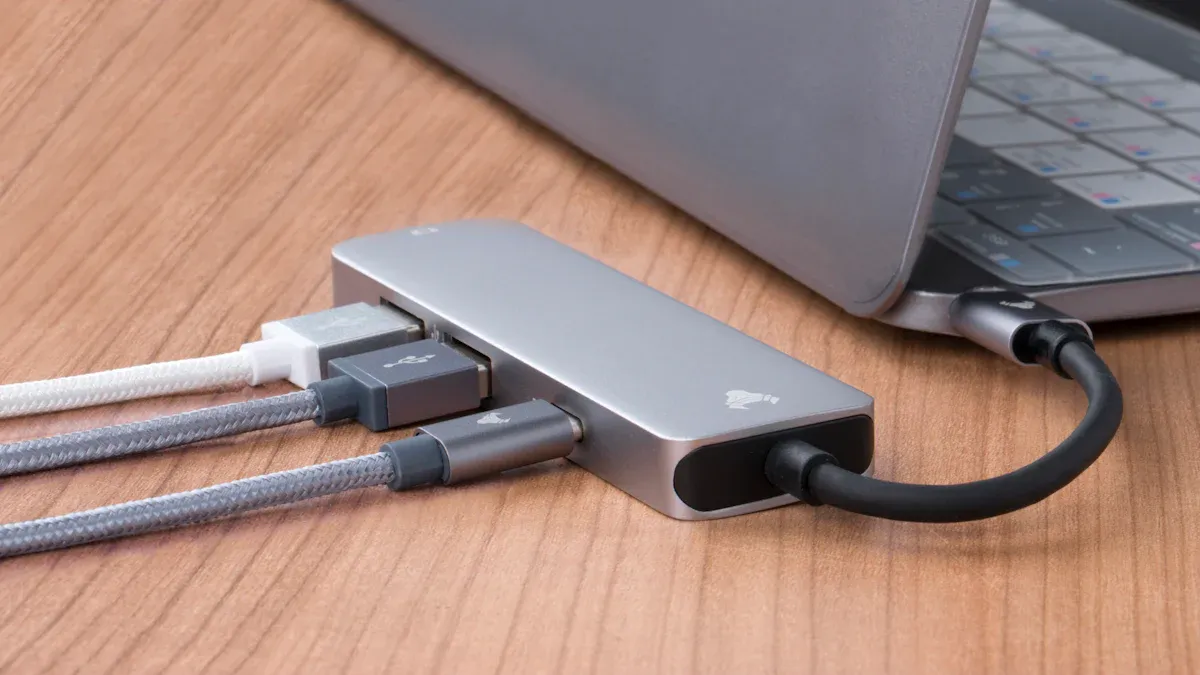
Start by picking the usb adapter that fits your needs. You can find adapters for charging, data transfer, or connecting different devices. Some usb adapters have multiple ports. Others are small and easy to carry.
Select USB Adapter Features and Colors
Decide which features matter most to you. Do you want a usb adapter with fast charging? Maybe you need a special color to match your brand. Suppliers offer many choices. You can pick from classic black, bright colors, or even metallic finishes.
Request a Quote
Contact the supplier and ask for a price. Tell them how many custom usb adapters you want. Ask about bulk discounts. Suppliers often give better prices for large orders.
Send Your Logo Artwork
Prepare your logo file. Make sure it looks good and is clear. You will send this to the supplier. They use your logo to print on the usb adapters.
Review the Proof
The supplier will show you a sample image. This is called a proof. Check the placement of your logo. Make sure the colors look right. If you want changes, tell the supplier.
Confirm Your Order
Once you like the proof, confirm your order. The supplier will start making your custom usb adapters.
Track Production and Delivery
Ask for updates on your order. Most suppliers will give you a timeline. You can track when your usb adapters will arrive.
Tip: Always ask for a sample before you place a big order. This helps you see the quality of the usb adapter and the printing.
Artwork Submission Tips
Getting your logo ready for printing on usb adapters is important. You want your brand to look sharp and clear. Here are some tips to help you:
Use High-Resolution Files
Your logo should be in a high-resolution format. This means the image is clear and not blurry. Most suppliers like files in PNG, AI, or EPS formats.
Check Colors and Effects
Some usb adapters cannot print gradients or shiny effects. Simple colors work best. If your logo has many colors, ask the supplier if they can print them.
Size Matters
Make sure your logo fits the usb adapter. If the adapter is small, use a simple version of your logo. Too much detail can get lost.
Include Clear Instructions
Tell the supplier where you want your logo placed. Do you want it on the front, back, or side of the usb adapter? Clear instructions help avoid mistakes.
Artwork File Type | Best For | Notes |
PNG | Most usb adapters | Transparent background |
AI | Vector printing | Editable, scalable |
EPS | High-quality print | Good for large orders |
Note: If you are not sure about your logo file, ask the supplier for help. They can check your artwork and suggest changes.
You can make your custom usb adapters stand out with good artwork. Take your time to prepare your logo. This will help your usb adapters look professional and match your brand.
Choosing the Right Adapter
Adapter Types and Uses
Choosing the right usb adapter can be confusing. You want one that works with your devices. It should also show your brand well. Different usb adapters do different jobs. Some are best for charging. Others are good for moving data. Some adapters have one port. Others have more than one port. Here is a quick guide to the main types you can customize:
USB Connector Type | Description | Typical Uses |
USB A-Type | Standard connector with a flat, rectangular interface. | Connects IT peripherals to PCs. |
USB B-Type | Square interface, traditionally used with printers. | Used in cell phones and external hard drives. |
USB Mini-B | Slim profile connector. | Used in smartphones and digital cameras. |
USB Micro-B | Very small 5-pin connector. | Common in smartphones, game controllers, and power banks. |
USB C-Type | Reversible, symmetrical interface. | Replaces older usb types and supports legacy connectors. |
Tip: If your logo has gradients or tints, ask your supplier which usb adapters are best for printing. Some adapters have smooth surfaces that make your logo look better.
Style and Color Selection
You can pick from many styles and colors for your custom usb adapters. Some adapters look simple and modern. Others are bright and bold. You can choose black, red, or even blue. Suppliers let you match the color to your brand. You can also pick matte or shiny finishes. If you want your usb adapters to stand out, pick a special shape or a bright color.
Want something small? Try a mini usb adapter.
Need more ports? Multi-port usb adapters let you connect more devices.
Like a fancy look? Metallic finishes make your usb adapters look cool.
Price Range Considerations
Custom usb adapters come in different price ranges. The price depends on what you pick. Here are the main things that change the price:
Material quality for conductors and insulation
Certification costs for meeting safety standards
Advanced features like usb4 support or GaN chipsets
Bulk discounts for large orders
Custom molds and tooling fees
Minimum order quantity flexibility, from single prototypes to big runs
If you want a basic usb adapter, it costs less. Special features or finishes cost more. Buying a lot at once saves money. Always ask your supplier for a price before you buy.
Note: Picking the right usb adapter makes your brand look good and keeps your devices working well.
Customization Options for USB Adapters
Logo Placement and Printing
When you order custom usb adapters, you get to choose where your logo goes. Most suppliers let you pick the front, back, or even the side of the usb adapter. Some usb adapters have big, flat spaces that make printing easy. Others have small or curved areas, so you might need a smaller logo or a simple design. If you want your usb adapters to look sharp, always check with your supplier about the best spot for your logo. They can show you a proof before printing starts.
Tip: If your usb adapter is tiny, pick a simple logo. Too much detail can get lost on small surfaces.
Printing Methods Overview
You have a few ways to print your design on usb adapters. Each method works best for different styles and surfaces. Here are some popular options:
UV printing gives you bright colors and lasts a long time.
Screen printing works well for bold, simple designs.
Full-color printing is great for detailed or photo-like images.
Laser engraving makes a permanent mark and looks classy.
Pad printing helps with designs on curved or uneven usb adapters.
Some printing methods have limits. For example, screen printing works best on flat surfaces. Laser engraving only works on metal or certain plastics. Always ask your supplier which method fits your usb adapter.
Printing Method | Limitations |
UV Printing | May not work on all materials. |
Screen Printing | Best for flat surfaces and simple designs. |
Full-Color Printing | Needs a smooth surface for best results. |
Laser Engraving | Only works on metal or special plastics. |
Pad Printing | Good for uneven surfaces, but not for large, detailed images. |
Artwork Requirements
To get the best results, you need to send the right file for your usb adapter. Most suppliers like PNG, AI, or EPS files. These formats keep your logo clear and sharp. If you use a photo or lots of colors, make sure the file is high-resolution. Always check the size. A big file works better than a small, blurry one. If you are not sure, ask your supplier for help. They can tell you if your file will look good on your usb adapters.
Note: Good artwork makes your usb adapters stand out and helps your brand look professional.
Bulk Orders and Production Timeline
Minimum Quantities
If you want to buy custom usb adapters, you should know about minimum order amounts. Most suppliers want you to buy a certain number. For example, MSL Forces needs you to order at least 100 pieces of their USB3.0 Magnetic Adapter TYPE C Adapter. Some manufacturers let you pick how many you want, but you should always ask them first.
Supplier | Product | Minimum Order Quantity |
MSL Forces | USB3.0 Magnetic Adapter TYPE C Adapter | 100 Pcs |
If you want usb adapters for gifts or promotions, buying a lot saves money. You pay less for each adapter, and you can give them to more people at events.
Buying usb adapters in bulk helps you save money.
Your logo will be on every adapter, so people remember your brand.
Usb adapters are useful gifts that people use often.
Tip: Ask your supplier if they offer bulk discounts. You might save more money if you order a lot of usb adapters.
Fast Production and Delivery
You want your custom usb adapters to arrive before your event. How long it takes depends on your order size and design. If you need a sample, you might get it in four weeks. Finished usb connectors can take up to twelve weeks.
Production Timeline | Factors to Expedite Delivery |
Prototypes: as little as 4 weeks | Quick approval of samples |
Finished connectors: as little as 12 weeks | Use stock components |
| Good communication with manufacturer |
You can get your order faster by approving samples quickly and picking stock usb parts. Talk to your supplier often to avoid delays. If you plan early, your usb adapters will be ready for your event.
Note: Fast production and bulk orders make usb adapters great for gifts and promotions.
Packaging and Extra Features
Custom Packaging Choices
You can make your usb adapters look nicer with custom packaging. Good packaging does more than hold your product. It helps your brand stand out. It keeps your adapters safe. Picking the right packaging shows you care about quality.
Custom packaging matches your brand style.
It keeps the adapter safe and neat.
Your product looks good in stores.
You can show your logo and info.
Strong design builds trust with buyers.
Simple packaging looks fancy.
Clean packaging brings in buyers.
Good packaging helps people like your product.
You can pick eco-friendly packaging too. Many companies use recycled paper, bamboo, or recycled plastic for usb packaging. These choices help the planet. They show your brand cares about the environment.
Material Type | Environmental Benefit | Customization Options |
Recycled Paper USB Drives | Made from recycled paper, cuts down on waste. | Logos and messages can be added. |
Environment-Friendly Wood | Breaks down easily, leaves no bad stuff. | Printing or etching possible. |
Bamboo USB Drives | Grows fast and looks nice. | Great for promotions. |
Recycled Plastic USB Drives | Uses old plastics, less need for new ones. | Many designs and colors available. |
Recycled ABS USB Drives | Strong, lasts longer, cuts down on waste. | Branding shows up well. |
Data Pre-Loading
You can ask your supplier to put data on your usb adapters. This makes your adapters good for marketing. You can add catalogs, videos, or presentations. People see your brand every time they use the adapter.
Pre-loaded usb drives work for many marketing ideas.
They are easy to use and help people know your brand.
You can share lots of files quickly.
Students and workers use them often, so your brand gets seen a lot.
You can send your message right to your customer.
Tip: Pre-loading data saves time and makes your usb adapters more helpful.
Gift Boxes and Accessories
Want your usb adapters to feel special? Try adding gift boxes or accessories. A nice box makes your product look like a fancy gift. You can pick simple boxes, shiny tins, or earth-friendly pouches. Some suppliers offer keychains, lanyards, or custom inserts to hold your adapters. These extras help your brand stand out. They make a good impression at events or as gifts.
Note: Small things like gift boxes or accessories can turn a plain usb adapter into a cool gift.
Tips for a Smooth Experience
Communicating with Suppliers
Talking clearly with your supplier makes things simple. You want answers that are easy to understand. Ask about the USB adapter style and where your logo will go. Find out how they will print your logo. Share your ideas with them. Listen to what they suggest. If you need your order by a certain date, tell them soon. Suppliers can help you choose what fits your money and time.
Ask for updates while your adapters are being made. Most suppliers will show you pictures or samples before printing your logo. If you see something wrong, say so right away. Fast feedback stops mistakes from happening. You can also ask for a sample before you buy a lot. This helps you know what you will get.
Tip: Keep all your messages together. This makes it easy to see what you agreed on.
Avoiding Common Mistakes
Ordering custom USB adapters can be hard sometimes. Many people make the same mistakes, but you can stop them. Here are some problems and how to keep them from happening:
Loose connections can happen if you plug and unplug too much or use adapters roughly.
Physical damage means cables get frayed, pins bend, or connectors break.
Compatibility issues show up if you use the wrong USB types or not enough power.
You can stop these problems before they start. Check your cables for damage. Pick adapters with strong, braided cables and strain relief. Store your adapters in a neat way to keep them safe.
Note: Taking care of your adapters helps them last longer.
Quality Assurance
You want your custom USB adapters to work well and look nice. Good manufacturers check their products many times. Here are things you should look for:
Quality Assurance Measure | Description |
Safety Certifications | Manufacturers get certifications from labs like Underwriters Laboratory (UL). |
Efficiency Certifications | Adapters meet energy standards such as DOE VII and COC. |
Environmental Certifications | ISO 14001 shows the company cares about the environment. |
Manufacturing Quality Standards | Advanced process lines keep production quality high. |
Build and Material Quality | Fire-resistant and energy-efficient materials like GaN boost safety. |
Testing Procedures | Rigorous tests, including USB-IF compliance, ensure safety and performance. |
Customer Service | Good support and access to engineers help solve problems fast. |
Ask your supplier about these checks. If they do these things, you can trust their products. Quality checks keep your brand and customers safe.
You can make your brand stand out with custom usb adapters. Start by picking the right style and sending your logo to the supplier. Customization lets you match your brand and impress people at trade shows or client events. Ordering in bulk saves money and helps you reach more customers. Ask for samples before you buy a lot. This way, you know the quality fits your needs. If you want your campaign to work, focus on design, packaging, and safety.
FAQ
How do you choose the best USB adapter for your logo?
Pick an adapter with a smooth, flat surface. Simple logos look best. Ask your supplier for advice. They can show you samples and help you match your brand colors.
Can you order just a few custom USB adapters?
Most suppliers need a minimum order, usually around 100 pieces. Some may offer smaller quantities for samples. Always check with your supplier before you order.
What file type works best for logo printing?
You should use high-resolution files like PNG, AI, or EPS. These keep your logo sharp and clear. If you need help, ask your supplier to check your artwork.
How long does it take to get your custom USB adapters?
Production time depends on your order size and design. Samples may take four weeks. Large orders can take up to twelve weeks. Fast approval helps speed things up.
Can you get eco-friendly packaging for your USB adapters?
Yes! Many suppliers offer recycled paper, bamboo, or recycled plastic packaging. Eco-friendly options help your brand stand out and show you care about the environment.