Thunderbolt Docking Station Guide
Thunderbolt 4 vs 5: Which Dock Should You Choose?
Thunderbolt 5 doubles the standard bidirectional bandwidth of Thunderbolt 4, increases the minimum PCIe data requirement, and expands the possibilities for high-resolution displays, NVMe storage, and performance-oriented docking stations. However, Thunderbolt 4 remains a practical choice for many office and professional deployments. The right generation depends on what the workstation actually needs to do.
Quick Answer
Choose Thunderbolt 4 when the target workstation mainly needs conventional displays, office peripherals, Gigabit-class networking, moderate external storage, and established compatibility with an existing laptop fleet. Choose a Thunderbolt 5 docking station when the system needs more demanding display configurations, faster PCIe storage, higher-performance networking, stronger charging, or a more capable single-cable workstation architecture.
Thunderbolt 4 has become a mature connectivity platform for business laptops, workstations, displays, docking stations, external SSDs, and other professional accessories. Thunderbolt 5 builds on that ecosystem rather than replacing its basic concept: one USB-C-shaped connection can carry high-speed data, display signals, and power.
The main difference is not the connector. It is the performance envelope behind that connector.
For buyers, IT teams, distributors, product managers, and OEM docking station projects, this distinction matters because a dock is rarely selected for one isolated specification. A complete workstation may need monitors, storage, Ethernet, USB peripherals, charging, audio, and card-reader functions at the same time.
This guide therefore compares Thunderbolt 4 vs 5 from a practical docking station and sourcing perspective rather than treating the decision as a simple “40Gbps vs 80Gbps” specification race.
Thunderbolt 4 vs 5 at a Glance
| Feature | Thunderbolt 4 | Thunderbolt 5 | Why It Matters for a Dock |
| Bidirectional bandwidth | Up to 40Gbps | Up to 80Gbps | Higher upstream capability for performance-oriented workstation designs |
| Bandwidth Boost | No | Up to 120Gbps transmit | Additional transmit bandwidth for display-heavy workloads |
| Minimum PCIe data requirement | 32Gbps | 64Gbps | Important for high-performance PCIe storage and related devices |
| Display technology | Earlier DisplayPort generation | DisplayPort 2.1 support | More headroom for newer high-resolution and high-refresh display applications |
| USB foundation | USB4 generation | USB4 Version 2 | Part of the newer connectivity architecture |
| Physical connector | USB-C | USB-C | Connector shape alone does not identify available protocol capability |
| Best fit | Established professional and office deployments | Next-generation high-performance workstations | Generation should follow the real deployment requirement |
These technology-level differences are defined by the Thunderbolt platform rather than by any one finished docking station. Buyers who need the underlying standard details can review the Intel Thunderbolt technology overview.
Important distinction: Thunderbolt specifications define the platform ceiling and mandatory capabilities. A finished docking station still has its own controller architecture, display outputs, USB speeds, power design, storage interface, and compatibility limits. Always evaluate the product specification separately from the Thunderbolt generation.
What Actually Changes from Thunderbolt 4 to Thunderbolt 5?
The most fundamental change is the host connection. Thunderbolt 4 operates at up to 40Gbps, while Thunderbolt 5 provides up to 80Gbps of bidirectional bandwidth during normal operation.
Thunderbolt 5 also introduces Bandwidth Boost. When the system encounters a high-volume display workload, the link can be rebalanced to provide up to 120Gbps in the transmit direction while retaining up to 40Gbps in the other direction.
That 120Gbps figure should not be interpreted as a normal 120Gbps file-transfer connection. It is an asymmetric operating mode designed to make more transmit bandwidth available when display traffic requires it.
The other major change for docking applications is PCIe capability. Thunderbolt 5 raises the minimum PC PCIe data requirement from 32Gbps to 64Gbps. This is particularly relevant when a dock includes or connects to PCIe-based storage.
For a deeper explanation of link rate, Bandwidth Boost, protocol overhead, and why real SSD transfer speed should not be confused with raw Thunderbolt bandwidth, see our guide on how fast Thunderbolt 5 is.
When Does Thunderbolt 5 Make a Meaningful Display Difference?
Display requirements are one of the clearest reasons to consider Thunderbolt 5, but the decision should be based on the required monitor topology rather than on an “8K” label alone.
A standard office workstation with one or two conventional external displays may already be well served by Thunderbolt 4. The additional capabilities of Thunderbolt 5 become more relevant as resolution, refresh rate, and monitor count increase.
Thunderbolt 5 is particularly attractive for:
8K display workflows
Multiple high-resolution external monitors
High-refresh-rate 4K displays
Video editing and color-grading workstations
CAD, engineering, and visualization environments
Financial trading and analytics desks
Software-development environments with large monitor layouts
However, a Thunderbolt 5 label does not guarantee that every host and every dock can drive the same monitor configuration. The GPU, operating system, host implementation, dock topology, cables, display interfaces, resolution, refresh rate, and monitor capabilities all remain part of the system.
Procurement Rule
Do not approve a dock only because the specification says “8K” or “triple display.” Define the exact host model, operating system, monitor count, resolution, refresh rate, and connection path before volume deployment.
Why Thunderbolt 5 Is More Relevant to NVMe Storage
External storage is a different decision from display capability. Here, the important Thunderbolt 5 change is the higher PCIe data requirement.
Workstations used for video production, large engineering projects, local development environments, virtual machines, backups, and large datasets may depend heavily on external or dock-integrated SSD performance. For these use cases, a stronger PCIe path is more useful than simply adding more USB ports.
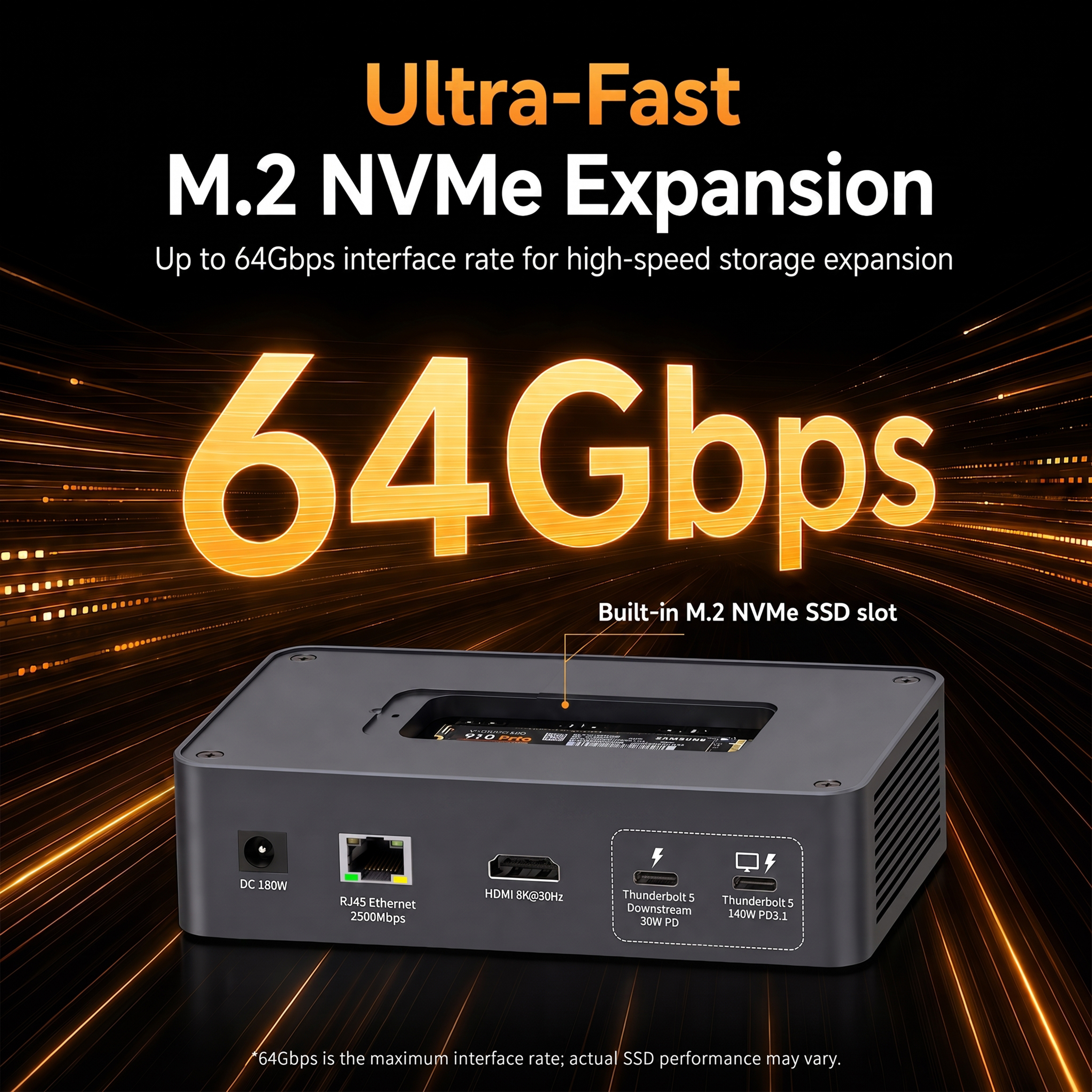
An integrated M.2 slot also changes the physical workstation design because storage can be incorporated into the dock instead of requiring a separate SSD enclosure.
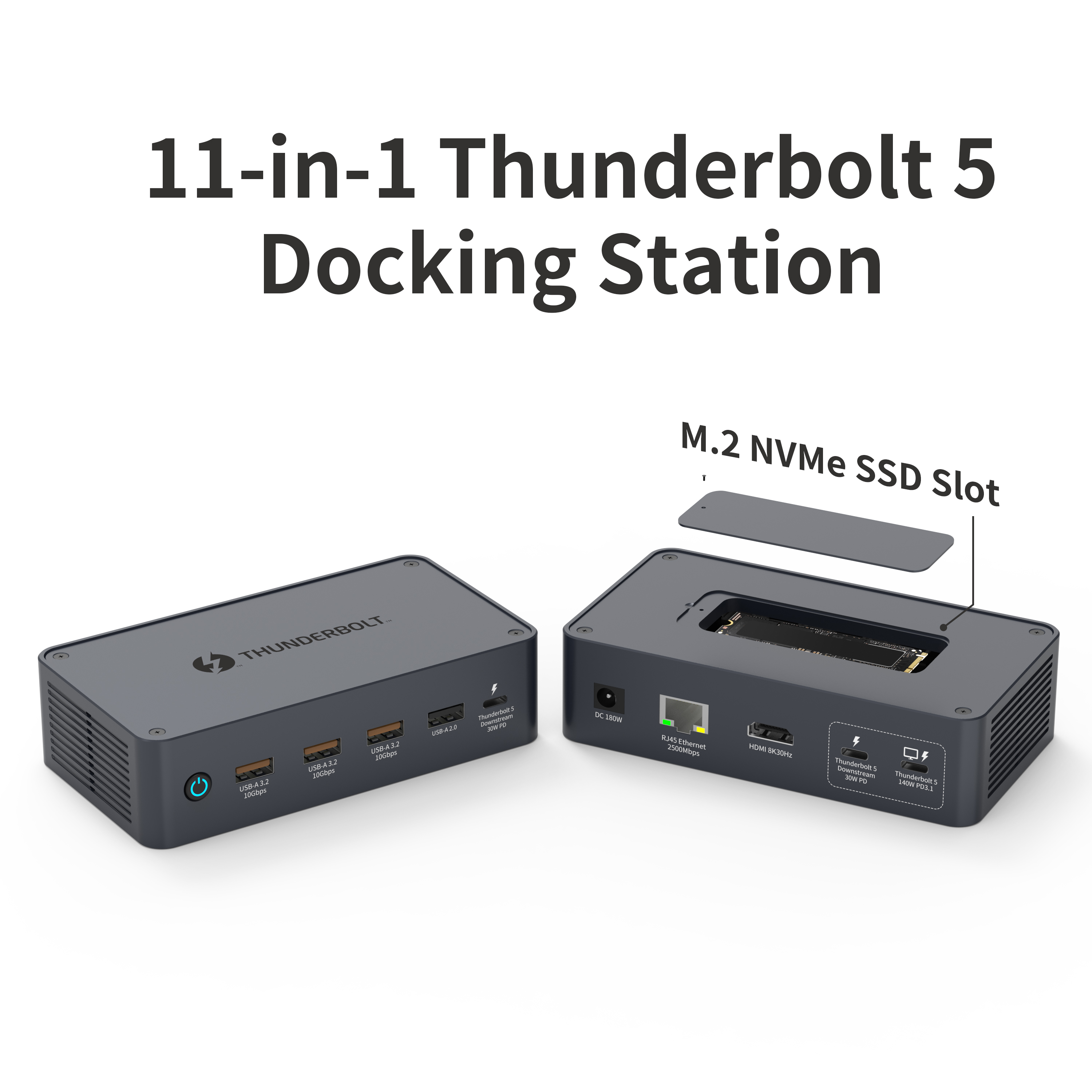
Our 11-in-1 Thunderbolt 5 Docking Station integrates M.2 NVMe storage into a compact professional docking platform.
Our 11-in-1 Thunderbolt 5 Docking Station includes an M.2 NVMe SSD slot supporting 2230, 2242, 2260, and 2280 form factors, with an interface rate specified at up to 64Gbps.
The 64Gbps value is the M.2 interface rate rather than a guaranteed real-world SSD transfer result. Actual performance also depends on the SSD, controller, host system, thermal conditions, file size, workload, and protocol overhead.
Thunderbolt 4 vs 5 for Laptop Charging
Charging is often discussed together with Thunderbolt generation, but buyers should separate platform capability from the actual power design of the dock.
The finished docking station determines how much power is delivered to the host. The power adapter, DC input, USB Power Delivery implementation, cable, host charging limit, and power budget for downstream devices all affect the result.
Our current Thunderbolt 5 models in this guide support up to 140W PD 3.1 host charging and use up to 180W DC input. The power adapter is not included with these configurations, so that requirement should be considered during sourcing and bundle planning.
For charging, verify five separate values:
Maximum host PD output
Required DC input
Power reserved for downstream ports
Cable power rating
Maximum charging rate accepted by the target laptop
This avoids a common sourcing mistake: treating the theoretical charging capability of a connectivity standard as if it were automatically the charging output of every dock.
Is Thunderbolt 5 Backward Compatible with Thunderbolt 4?
Backward compatibility is one of the most important practical considerations for companies managing mixed laptop fleets.
Thunderbolt technology is designed to interoperate across generations, but compatibility and full performance are different questions. An older component in the connection can reduce the available bandwidth or features.
For example, a Thunderbolt 4 accessory connected to a Thunderbolt 5 computer remains a Thunderbolt 4-class accessory. Likewise, a Thunderbolt 5 dock connected to an older host can only use the modes that the host and dock mutually support.
USB-C also should not be treated as proof of Thunderbolt compatibility. USB-C describes the physical connector; Thunderbolt, USB4, DisplayPort, PCIe, and USB Power Delivery describe capabilities that may or may not be implemented through that connector.
For a full host-dock compatibility matrix and deployment checklist, read our dedicated guide: Is Thunderbolt 5 Backwards Compatible?
When Thunderbolt 4 Is Still the Better Choice
A newer interface is not automatically the better commercial choice for every product line or IT deployment.
Thunderbolt 4 remains highly relevant when the customer base already uses Thunderbolt 4 computers, the required display configuration is moderate, storage performance is not PCIe-intensive, and price positioning matters more than maximum future capability.
Thunderbolt 4 may be the more rational choice for:
Standard corporate office fleets
Conventional productivity workstations
Existing Thunderbolt 4 laptop deployments
Moderate external SSD usage
Projects with tighter target pricing
Markets where Thunderbolt 5 host penetration remains limited
For buyers who still need a high-port-count Thunderbolt 4 solution, our 14-in-1 Thunderbolt 4 Docking Station provides triple 4K display expansion, 100W PD, USB connectivity, and Gigabit Ethernet.
We also offer an 18-port Thunderbolt 4 docking station for projects that prioritize broader I/O expansion within a Thunderbolt 4 platform.
When a Thunderbolt 5 Docking Station Makes More Sense
Thunderbolt 5 becomes more compelling when the product or workstation is expected to remain relevant as display, storage, and network requirements increase.
The strongest use cases are not simply “users who want the newest technology.” They are users whose actual workflows can make use of the additional platform capabilities.
| Workstation Type | Typical Requirement | Why TB5 Can Be Relevant |
| Creative workstation | High-resolution monitors, fast storage, card media, charging | Display and PCIe capabilities become more important |
| Engineering / CAD | Large displays, local files, network access, peripherals | Supports more ambitious workstation configurations |
| Development / IT | Multiple monitors, storage, wired network, device testing | Higher-performance dock architecture and expansion |
| Trading / finance | Multiple displays and stable wired networking | Useful where monitor topology and workstation density are priorities |
| Desktop replacement | One cable for display, network, storage, peripherals, and charging | Allows a more capable single-dock desktop environment |
11-in-1 vs 18-in-1 Thunderbolt 5 Docking Station
Our current Thunderbolt 5 Docking Stations include an 11-in-1 configuration and a broader 18-in-1 configuration. Both are based on an up to 80Gbps Thunderbolt 5 host connection and support up to 140W PD 3.1 host charging, but they address different I/O requirements.
| Comparison Point | 11-in-1 TB5 Dock | 18-in-1 TB5 Dock |
| Host | Thunderbolt 5, up to 80Gbps | Thunderbolt 5, up to 80Gbps |
| Host charging | Up to 140W PD 3.1 | Up to 140W PD 3.1 |
| Video outputs | HDMI 2.1 + 2 downstream Thunderbolt 5 | HDMI 2.1 + DP 2.1 + downstream Thunderbolt 5 |
| M.2 NVMe | Yes, up to 64Gbps interface rate | Yes, up to 64Gbps interface rate |
| Ethernet | 2.5Gbps | 2.5Gbps |
| USB strategy | Compact high-speed expansion | Broader mix of USB-A and USB-C ports |
| Additional I/O | Focused professional dock architecture | Card-reader and audio connectivity included |
| Best fit | Compact performance-oriented workstations | All-in-one workstation consolidation |
11-in-1 Thunderbolt 5 Docking Station
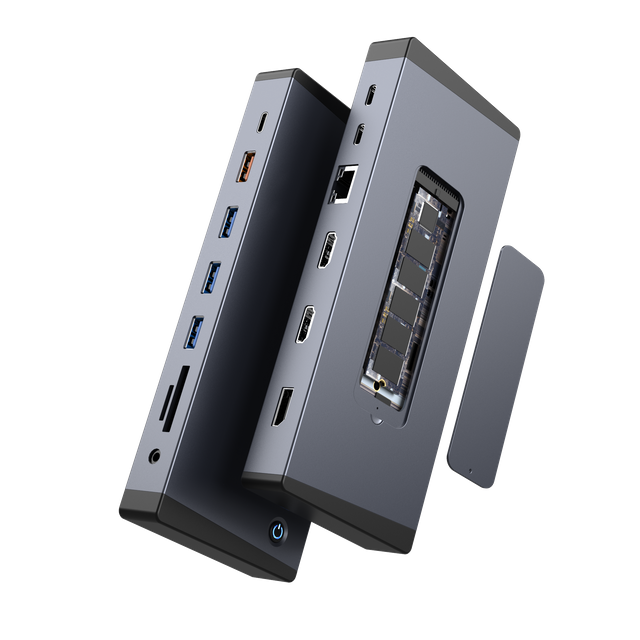
Our 11-in-1 model prioritizes high-speed core functions without maximizing the number of physical ports. It combines an up to 80Gbps host connection, HDMI 2.1, two downstream Thunderbolt 5 connections, three 10Gbps USB-A ports, 2.5Gbps Ethernet, M.2 NVMe storage expansion, and up to 140W PD 3.1 host charging.
This configuration is suitable for professional product lines where display, storage, wired networking, and charging are more important than offering the broadest possible legacy I/O mix.
18-in-1 Thunderbolt 5 Docking Station
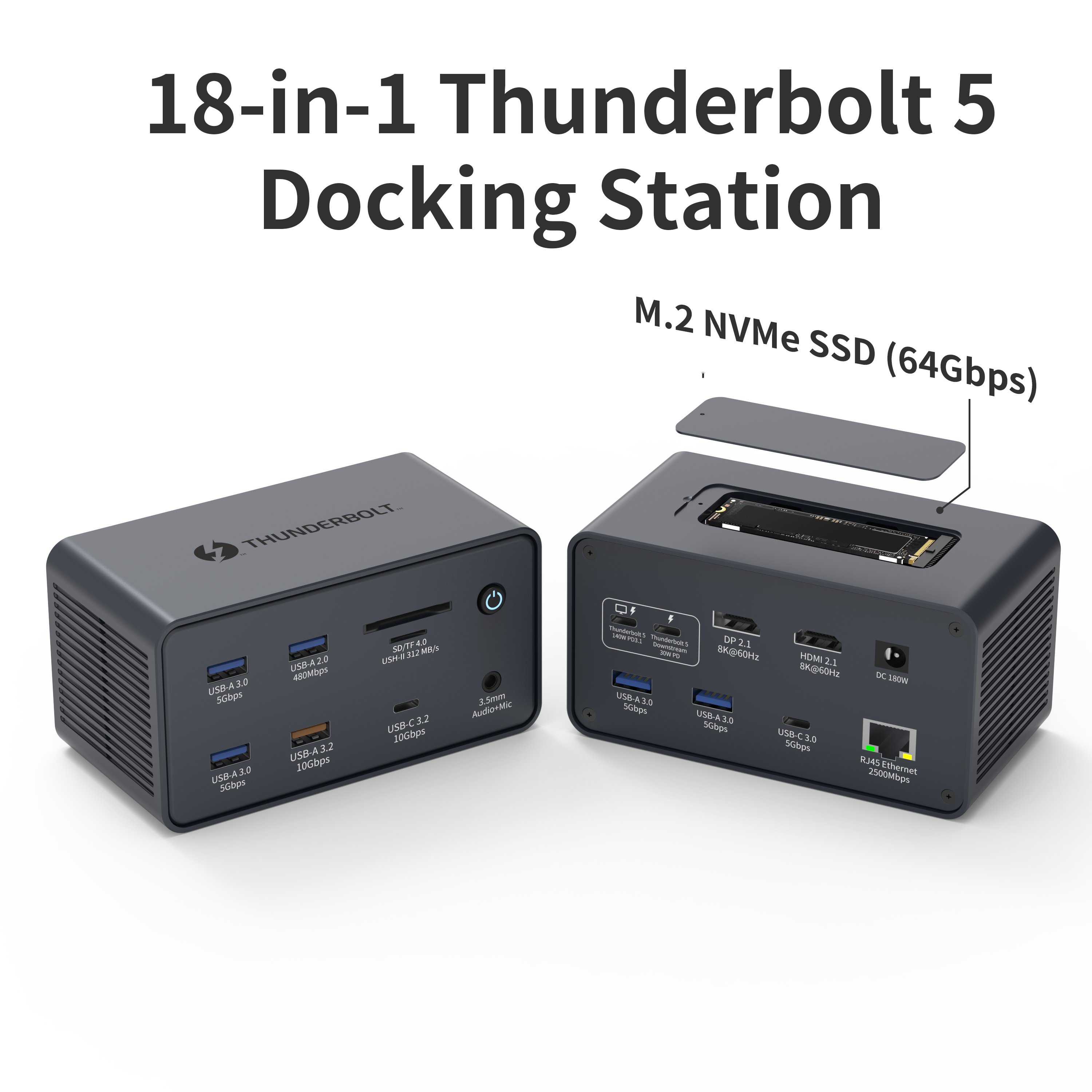
Our 18-in-1 Thunderbolt 5 Docking Station expands the port mix for broader workstation consolidation.
Our 18-in-1 Thunderbolt 5 Docking Station adds DisplayPort 2.1, a broader mix of USB-A and USB-C interfaces, card-reader connectivity, and 3.5mm audio alongside its Thunderbolt 5, HDMI 2.1, 2.5Gbps Ethernet, M.2 NVMe, and 140W charging functions.
The 18-in-1 configuration is therefore more appropriate for a desktop-replacement product where one dock is expected to replace several standalone adapters, storage enclosures, card readers, and peripheral connections.
What Professional Buyers Should Check Before Selecting a Thunderbolt 5 Dock
The Thunderbolt generation is only the first layer of a sourcing decision. Before approving a product for distribution, private label, or enterprise deployment, define the full workstation requirement.
1. Target Host Platform
List the laptop models, Thunderbolt or USB4 generation, operating systems, GPU limitations, and host charging capability. Compatibility should be validated against real target systems rather than connector shape alone.
2. Monitor Topology
Define the number of monitors, resolution, refresh rate, display connectors, and whether the same configuration must work across Windows and macOS systems.
3. Storage Requirement
Decide whether users need only standard USB storage or whether integrated NVMe storage is part of the workstation concept. For NVMe designs, verify SSD form factor, thermal behavior, interface rate, and actual workload expectations.
4. USB Port Mix
Do not describe every USB port simply as “high speed.” Specify the required quantity of USB-A and USB-C ports and their individual 5Gbps, 10Gbps, charging, or legacy-device roles.
5. Wired Network Speed
Gigabit Ethernet remains adequate for many office deployments. 2.5Gbps Ethernet becomes more useful for faster NAS environments, large local transfers, high-speed broadband, and professional network workflows.
6. Power Architecture
Confirm host PD output, DC input, whether the adapter is included, downstream charging requirements, cable rating, and the power accepted by the target laptops.
7. Deployment and Commercial Requirements
For OEM and ODM projects, also define housing, logo, packaging, manuals, target markets, compliance requirements, sample validation, quantity, and forecast before finalizing the SKU.
Thunderbolt 4 vs 5 as a Product-Line Decision
For distributors and electronics brands, the choice between Thunderbolt 4 and Thunderbolt 5 also affects product positioning.
Thunderbolt 4 can continue to serve mature professional markets where compatibility, established host penetration, and cost control are priorities. Thunderbolt 5 is better positioned as a higher-performance platform for newer laptops and more demanding workstation scenarios.
This means a product line does not necessarily need to replace every Thunderbolt 4 SKU with Thunderbolt 5. The two generations can address different price tiers, host populations, and application requirements.
Product-planning principle: choose the interface generation after defining the target user, host ecosystem, display topology, storage requirement, charging target, and price position. Do not select the generation first and then add ports merely to fill a specification sheet.
Is Thunderbolt 5 Worth the Upgrade?
For a conventional office user with standard monitors, basic peripherals, and moderate storage needs, Thunderbolt 4 remains capable and may offer a better cost-to-requirement balance.
For a new workstation built around high-resolution displays, fast NVMe storage, 2.5Gbps networking, stronger laptop charging, and a broader single-cable desktop architecture, Thunderbolt 5 becomes much easier to justify.
The upgrade should therefore be measured against the workload, not against the generation number.
A buyer who only needs the same office functions already handled by a Thunderbolt 4 dock may see little immediate benefit. A buyer designing a new high-performance product line, however, may value Thunderbolt 5 because it offers more room for the workstation requirements expected over the product's commercial lifetime.
OEM and ODM Thunderbolt Docking Station Projects
We manufacture USB-C hubs and docking stations for brands, distributors, and commercial buyers. Our OEM and ODM docking station services cover product specification development, product design, prototyping, production, branding, private labeling, packaging, and related project requirements.
For a Thunderbolt docking station project, the most useful inquiry is not simply “I need a Thunderbolt 5 dock.” A clearer RFQ should define the intended host platform, port combination, monitor topology, PD target, network speed, storage requirement, housing, packaging, target market, and expected order quantity.
We can then evaluate whether the application is better suited to a Thunderbolt 4 platform, one of our current Thunderbolt 5 configurations, or a different docking architecture.
Planning a Thunderbolt Docking Station Project?
Send us your target host, required display outputs, monitor configuration, USB port mix, Ethernet speed, charging target, storage requirements, branding, packaging, and expected quantity. Our team can review the specification before quotation and sampling.
Contact Us FAQ: Thunderbolt 4 vs 5
Is Thunderbolt 5 twice as fast as Thunderbolt 4?
Thunderbolt 5 provides up to 80Gbps bidirectional bandwidth, compared with up to 40Gbps for Thunderbolt 4. However, this does not mean every individual device connected to a Thunderbolt 5 dock transfers data at twice the speed. Actual performance depends on the device, protocol, dock architecture, and host.
What is the 120Gbps Thunderbolt 5 mode?
Thunderbolt 5 Bandwidth Boost can rebalance the link to provide up to 120Gbps in the transmit direction when high display bandwidth is needed, while retaining up to 40Gbps in the opposite direction. It should not be described as a normal symmetrical 120Gbps file-transfer mode.
Can a Thunderbolt 5 docking station work with a Thunderbolt 4 laptop?
Compatible Thunderbolt 5 docks can operate with older Thunderbolt hosts when the required fallback mode is supported, but the older host becomes a limiting part of the system. Full Thunderbolt 5 performance requires a suitable Thunderbolt 5 host, dock, cable, and device path.
Is Thunderbolt 5 better for external SSDs?
Thunderbolt 5 raises the minimum PCIe data requirement from 32Gbps to 64Gbps, which makes the platform more suitable for higher-performance PCIe storage. Actual SSD transfer speed still depends on the SSD, controller, enclosure or dock, host, thermals, and workload.
Does Thunderbolt 5 automatically mean 240W laptop charging?
No. The finished device determines actual charging output. Our Thunderbolt 5 docking station configurations referenced here support up to 140W PD 3.1 host charging. Always check the dock specification, power adapter, cable, and laptop charging capability.
Does Thunderbolt 5 guarantee three 8K displays?
No. Display capability depends on the specific dock, host GPU, operating system, implementation, cables, and displays. Product-level monitor specifications should be validated with the exact target workstation before deployment.
Should a distributor stop selling Thunderbolt 4 docks?
Not necessarily. Thunderbolt 4 can remain relevant for established laptop fleets, conventional professional workstations, and price-sensitive product tiers. Thunderbolt 5 can be added as a higher-performance option for newer applications rather than automatically replacing every Thunderbolt 4 SKU.
What should be included in a Thunderbolt docking station RFQ?
Include the target Thunderbolt generation, host models, display outputs, required monitor topology, USB port types and speeds, Ethernet, storage expansion, host charging target, power input, housing, branding, packaging, destination markets, expected quantity, and sample requirements.
Technical note: Thunderbolt bandwidth and platform capabilities in this guide refer to technology-level specifications published by Intel. Product-level display, storage, networking, and charging values refer to the YUANSHAN docking station configurations linked in the article. Real-world results vary according to the host computer, operating system, GPU, cable, monitor, SSD, peripheral, power negotiation, and system configuration.