You might wonder if Thunderbolt is truly faster than Ethernet in 2025. Recent speed tests confirm Thunderbolt faster than standard Ethernet connections. However, 10 Gbps Ethernet can outperform Thunderbolt at its peak. In practical situations, consider how Thunderbolt faster speeds impact gaming, file transfers, and work tasks. While speed is crucial, consistency and reliability are also key factors when choosing the best connection.
Key Takeaways
Thunderbolt connections can go as fast as 9.48 Gbps. This makes them great for moving files quickly and for gaming. 10 Gbps Ethernet can be even faster than Thunderbolt sometimes. This is true when the network is very busy. Both Thunderbolt and Ethernet give you strong connections. But Thunderbolt is simpler for most people to set up and use. If you need to move big files, Thunderbolt 10G Ethernet adapters help a lot. They can make transfer times much shorter. This can save you many hours. Think about what you need most. Pick Thunderbolt if you want speed and flexibility. Pick Ethernet if you need the best performance in big networks.
Thunderbolt Faster Than Ethernet?
2025 Speed Test Overview
People want to know if Thunderbolt faster connections help in 2025. Many people test their devices to find the best speed. Recent tests show Thunderbolt faster speeds can reach 9.48 Gbps with an Orico adapter. You can move big files fast and connect many accessories quickly. Thunderbolt works with USB4 ports, so you have more choices for your setup.
Ethernet is still important for networks. In busy places, Ethernet keeps up with Thunderbolt faster speeds. Some built-in Ethernet NICs reach 5 Gbps easily. There is also 10 Gbps Ethernet, which can be faster than Thunderbolt faster speeds. This is good if you need the highest speed for work.
Tip: If you use webFrame or similar tools, you can switch between Ethernet and Thunderbolt faster connections. This helps you stay connected and keep your network strong.
Direct Comparison Results
You can see the main speed differences by looking at the numbers. Here is a table that shows how Thunderbolt faster speeds compare to 10 Gbps Ethernet in 2025:
Technology | Speed (Gbps) | Notes |
Thunderbolt (Orico Adapter) | 9.48 | Speeds stay steady in local tests |
10 Gbps Ethernet | Up to 10 | Real speeds can change with conditions |
Thunderbolt faster speeds are close to 10 Gbps Ethernet, but Ethernet can be a little faster sometimes. You may see that Thunderbolt faster connections work well for most jobs. If you want the very top speed, 10 Gbps Ethernet might be better. For most people, Thunderbolt faster gives quick data transfer and a steady connection.
Thunderbolt faster speeds let you move files fast.
Ethernet works well in busy networks.
You can get 10 Gbps with Thunderbolt or USB4 ports.
Ethernet NICs often reach 5 Gbps with no problem.
Both choices give you flexible network setups.
When picking between Thunderbolt faster and Ethernet, think about what you need. If you want fast file transfers or to connect accessories, Thunderbolt faster is a good choice. If you need the highest speed in a big network, 10 Gbps Ethernet may be best.
Thunderbolt Speed Results
Max Transfer Rates
Thunderbolt technology in 2025 shows big numbers. Thunderbolt 4 can reach 40 Gbit/s. Thunderbolt 5 goes up to 80 Gbit/s. Boost Mode on Thunderbolt 5 can hit 120 Gbit/s. These speeds let you move huge files very fast. New thunderbolt ports are much quicker than old ones.
Thunderbolt 4: Maximum bandwidth is 40 Gbit/s
Thunderbolt 5: Maximum bandwidth is 80 Gbit/s
Thunderbolt 5 Boost Mode: Up to 120 Gbit/s
Note: You need the right devices and cables for top speeds.
Real-World Performance
You might ask how these speeds work in real life. The real data transfer speed is often lower than the highest possible speed. The table below shows how thunderbolt versions work when moving files:
Thunderbolt Version | Theoretical Maximum Speed | Effective Maximum Speed |
Thunderbolt 2 | 40 Gb/s | 32 GB/s |
Thunderbolt 3 | 40 Gb/s | 32.05 Gb/s |
Thunderbolt 4 | 40 Gb/s | 32 GB/s |
The effective speed is usually less than the maximum. Devices, cables, and software can slow things down. Thunderbolt still gives fast and steady data transfer for most jobs.
Bottlenecks
Some things can slow down thunderbolt performance. These problems can make your data transfer slower.
Non-certified cables lower speed to USB4 levels.
Very long passive cables cut down bandwidth.
Device bottlenecks make the connection use the slowest device.
Charger mismatch means you cannot get 240 W unless both host and charger are EPR-compatible.
Display limits stop some GPUs or operating systems from using two 8K monitors.
To get the best speeds, use certified cables and check your devices. Paying attention to these things helps you get the most from thunderbolt.
Ethernet Speed Results
Max Transfer Rates
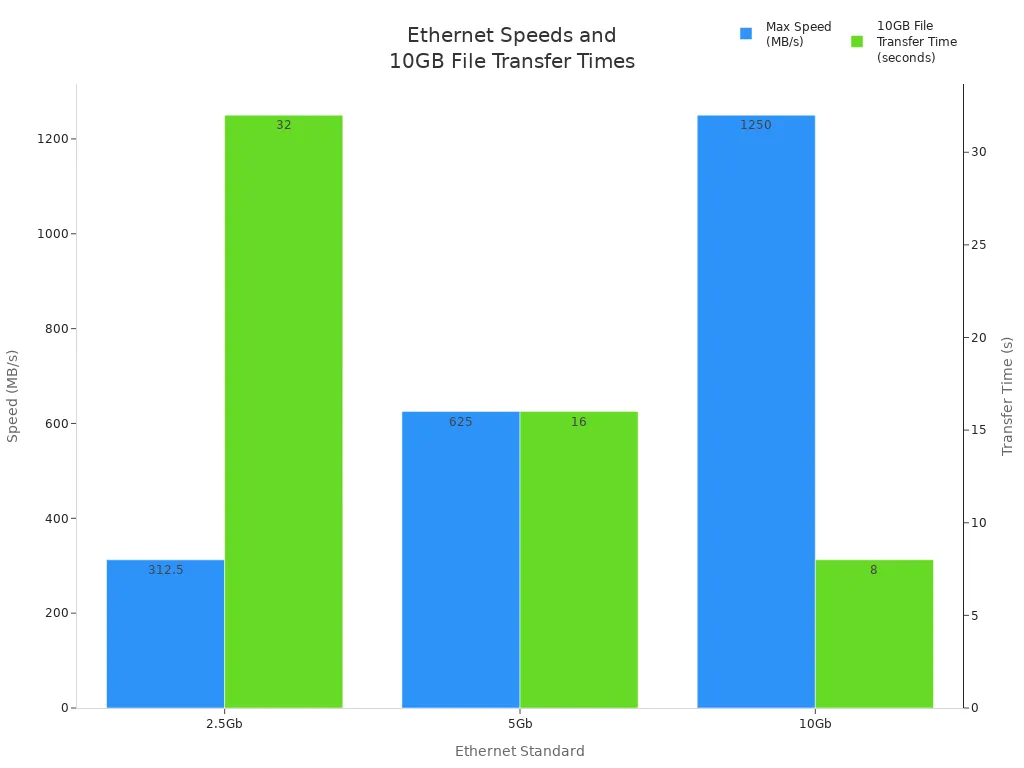
Ethernet speed depends on its standards. In 2025, ethernet gives you many fast choices. The table below shows how each standard works with a 10GB file:
Ethernet Standard | Maximum Speed (Mbps) | Maximum Speed (MB/s) | 10GB File Transfer Time |
2.5Gb | 2,500 | 312.5 | ~32 seconds |
5Gb | 5,000 | 625 | ~16 seconds |
10Gb | 10,000 | 1,250 | ~8 seconds |
You can see that 10Gb ethernet moves big files fast. Using a direct ethernet cable gives you the top speed for your setup.
Real-World Performance
Ethernet does not always hit its top speed. Many things can slow it down in real life. The table below shows how real speeds compare to the highest possible:
Connection Type | Advertised Speed | Real-World Speed | Factors Affecting Speed |
1 Gbps | 1 Gbps | Often lower | Network congestion, hardware limitations, cabling quality |
10 Gbps | 10 Gbps | Often lower | Network congestion, hardware limitations, cabling quality |
You might use ethernet for streaming videos, gaming, or moving big files. Many people also use it to sync data to the cloud. These activities show why ethernet speed matters every day.
Bottlenecks
Some things can slow down ethernet. Bottlenecks make your connection slower and affect your experience. The table below lists common problems:
Bottleneck Type | Description |
Protocol Overhead | iSCSI and FCoE have more overhead than NVMe-oF, which affects latency and CPU use. |
Lossless Capabilities | Ethernet needs DCB features for lossless work, making things more complex for steady performance. |
Host CPU Utilization | Software initiators for iSCSI use more CPU than FC HBAs, which can lower performance. |
Tip: You can make ethernet faster by using good cables and checking your hardware. Always pick the right equipment for what you need.
Thunderbolt vs Ethernet Analysis
Speed Metrics
You want a fast connection for your work or games. Thunderbolt gives very high speed, especially with new adapters. You can get up to 9.48 Gbps in real tests. This lets you move big files fast. Ethernet is also fast. Standard Ethernet can reach 5 Gbps. But 10 Gbps Ethernet can go even faster. If you want the fastest speed, 10 Gbps Ethernet is a bit better. Both Thunderbolt and Ethernet move data quickly. Thunderbolt is easier for most people to set up. You get fast speed for gaming, editing videos, and moving big files.
Latency & Stability
You want your connection to react quickly. Thunderbolt has very low latency. This is great for gaming and streaming videos. You get smooth use with almost no lag. Ethernet is also made for low latency. Sometimes, you may see delays if your network is busy or your gear is old. Most times, Ethernet gives steady performance.
Thunderbolt: Very low latency, good for real-time use.
Ethernet: Low latency, but can slow down if busy or old.
Reliability
You want your connection to always work. Many people say Thunderbolt works well with no bugs, especially with OWC on macOS. Some have used their Thunderbolt dock for six years with no issues. Ethernet is known for being reliable in big networks. You can trust both Thunderbolt and Ethernet for a long time. If you want a connection that lasts, both are good choices.
Pick Thunderbolt if you want easy setup and fast speed. Choose Ethernet if you need the fastest speed in a big network or want steady performance.
Use Cases
Gaming
You want fast and stable connections when you play games. Thunderbolt gives you low latency and quick response times. This helps you avoid lag and keeps your gameplay smooth. Ethernet also works well for gaming, especially in busy homes or offices. If you use 10GbE Ethernet, you get even more stability and speed. Many gamers choose Ethernet for tournaments because it stays steady under heavy use. Thunderbolt works best if you want to connect extra screens or devices while you play.
File Transfers
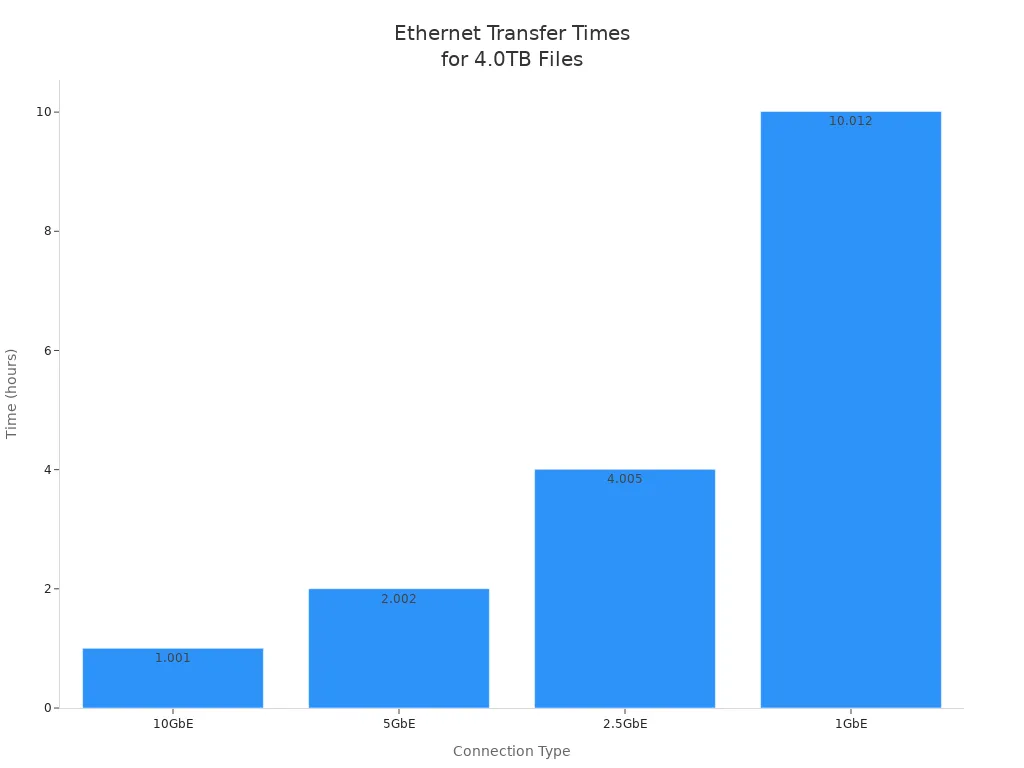
You often need to move big files between computers or drives. Thunderbolt and high-speed Ethernet both help you finish large file transfers quickly. Standard Ethernet, like 1GbE, takes much longer. For example, moving 4.0TB of 4K video footage can take over 10 hours on 1GbE. With 10GbE, you finish in about 1 hour. Thunderbolt 10G Ethernet adapters let you reach speeds over 900MB/s, so you save a lot of time.
Connection Type | Time to Transfer 4.0TB of 4K Footage |
10GbE | 1h 0m 4s – Save 9 hours! |
5GbE | 2h 0m 8s |
2.5GbE | 4h 0m 17s |
1GbE | 10h 0m 44s |
You see up to a 90% decrease in time for large file transfers when you use Thunderbolt 10G Ethernet adapters. This makes a big difference if you work with videos or photos.
Professional Workflows
You need fast transfers in professional environments like video editing or content creation. Thunderbolt 10G Ethernet adapters help teams work together by moving large file transfers quickly. Editors can share projects without waiting for hours. This keeps your projects on schedule and within budget. Standard Ethernet may slow down your workflow if you handle large file transfers every day. Thunderbolt and 10GbE Ethernet both support smooth collaboration and fast results.
Tip: Use Thunderbolt to Ethernet adapters if your device does not have a built-in 10GbE port. This upgrade gives you faster transfers and better performance for large file transfers.
Practical Factors
Compatibility
You want your devices to work well together. In 2025, some people have trouble with Thunderbolt and Ethernet. Here are some common problems you might see:
Some laptops, like the Framework Laptop 13 AMD 7840U, do not work with regular USB 3.0 devices. This means USB Ethernet adapters and docks may not work.
Some Windows computers, like some Asus models, may not see Thunderbolt 4 devices. Updates from the company can cause this problem.
Always check your device’s specs before you pick a connection. If you use a wired connection, make sure your laptop or PC has the right ports and adapters.
Cost
When you look at Thunderbolt and Ethernet, you see a big price difference. Thunderbolt cables cost more than Ethernet cables. The table below shows the usual prices in 2025:
Thunderbolt Cable Type | Price (USD) |
Thunderbolt 5 Cable 0.8m | 25.99 |
Thunderbolt 4 Cable USB C to USB C 8k | 24.99 |
Thunderbolt 3 USB C Cable | 18.99 |
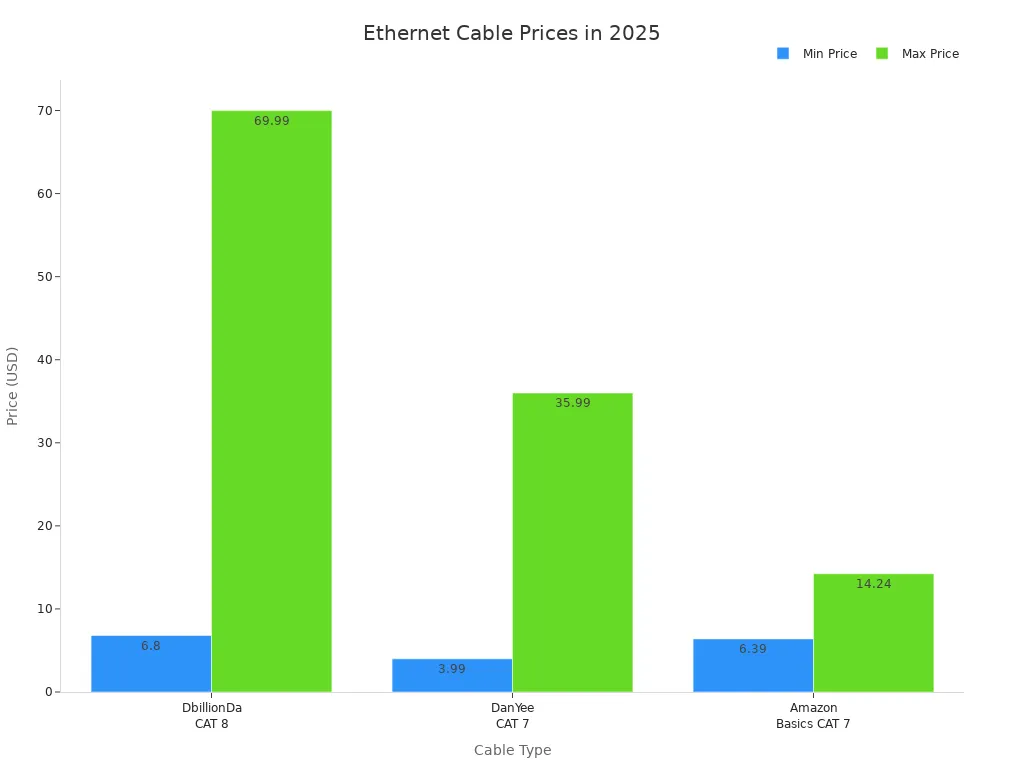
Ethernet Cable Type | Price Range (USD) |
DbillionDa CAT 8 | 6.80–69.99 |
DanYee CAT 7 | 3.99–35.99 |
Amazon Basics CAT 7 | 6.39–14.24 |
You save money if you pick Ethernet, especially for long cables. Thunderbolt cables cost a lot, so this may change your choice.
Setup
Setting up your connection should be simple and safe. Thunderbolt gives strong security and uses encryption. This is good for sending private data. Thunderbolt gives a direct link, so your connection stays steady and does not get mixed up. You also get easy setup with new Thunderbolt-to-Ethernet adapters.
Ethernet helps lower lag and makes your connection more reliable. This is great for gaming and streaming. You get a steady connection that does not drop often. If you want a fast and steady wired connection, Ethernet is a smart choice.
Tip: Thunderbolt cables cost more, especially for long cables. If you want to save money and still get a strong connection, Ethernet is usually better.
You want a fast connection in 2025. Thunderbolt and Ethernet are both very quick. Sometimes, 10 Gbps Ethernet is faster than Thunderbolt. The table below shows how fast some providers are:
Connection Type | Provider | Median Download Speed (Mbps) |
Fixed | AT&T Fiber | 363.54 |
Mobile | T-Mobile | 245.48 |
Thunderbolt is good for gaming because it has low latency. It is also easy to set up. If you need to move big files, 10 Gbps Ethernet is the fastest. Both Thunderbolt and Ethernet help with work tasks. Thunderbolt is flexible and simple to use. Ethernet is best if you want the highest speed and strong reliability.
FAQ
Can you use a thunderbolt to ethernet adapter with a macbook?
Yes, you can use this adapter with a macbook. It gives you fast wired internet. Many people like it for stable connections. Check if your macbook has thunderbolt ports before buying.
Why should you pick a thunderbolt to ethernet adapter for file transfers?
Pick this adapter for file transfers because it moves big files fast. You save time when sending videos or photos. Many workers use thunderbolt adapters for quick and steady results.
Do thunderbolt network adapters work with all macbook models?
Thunderbolt adapters work with most macbooks. You need to check your macbook’s port type first. Some older macbooks may not work with new adapters. Always look at your device before buying.
How do you set up a thunderbolt to ethernet adapter on a macbook?
Plug the adapter into your macbook’s thunderbolt port. Your macbook should find the adapter. You might need to install drivers. After setup, you get a wired connection. Most people think this is easy to do.
What speed can you expect from a thunderbolt to ethernet adapter?
You can get high speed with this adapter. Many reach up to 10 Gbps. Your macbook and network must support these speeds. You get fast downloads and uploads for work or games.