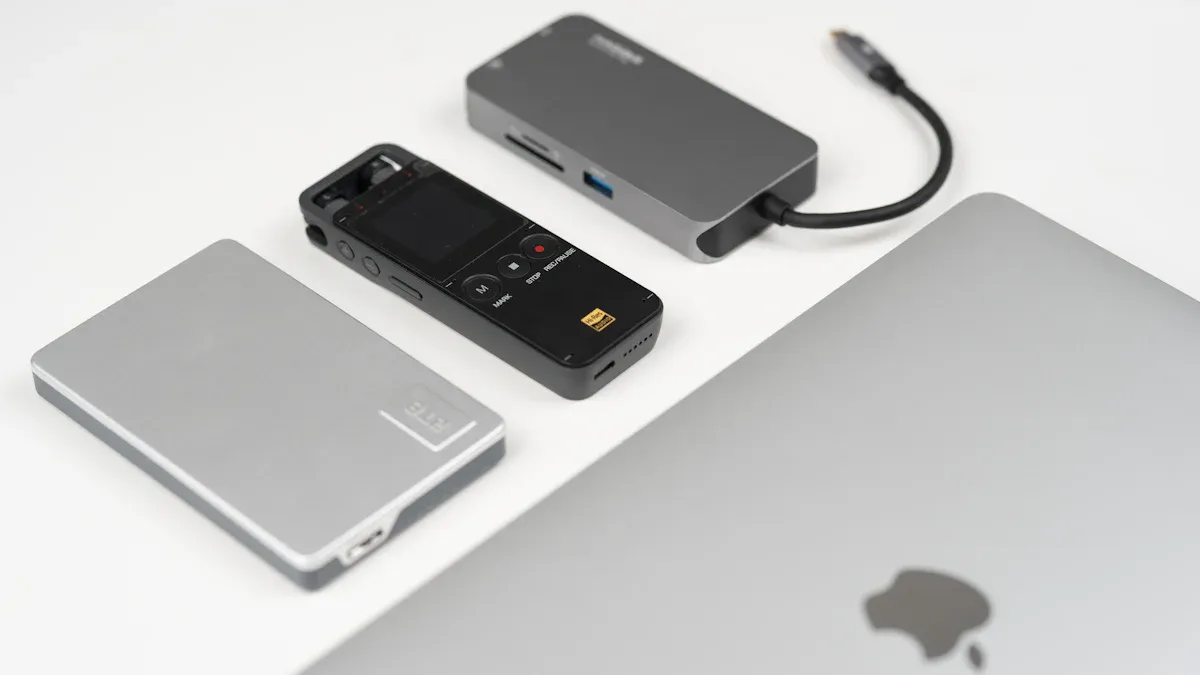
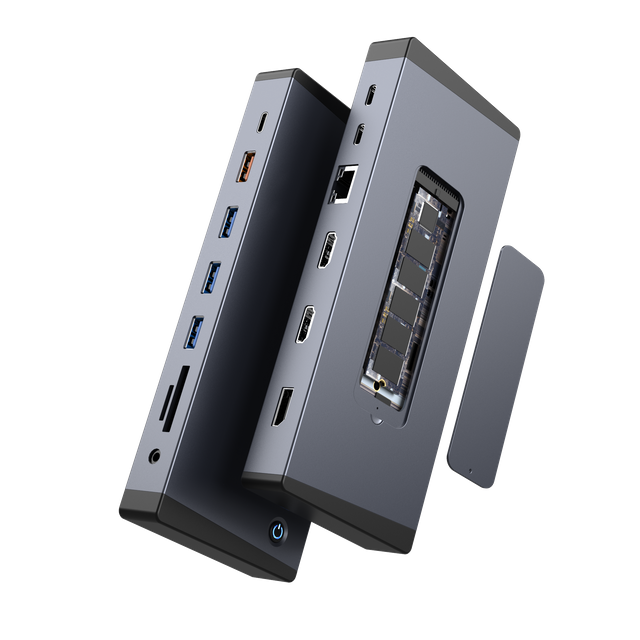
When you pick a surface hub adapter like the Yuanshan 12-in-1 Docking Station, you get better ways to work and have meetings. Easy connections help your business work well, help with remote access, and keep your team working hard. Both OEM and non-OEM adapters, even ones that work with Surface Pro 3, give you many choices.
Aspect | Impact on Business Operations and Meeting Efficiency |
Seamless System Integration | Makes work easier and helps things run better |
AI-Powered Tools | Helps people work together without problems |
Real-Time Communication | Makes planning and joining meetings simple |
You need strong remote access tools.
You need tech that works everywhere.
You need tools that help teams work from different places.
Key Takeaways
Pick the best Surface Hub adapter to help you work better and share ideas in meetings.
Find adapters that have many ports and work with your devices. This helps you connect everything easily.
Get adapters that can charge fast and show clear video. This makes things work well.
Think about how strong and easy to carry the adapter is. This matters if you travel or use it every day.
Watch for new adapters and check if they work with your stuff. This keeps your tech working well.
Why the Right Surface Hub Adapter Matters
Productivity and Collaboration Benefits
Having the right hub adapter helps your meetings go well. Adapters made for Surface Hub give you quick connections and fewer issues. You can share your screen, plug in devices, and charge your Surface Hub fast. This lets your team work together and finish jobs on time. You can join video calls without waiting. You can move from one device to another easily.
Tip: Pick adapters that fit your Surface Hub model. This saves time and helps your team stay on track.
In 2025, people work in new ways. You join meetings from many places. You need tools that connect fast. Adapters with cool features, like magnetic connectors and strong power, make work simple. You do not need to worry about losing your connection or battery.
Here is a table that shows how top adapters help you:
Feature | Description |
Designed for | Made for Surface Hub 2S, so it works best. |
Magnetic Connector | Stays in place and gives the right power. |
Power Delivery | Gives up to 127 watts for fast charging and steady use. |
User-Centric Advantages | Simple to use, safe, and strong for every day. |
Common Connectivity Issues
If you use the wrong adapter, you can have problems. Devices may not connect, or you might lose power in a meeting. Sometimes, the screen does not show, or the sound does not work. These problems slow you down and make meetings tough.
You might see error messages.
You might have to restart your device.
You might miss important parts of a meeting.
The right adapters stop these problems. You get better device matches and things work smoother. You can trust your setup to work each time.
Choosing Adapters for Surface Hub in 2025
Compatibility and Ports
You need to check if adapters work with your device. Some adapters fit Surface Hub and Surface Pro models. Make sure the adapter has the ports you need. Most people use usb-c, hdmi, displayport, and ethernet. These ports help you connect to screens and networks.
Here is a table that shows what you should look for:
Compatibility Factor | Description |
Port Selection | Enough usb-a ports for old devices and the right video output. |
Thunderbolt 4 Compatibility | Use Surface Pro 9’s Thunderbolt 4 ports for fast data and display. |
Power Delivery | Find adapters with power delivery passthrough to charge your Surface while you use it. |
Form Factor | Pick small adapters for travel or bigger docks for more ports. |
Video Output Specifications | Support for high resolutions and refresh rates, like 4K at 60Hz. |
Usb-c multiport adapters are now very important. They often have hdmi and displayport connections. Ethernet support helps keep your network strong.
Performance and Reliability
You want adapters that work every time you use them. Good adapters let you use usb-c, usb-a, and ethernet without problems. Fast data transfer is important if you use Thunderbolt 4. Check if the adapter supports high-speed usb and video output. This helps you run meetings and move files fast.
Tip: Pick adapters that support power delivery. You can charge your Surface Hub while using other ports.
Build Quality and Future-Proofing
Strong build quality means your adapters last longer. Look for adapters made with aluminum housing. Small and portable designs make them easy to carry. Advanced connectivity options help you get ready for new devices. Well-built adapters handle daily use and travel.
Feature | Description |
Material | Aluminum housing Adapter |
Design | Small and portable |
Connectivity | Advanced options, including usb-c and usb-a ports |
Portability | Strong and easy to carry |
Picking the right adapters helps you stay connected and ready for new tech.
Top Surface Hub Adapter Picks for 2025
Picking the right surface hub adapter helps you connect devices. You can work better with the right adapter. There are many adapters for different needs. Some adapters help with more screens, fast charging, and older devices. Here are the best choices for 2025.
Baseus Dual Monitor 10-in-1 Docking Station
The Baseus Dual Monitor 10-in-1 docking station has many ports. It gives you usb-c, usb-a, hdmi, displayport, ethernet, and sd card slots. You can connect two monitors at the same time. You can charge your surface hub while using other devices. The aluminum body is strong and easy to carry.
Best Use Cases:
You want two screens at your desk.
You need fast data with thunderbolt.
You use the docking station at work or when traveling.
Pros:
Many ports for lots of devices.
Fast usb and thunderbolt support.
Charges your hub while you work.
Cons:
Plugable TBT4-UDZ Dock
The Plugable TBT4-UDZ dock is good for many monitors. This surface hub adapter lets you use up to four monitors if you turn off your laptop screen. If you keep your laptop screen on, you use three monitors. The dock has two displayport and two hdmi ports. You can set up your monitors in different ways. Thunderbolt helps with fast data and video. How well it works depends on your monitor’s resolution.
Best Use Cases:
You need many monitors for meetings or talks.
You want flexible video output with hdmi and displayport.
You use thunderbolt for quick connections.
Pros:
Works with up to four monitors.
Many video output choices.
Fast usb and thunderbolt ports.
Cons:
Tip: Turn off your laptop screen to use four monitors with this dock.
Dell Dual Charge Dock
The Dell Dual Charge Dock is good for wireless charging and usb-c support. This docking station works with laptops and hubs that have usb-c ports with displayport over usb type-c. You can charge one device at a time. The dock has a wireless charging pad. You need to put your device in the right spot for best charging. More coils do not make charging faster.
Best Use Cases:
You want wireless charging for your hub or phone.
You use usb-c for video and data.
You need a docking station for your desk.
Pros:
Wireless charging pad makes charging easy.
Works with usb-c and displayport devices.
Clean design for office desks.
Cons:
Surface Docking Station for Hotel TVs
A surface hub adapter docking station for hotel TVs helps in business places. This docking station keeps your workspace neat and safe. You can mount devices so they do not move. You stop theft and damage. You keep devices charged and ready for guests or staff.
Advantage | Description |
Improved Organization | Docking stations keep workspaces neat and help people work better. |
Enhanced Safety | Secure mounts lower the chance of accidents. |
Theft and Damage Prevention | Mounted devices stay safe and last longer. |
Always Charged Devices | Devices stay charged and ready to use. |
Best Use Cases:
You manage hotel rooms or meeting spaces.
You want to keep devices safe and neat.
You need devices always charged for guests.
Pros:
Cons:
Surface Pro 3 USB Hub Adapter
The Surface Pro 3 usb hub adapter helps with older devices. This adapter connects old devices to new usb-c ports. You use usb 3.0, 2.0, and 1.x devices. You can move data up to 5 Gbps. You connect flash drives and hard drives to your hub.
Feature | Description |
Adapter Type | USB-C to USB-A |
Compatibility | Works with USB 3.0, 2.0, and 1.x devices |
Data Transfer Rate | Up to 5 Gbps |
Purpose | Connects old devices to USB-C devices |
Best Use Cases:
You use older usb devices with your hub.
You need fast data transfer for old devices.
You want to keep old equipment working.
Pros:
Cons:
OEM vs. Non-OEM Adapter Comparison
You can pick OEM or non-OEM surface hub adapters. OEM adapters come from the original maker. Non-OEM adapters come from other brands. You compare them to find the best one for you.
Type | Pros | Cons |
OEM | Reliable, tested for your hub, strong support | Higher price, fewer port choices |
Non-OEM | More ports, lower cost, flexible designs | May need updates, support can change |
Note: Pick OEM adapters for best compatibility. Choose non-OEM adapters for more features and better value.
You choose based on your hub model, your devices, and your workspace. Look for adapters with usb, thunderbolt, and docking station features. Check for legacy support and multi-monitor setups. Find the best surface hub adapter for your business in 2025.
Surface Hub Adapter Comparison Table
You want to compare adapters before you pick one. A table lets you see specs, ports, and features side by side. This helps you choose the best docking station for your needs.
Adapter Name | Ports & Features | Compatibility | Best For |
Baseus Dual Monitor 10-in-1 Docking Station | 2 x usb-c, 2 x usb-a, hdmi, displayport, ethernet, sd card, micro sd card | Surface Hub, Surface Pro, laptops | Multi-monitor setups, fast charging |
Plugable TBT4-UDZ Dock | 2 x displayport, 2 x hdmi, 1 x usb-c, 4 x usb-a, ethernet, audio | Surface Hub, Surface Pro, Thunderbolt 4 PCs | Four-monitor workstations |
Dell Dual Charge Dock | usb-c, usb-a, wireless charging pad, displayport over usb-c | Surface Hub, laptops with usb-c | Wireless charging, office desks |
| YuanShan 15-in-1 Thunderbolt™ 4 Dock | 3× Video (DP/HDMI), 4× USB-C (inc. TB4), 3× USB-A, 2.5G Ethernet, SD Card Reader, M.2 SSD Enclosure, 100W PD Charging | Thunderbolt™ 4/3 laptops, USB4 Macs, Surface devices | Triple-display setups, high-speed data transfer & expandable storage, all-in-one workstation docking |
Surface Docking Station for Hotel TVs | usb-c, usb-a, hdmi, ethernet, secure mounting | Surface Hub, hotel TVs, meeting rooms | Safe device mounting, neat spaces |
Surface Pro 3 USB Hub Adapter | 2 x usb-a 3.0, micro usb, sd card reader, 2 x micro sd card readers | Surface Pro 3, 4, 5, 6 | Legacy device support |
Surface USB-C Travel Hub | usb-c with charging, usb-a, vga, ethernet, hdmi 2.0 | Modern PCs, Surface laptops with usb-c | Travel, presentations |
Tip: Count the usb ports and check the video output type before you buy a docking station. This helps you connect all your devices without problems.
Each docking station gives you different usb choices. Some have more usb-c ports for new devices. Others have extra usb-a ports for older gear. Some models have sd card readers to help you move files fast. If you travel, pick a docking station that is small and strong. For hotels or meeting rooms, you need secure mounting and easy charging.
The Surface Pro 3 usb hub adapter works with older devices. This lets you use old equipment with new tech. The Surface USB-C Travel Hub gives fast video output at 4K and charges your device at the same time. The Dell Dual Charge Dock lets you charge wirelessly for a clean desk.
A good docking station helps you get work done. You can connect monitors, move files, and charge your Surface Hub easily. Match the docking station to your workspace and device needs. This table helps you pick the right one for easy connectivity in 2025.
How to Choose the Best Adapter
For Video Conferencing
You want your video calls to work well. Pick an adapter that lets you use high-quality video, like 4K at 60Hz. Find a docking station with ethernet for a strong internet connection. This helps you stop lag and dropped calls. Get adapters with many usb ports for cameras, microphones, and speakers. If you use a Surface Hub, pick one with built-in cameras and stereo speakers. These things make meetings clear and simple.
Tip: Try your setup before big meetings. Make sure your usb devices and docking station work together.
For Multi-Device Setups
You often need to connect many devices at the same time. You should get a docking station with lots of usb ports and video outputs. Check if the adapter works with both usb-c and usb-a. This helps you use both new and old devices. Watch for MAC address problems when sharing adapters. Try to use one adapter for each device if you can. If you share adapters, use System UUID to tell devices apart.
Criteria | Description |
Compatibility | Make sure adapters work with Surface devices. |
MAC Address Conflicts | Check for network problems from address conflicts. |
Supported Ethernet Devices | Use adapters that let you boot from the network. |
Dedicated vs Shared Adapters | Pick if you want one adapter per device or to share. |
Unique System Identification | Use System UUID for shared adapters. |
For Legacy Devices
You might still use old equipment. Pick an adapter with usb-a ports for older devices. Some docking stations have sd card readers and micro usb ports. This helps you connect flash drives, hard drives, and other old devices. Look for adapters that move data fast, like up to 5 Gbps. This keeps your work moving smoothly.
Note: Always check if your docking station works with both old and new usb types.
For Enterprise Use
You may manage devices for a business or school. Pick a docking station with smart features. Look for built-in computers with Intel Core processors and Microsoft Office apps. Built-in cameras and stereo speakers help with meetings and talks. Choose stands and mounts that fit your room. Surface Hub pens and touch screens make teamwork easy.
Feature | Description |
Embedded Computer | Has a built-in processor and Office apps. |
Integrated Cameras | Has two wide cameras for meetings. |
Surface Hub Pen | Rechargeable pens and touch screens. |
Stands and Mounts | Many choices for different rooms. |
Stereo Speakers | Good sound for calls and talks. |
Tip: For business setups, pick docking stations with many usb ports and safe mounting.
You can pick from many Surface Hub adapters in 2025. Each adapter has special features. Some let you use more monitors. Some charge your device fast. Some work with older devices. Choose an adapter that fits your workspace. This helps you work well and stops problems. Look at the comparison table to find the best one for your devices.
Keep up with new adapter releases and updates. Microsoft gives updates for six years after new adapters come out.
Release Date Condition | Servicing Period for Updates |
Before January 1, 2021 | At least 4 years from release |
On and after January 1, 2021 | At least 6 years from release |
You can find update news in these places:
FAQ
What ports do most Surface Hub adapters offer?
Most adapters have USB-C, HDMI, DisplayPort, and Ethernet ports. Some also have USB-A and SD card slots. These ports let you connect monitors, networks, and storage.
Can you use a Surface Hub adapter with older Surface Pro models?
Many adapters work with older Surface Pro models. Look for ones with USB-A and legacy support. Always check if the adapter fits your device before buying.
How do you know if an adapter supports fast charging?
Check if the adapter says "Power Delivery" or "PD" in its details. Adapters with PD charge your Surface Hub quickly. Look for wattage numbers like 60W or 127W.
Do non-OEM adapters work as well as OEM adapters?
Non-OEM adapters often have more ports and cost less. OEM adapters are more reliable and have better support. Pick the one that fits your needs and budget.
What should you do if your adapter stops working during a meeting?
Unplug the adapter and plug it back in. Restart your device if needed. Use a backup adapter if it still does not work. Always test your setup before big meetings.